Blocked phone

so this is my problem whether i click on allow or not allow the bar doesn't disappear and i can't turn my mobile on or off either because all the buttons around the bar i can't tap on that my mobile is exactly blocked


iPhone SE, iOS 15

Posted on May 9, 2023 1:36 AM

Reply
Question marked as Top-ranking reply

Posted on May 11, 2023 12:45 PM

Loretemmerman wrote:

so this is my problem whether i click on allow or not allow the bar doesn't disappear and i can't turn my mobile on or off either because all the buttons around the bar i can't tap on that my mobile is exactly blocked
https://discussions.apple.com/content/attachment/18889fe2-5440-4c44-82f5-59bca012bf81

  • Press and quickly release VOLUME UP


     then

  • Press and quickly release VOLUME DOWN


     then

  • Hold the SIDE button until an Apple logo appears (15-30 seconds), ignoring "slide to power off" if it appears


The operative word here is QUICKLY; and try it a couple of times, the timing is a little tricky.


2 replies
Question marked as Top-ranking reply

May 11, 2023 12:45 PM in response to Loretemmerman

Loretemmerman wrote:

so this is my problem whether i click on allow or not allow the bar doesn't disappear and i can't turn my mobile on or off either because all the buttons around the bar i can't tap on that my mobile is exactly blocked
https://discussions.apple.com/content/attachment/18889fe2-5440-4c44-82f5-59bca012bf81

  • Press and quickly release VOLUME UP


     then

  • Press and quickly release VOLUME DOWN


     then

  • Hold the SIDE button until an Apple logo appears (15-30 seconds), ignoring "slide to power off" if it appears


The operative word here is QUICKLY; and try it a couple of times, the timing is a little tricky.


May 11, 2023 12:43 PM in response to Loretemmerman

Hi Loretemmerman,


To clarify, what does the message state in English? We're unable to fully make it out from the screenshot.


In the meantime, if your iPhone is fully unresponsive, you can take the steps below to force it to restart. Should the problem persist after that restart, let us know the message you're receiving.


"If iPhone isn’t responding, and you can’t turn it off then on, try forcing it to restart.


  1. Press and quickly release the volume up button.
  2. Press and quickly release the volume down button.
  3. Press and hold the side button.
  4. When the Apple logo appears, release the side button.
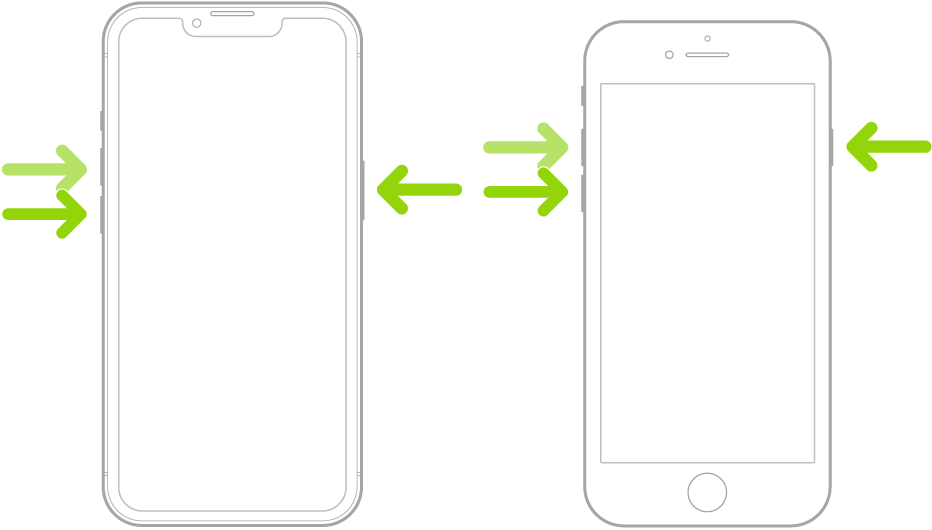
An illustration of two iPhone models, one with a Home button and one without, with the screens facing up. The volume buttons for each model are on the left side of iPhone, and the side button is on the right.

Note: For force restart instructions for iPhone 7, iPhone 6s, or iPhone SE (1st generation)—models that don’t support iOS 16—see the iOS 15 version of this page.


If iPhone doesn’t restart after you try these steps, see the Apple Support article If your iPhone won’t turn on or is frozen. Or if your iPhone isn’t working as expected after you restart it, see the iPhone Support website."


Cheers!

This thread has been closed by the system or the community team. You may vote for any posts you find helpful, or search the Community for additional answers.

Blocked phone

Welcome to Apple Support Community
A forum where Apple customers help each other with their products. Get started with your Apple Account.
