email account
El Captain 10.11.6 Cannot access email after changing password. Ok on all other devices. "this account already exists". Apple support failed ... too old!
Earlier displays & monitors
El Captain 10.11.6 Cannot access email after changing password. Ok on all other devices. "this account already exists". Apple support failed ... too old!
Earlier displays & monitors
Hello ponty56,
Thanks for that info and for choosing the Apple Support Communities. If we understand correctly, you are unable to use email on your Mac after changing the password for the account. To help with this, you may have to remove the account and add it back again along with the rest of these steps:
"If you're having issues with sending or receiving mail using the Mail app on your Mac, try these solutions.
If your Mac is connected to the internet but suddenly stops sending or receiving email, you should generally try again later, and if necessary work with your email provider to resolve. If you're using Apple's iCloud Mail, learn how to resolve issues with iCloud Mail.
Check for status messages
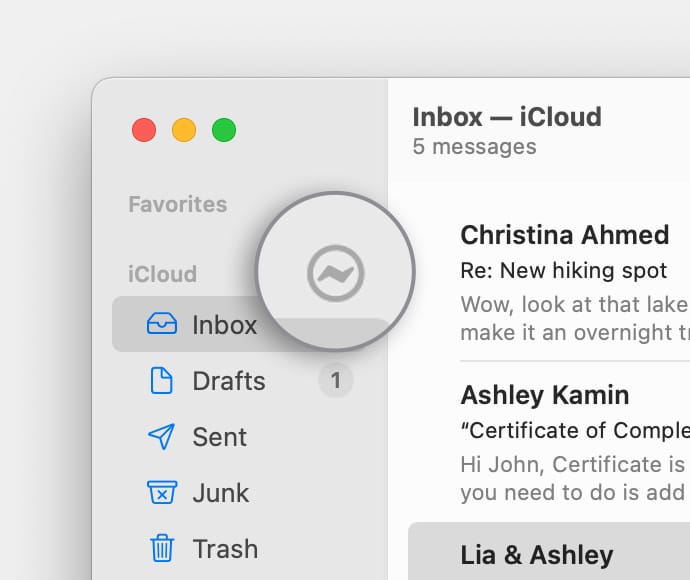
You might see a status icon such as a lightning boltor warning symbol
next to your account's inbox in the Mail sidebar, or in the upper-right corner of the Mail window. Click it to learn more.
* If the status is Network Offline, make sure that your Mac is connected to the internet.
* If the status is Login Failed, check with your email service provider (ESP) to be sure that your account is set up correctly on your Mac.
* If Mail asks for your password, but entering the password doesn't help, find out why your email provider is rejecting your password.
* If your email service is experiencing a temporary outage, your email provider might have a status message on their website. For example, Apple's system status page shows the status of iCloud Mail. Status pages are also available for other email services, such as Gmail and Outlook. Some brief service outages might not appear on a system status page, so you might want to try again later.
Test using webmail
Many email providers offer webmail, which is a way to use email with a web browser such as Safari, instead of with an email app such as Mail. For example, if you're using an iCloud Mail account, you can use iCloud.com to send and receive email.
Webmail is a good way to verify that your account is valid, but it doesn't mean that your account is set up correctly in Mail on your Mac. Your email provider can help you verify your email settings and check for other issues that affect sending or receiving email.
Remove your email account, then add it back
If no other solutions work, follow these steps:
1. Remove your email account in Mail.
2. Add your email account in Mail again. When adding the account, make sure that you choose the correct email service provider for your email address.
3. Try to send and receive email."
And those steps are from here: If you can’t send or receive email on your Mac - Apple Support
Cheers!
Hello ponty56,
Thanks for that info and for choosing the Apple Support Communities. If we understand correctly, you are unable to use email on your Mac after changing the password for the account. To help with this, you may have to remove the account and add it back again along with the rest of these steps:
"If you're having issues with sending or receiving mail using the Mail app on your Mac, try these solutions.
If your Mac is connected to the internet but suddenly stops sending or receiving email, you should generally try again later, and if necessary work with your email provider to resolve. If you're using Apple's iCloud Mail, learn how to resolve issues with iCloud Mail.
Check for status messages
You might see a status icon such as a lightning bolt
* If the status is Network Offline, make sure that your Mac is connected to the internet.
* If the status is Login Failed, check with your email service provider (ESP) to be sure that your account is set up correctly on your Mac.
* If Mail asks for your password, but entering the password doesn't help, find out why your email provider is rejecting your password.
* If your email service is experiencing a temporary outage, your email provider might have a status message on their website. For example, Apple's system status page shows the status of iCloud Mail. Status pages are also available for other email services, such as Gmail and Outlook. Some brief service outages might not appear on a system status page, so you might want to try again later.
Test using webmail
Many email providers offer webmail, which is a way to use email with a web browser such as Safari, instead of with an email app such as Mail. For example, if you're using an iCloud Mail account, you can use iCloud.com to send and receive email.
Webmail is a good way to verify that your account is valid, but it doesn't mean that your account is set up correctly in Mail on your Mac. Your email provider can help you verify your email settings and check for other issues that affect sending or receiving email.
Remove your email account, then add it back
If no other solutions work, follow these steps:
1. Remove your email account in Mail.
2. Add your email account in Mail again. When adding the account, make sure that you choose the correct email service provider for your email address.
3. Try to send and receive email."
And those steps are from here: If you can’t send or receive email on your Mac - Apple Support
Cheers!
email account