
my i phone 7+ is stuck in photos - everything else is OK - can someone help a 90 yrs lady..
my i phone 7+ is stuck in photos - everything else is OK - can someone help a 90 yrs lady..
my i phone 7+ is stuck in photos - everything else is OK - can someone help a 90 yrs lady..
I'm not sure what you mean by "stuck in photos." Do you mean that the Photos app is on your screen and you can't do anything in photos and can't leave Photos for something else (i.e., the phone is frozen)? If so, see the following from If your iPhone won't turn on or is frozen - Apple Support
On your iPhone 7 or iPhone 7 Plus
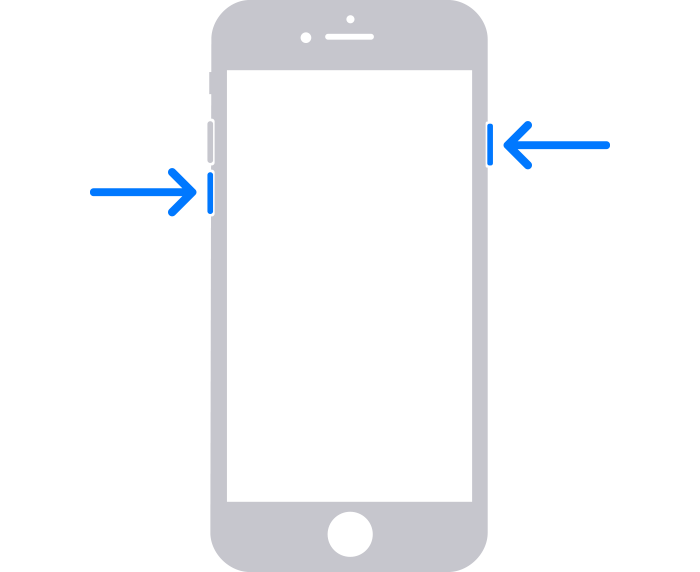
If that isn't what you meant, please reply with details.
I'm not sure what you mean by "stuck in photos." Do you mean that the Photos app is on your screen and you can't do anything in photos and can't leave Photos for something else (i.e., the phone is frozen)? If so, see the following from If your iPhone won't turn on or is frozen - Apple Support
On your iPhone 7 or iPhone 7 Plus
If that isn't what you meant, please reply with details.
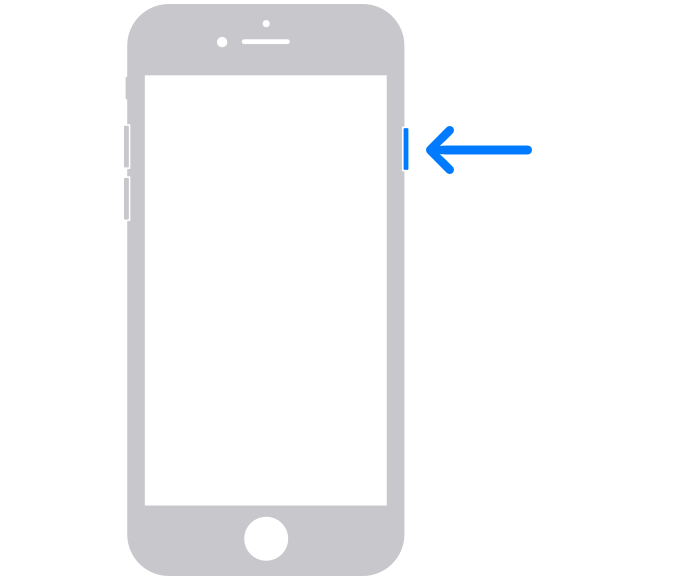
Try restarting the iPhone of uyou. haven't already. See the following from Restart your iPhone - Apple Support
My iphone 7+ works fine except in photos.
I was editing a photo I took & hit cancel & that was the end of any movement . I have hit all - forward/trash /send but nothing moves.
I took another 4 photos but now they are also frozen.
Please some one help an old lady....
my i phone 7+ is stuck in photos - everything else is OK - can someone help a 90 yrs lady..
