Iphone code vergessen, Werkseinstellungen nicht möglich, alte id noch drin

Ich hatte für mein altes Handy den code vergessen. Wollte dann auf Werkseinstellungen zurück stellen und weiß leider auch nicht mehr das Passwort der ID. Habs mit ein paar Tricks lt Internet bis zur Werkseinstellungen geschafft.


Jetzt kann ich das Handy nicht neu einrichten, er sagt es ist noch mit meiner id hinterlegt. In der “wo ist“ app ist das Handy leider nicht mehr drin. Die Möglichkeit fällt somit auch raus.


Ich hab schon so viel versucht, weiß aber wirklich nicht mehr weiter.


kann ich das Handy irgendwie noch retten?

iPhone 14, iOS 16

Posted on May 16, 2023 4:46 AM

Reply
Question marked as Top-ranking reply

Posted on May 16, 2023 4:54 AM

If you can't unlock your Apple ID

If you use security questions with your Apple ID, or if you don't have access to a trusted device or phone number, go to iforgot.apple.com. Then you can unlock your account with your existing password or reset your password.


Watch this GIF
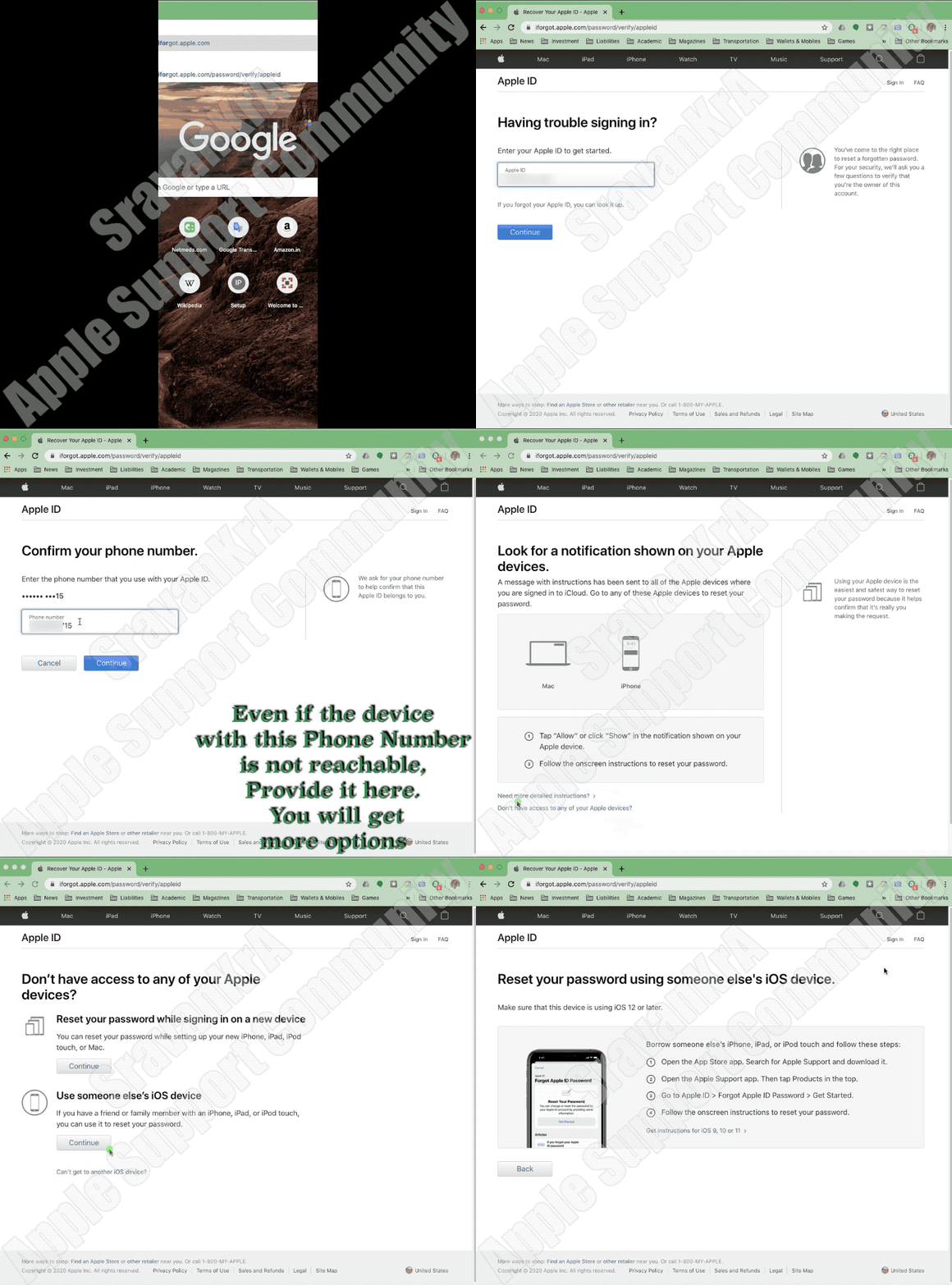


What if I can't access a trusted device or didn't receive a verification code?

If you're signing in and don’t have a trusted device handy that can display verification codes, you can have a code sent to your trusted phone number via text message or an automated phone call instead. Click Didn't Get a Code on the sign in screen and choose to send a code to your trusted phone number. You can also get a code directly from Settings on a trusted device. Learn how to get a verification code.

If you use iOS 11.3 or later on your iPhone, you might not need to enter a verification code. In some cases, your trusted phone number can be automatically verified in the background on your iPhone. It’s one less thing to do, and your account is still protected with two-factor authentication.


If I can't sign in, how do I regain access to my account?

If you can’t sign in, access a trusted device, reset your password, or receive verification codes, you can request account recovery to regain access to your account. Account recovery is an automatic process designed to get you back in to your account as quickly as possible while denying access to anyone who might be pretending to be you. It might take a few days—or longer—depending on what specific account information you can provide to verify your identity.


Do I still need to remember any security questions?

No. With two-factor authentication, you don't need to remember any security questions. We verify your identity exclusively using your password and verification codes sent to your trusted devices and phone numbers. When you enroll in two-factor authentication, we keep your old security questions on file for two weeks in case you need to return your account to its previous security settings. After that, they're deleted.


Can Apple Support help me regain access to my account?

Apple Support can answer your questions about the account recovery process, but can't verify your identity or expedite the process in any way.


Similar questions

2 replies
Question marked as Top-ranking reply

May 16, 2023 4:54 AM in response to levke

If you can't unlock your Apple ID

If you use security questions with your Apple ID, or if you don't have access to a trusted device or phone number, go to iforgot.apple.com. Then you can unlock your account with your existing password or reset your password.


Watch this GIF


What if I can't access a trusted device or didn't receive a verification code?

If you're signing in and don’t have a trusted device handy that can display verification codes, you can have a code sent to your trusted phone number via text message or an automated phone call instead. Click Didn't Get a Code on the sign in screen and choose to send a code to your trusted phone number. You can also get a code directly from Settings on a trusted device. Learn how to get a verification code.

If you use iOS 11.3 or later on your iPhone, you might not need to enter a verification code. In some cases, your trusted phone number can be automatically verified in the background on your iPhone. It’s one less thing to do, and your account is still protected with two-factor authentication.


If I can't sign in, how do I regain access to my account?

If you can’t sign in, access a trusted device, reset your password, or receive verification codes, you can request account recovery to regain access to your account. Account recovery is an automatic process designed to get you back in to your account as quickly as possible while denying access to anyone who might be pretending to be you. It might take a few days—or longer—depending on what specific account information you can provide to verify your identity.


Do I still need to remember any security questions?

No. With two-factor authentication, you don't need to remember any security questions. We verify your identity exclusively using your password and verification codes sent to your trusted devices and phone numbers. When you enroll in two-factor authentication, we keep your old security questions on file for two weeks in case you need to return your account to its previous security settings. After that, they're deleted.


Can Apple Support help me regain access to my account?

Apple Support can answer your questions about the account recovery process, but can't verify your identity or expedite the process in any way.

May 16, 2023 4:53 AM in response to levke

Was passiert, wenn ich nicht auf ein vertrauenswürdiges Gerät zugreifen kann oder keinen Bestätigungscode erhalten habe?

Wenn Sie sich anmelden und kein vertrauenswürdiges Gerät zur Hand haben, das Bestätigungscodes anzeigen kann, können Sie stattdessen einen Code per SMS oder automatisiertem Telefonanruf an Ihre vertrauenswürdige Telefonnummer senden lassen. Klicken Sie auf dem Anmeldebildschirm auf „Keinen Code erhalten“ und wählen Sie aus, ob Sie einen Code an Ihre vertrauenswürdige Telefonnummer senden möchten. Sie können einen Code auch direkt über die Einstellungen auf einem vertrauenswürdigen Gerät abrufen.Erfahren Sie, wie Sie einen Bestätigungscode erhalten.

Wenn Sie iOS 11.3 oder höher auf Ihrem iPhone verwenden, müssen Sie möglicherweise keinen Bestätigungscode eingeben. In einigen Fällen kann Ihre vertrauenswürdige Telefonnummer automatisch im Hintergrund auf Ihrem iPhone überprüft werden. Sie müssen eine Sache weniger tun und Ihr Konto ist weiterhin durch die Zwei-Faktor-Authentifizierung geschützt.


Wenn Sie das vertrauenswürdige Gerät oder die mit Ihrer Apple-ID verknüpfte Telefonnummer verloren haben oder nicht erreichen können

Solange Sie noch über Ihren Wiederherstellungsschlüssel verfügen und sich Ihr Apple-ID-Passwort merken, können Sie sich anmelden und Ihrem Konto ein neues vertrauenswürdiges Gerät oder eine neue Telefonnummer hinzufügen. Sie können auch alle Geräte entfernen, die Sie möglicherweise verloren, verkauft oder verschenkt haben.

  1. Gehen Sie zu IhremApple-ID-Kontoseite und geben Sie Ihre Apple-ID und Ihr Passwort ein.
  2. Wählen Sie auf dem Bildschirm „Ihre Identität bestätigen“ die Option „Sie können nicht auf Ihre vertrauenswürdigen Geräte zugreifen?“ aus.
  3. Geben Sie im Popup-Fenster Ihren Wiederherstellungsschlüssel ein.
  4. Gehen Sie zum Abschnitt Sicherheit und klicken Sie auf Bearbeiten.

Entfernen Sie das Gerät, das Sie nicht mehr zur Überprüfung Ihrer Identität verwenden möchten. Wenn Sie über weitere Geräte verfügen, auf denen „Mein iPhone suchen“ aktiviert ist, können Sie diese als vertrauenswürdige Geräte überprüfen. Sie können auch weitere vertrauenswürdige Telefonnummern hinzufügen.


Wenn Sie Ihren Wiederherstellungsschlüssel verloren haben

Solange Sie sich an Ihr Apple-ID-Passwort erinnern und weiterhin Zugriff auf eines Ihrer vertrauenswürdigen Geräte haben, können Sie sich anmelden und einen neuen Wiederherstellungsschlüssel erstellen.

  1. Gehen Sie zu IhremApple-ID-Kontoseite.
  2. Melden Sie sich mit Ihrem Passwort und Ihrem vertrauenswürdigen Gerät an.
  3. Klicken Sie im Abschnitt „Sicherheit“ auf Bearbeiten > Verlorenen Schlüssel ersetzen.

Bewahren Sie Ihren neuen Wiederherstellungsschlüssel an einem sicheren Ort auf. Ihr alter Wiederherstellungsschlüssel funktioniert nicht mehr und Sie können ihn nicht zum Zurücksetzen Ihres Passworts oder zum Zugriff auf Ihr Konto verwenden.

Wenn Sie sich mit der zweistufigen Verifizierung mit Ihrer Apple-ID nicht anmelden können ...


This thread has been closed by the system or the community team. You may vote for any posts you find helpful, or search the Community for additional answers.

Iphone code vergessen, Werkseinstellungen nicht möglich, alte id noch drin

Welcome to Apple Support Community
A forum where Apple customers help each other with their products. Get started with your Apple Account.