vip email sounds

Since updating to ios 16.5, my VIP emails no longer make sounds. Notifications for VIP sounds are turned on in Mail notifications, my mute button is off, and I have reset my phone. I have spent about 10 hours over several days trying everything that every help article has suggested. My iPhone 13 and my iPad 9th gen are set up properly according to Apple and every other article that I have read. Is Apple working to fix this problem?

iPhone 13 Pro Max

Posted on May 20, 2023 5:35 AM

Reply
Question marked as Top-ranking reply

Posted on Feb 22, 2024 10:08 AM

Apple replied to change alert sound. I did change mine to a classic tone (Anticipate) and it worked. I didn’t try any other tones.

Similar questions

2 replies

May 22, 2023 10:36 AM in response to LeslieCohen

Hi LeslieCohen,


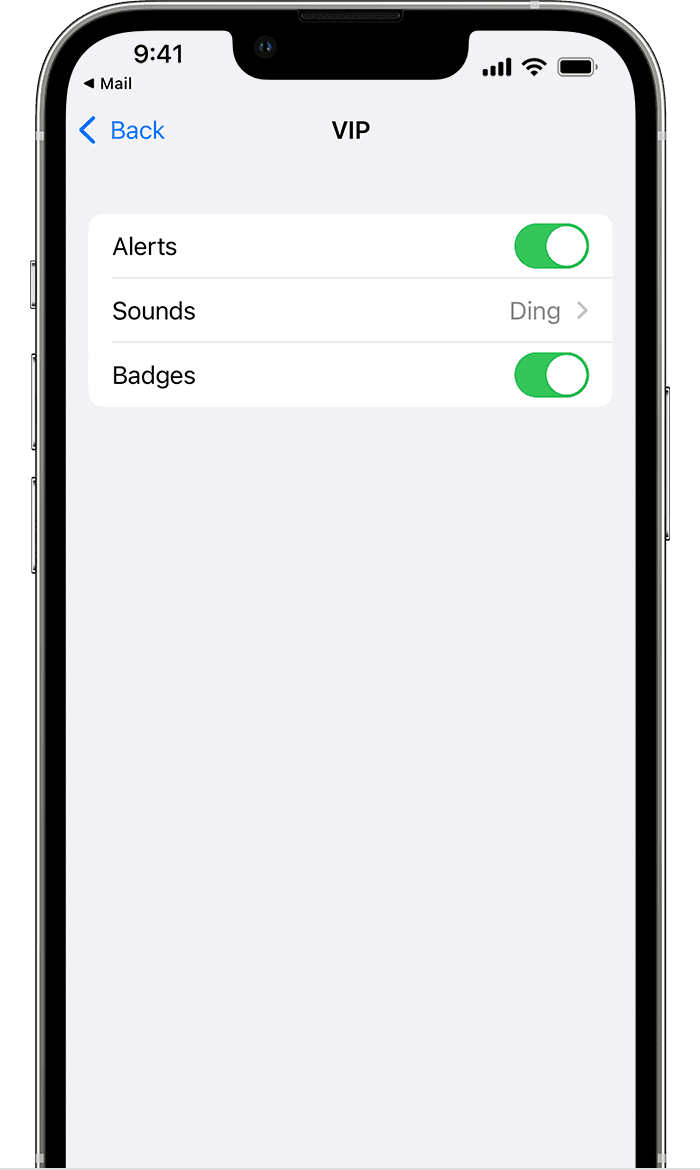
For help with VIP alerts, test changing the notification sound. If needed, the steps below found in the article here can help: Use mailboxes to organize email on your iPhone or iPad


"Change VIP alerts


Adjusting your alert preferences for VIP emails in iOS 15

  1. Open Mail.
  2. Tap the Info button  next to VIP.
  3. Tap VIP Alerts.
  4. Then select the alerts you want to set."


You can also use the steps here to help check for any potential Focus conflicts. Use Focus on your iPhone or iPad


If the issue continues, reach out to Apple directly to report it and further assist.


Get Support


Cheers.


This thread has been closed by the system or the community team. You may vote for any posts you find helpful, or search the Community for additional answers.

vip email sounds

Welcome to Apple Support Community
A forum where Apple customers help each other with their products. Get started with your Apple Account.