No subscription but still getting charged
No subscription but still getting charged
No subscription but still getting charged
Hello Tmk232,
Thanks for posting in the Apple Support Communities. We're happy to look into this with you.
If you're unable to locate the subscription you are being charged for, there are actions you can take to help in locating it. Please see the recommendations below that will help with this specific issue.
If you want to cancel a subscription from Apple - Apple Support
Can’t find the subscription that you want to cancel?
You can cancel iCloud+ in your iCloud storage settings.
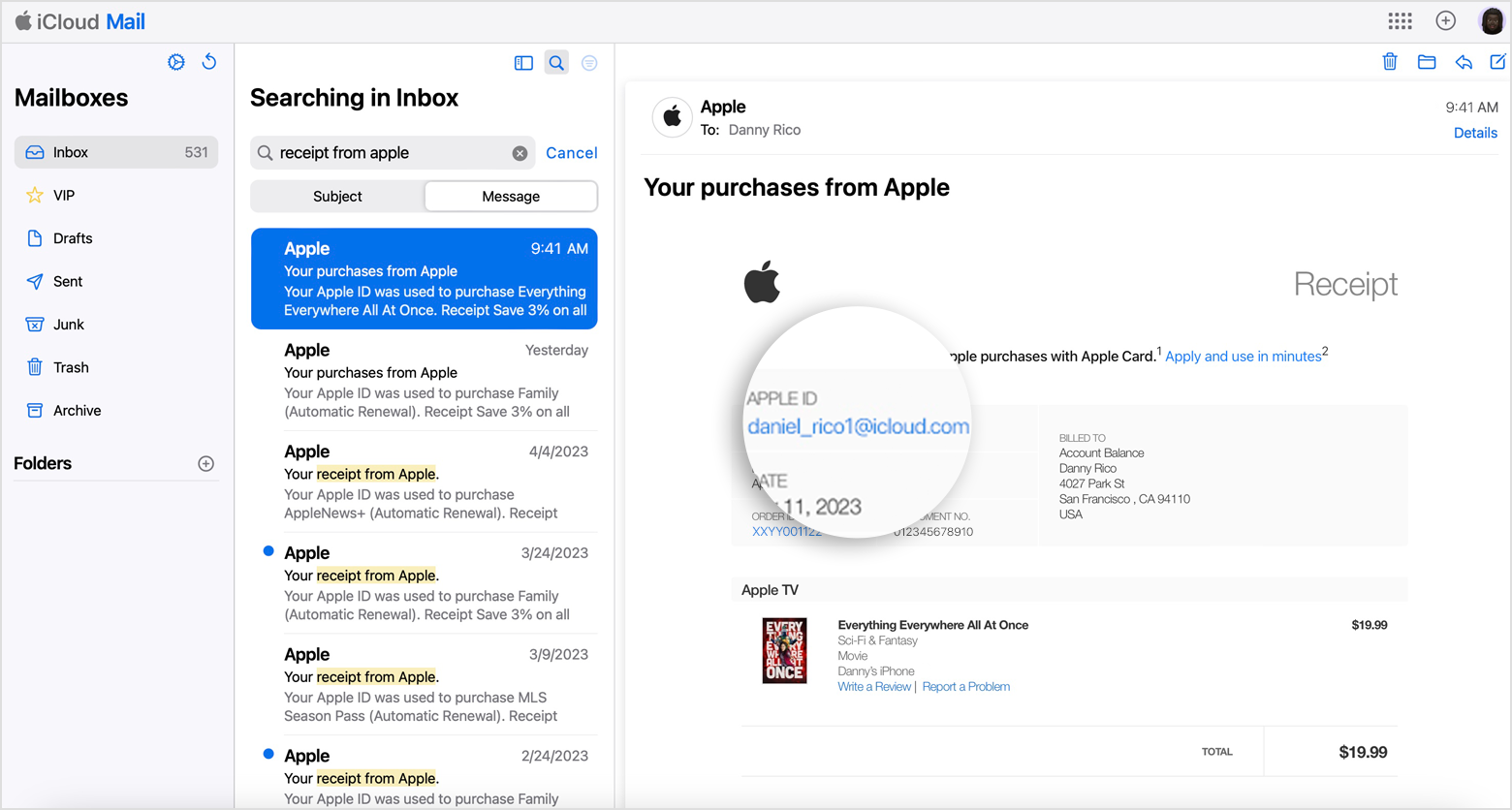
If you aren't trying to cancel iCloud+, find your receipt:
1. Search your email for the words "receipt from Apple."
2. On the receipt for the subscription, check which Apple ID was used.
* If a family member's Apple ID appears on the receipt, ask that family member to use the steps in this article to cancel the subscription. You can’t cancel a family member's subscription.
* If another Apple ID that you use appears on the receipt, sign in with that Apple ID and use the steps in this article to cancel the subscription.
* If you can't find a receipt from Apple for the subscription, you might have bought the subscription from another company. To find out which company bills you, check your bank or credit card statement.
To cancel the subscription, you must contact the company that bills you for the subscription.
Should you continue to experience issues finding the subscription, contact Apple Support for additional assistance. They can be reached at Get Support.
Best regards.
Hello Tmk232,
Thanks for posting in the Apple Support Communities. We're happy to look into this with you.
If you're unable to locate the subscription you are being charged for, there are actions you can take to help in locating it. Please see the recommendations below that will help with this specific issue.
If you want to cancel a subscription from Apple - Apple Support
Can’t find the subscription that you want to cancel?
You can cancel iCloud+ in your iCloud storage settings.
If you aren't trying to cancel iCloud+, find your receipt:
1. Search your email for the words "receipt from Apple."
2. On the receipt for the subscription, check which Apple ID was used.
* If a family member's Apple ID appears on the receipt, ask that family member to use the steps in this article to cancel the subscription. You can’t cancel a family member's subscription.
* If another Apple ID that you use appears on the receipt, sign in with that Apple ID and use the steps in this article to cancel the subscription.
* If you can't find a receipt from Apple for the subscription, you might have bought the subscription from another company. To find out which company bills you, check your bank or credit card statement.
To cancel the subscription, you must contact the company that bills you for the subscription.
Should you continue to experience issues finding the subscription, contact Apple Support for additional assistance. They can be reached at Get Support.
Best regards.
No subscription but still getting charged