Missing photos
Many missing photos from albums since ios 16.5 upgrade
Many missing photos from albums since ios 16.5 upgrade
Thanks for reaching out elongnyc,
It sounds like you're missing some photos since updating to iOS 16.5. We can help.
We want to let you know before we get started that according to the Apple - Support - System Status page, Photos did have an outage that was recently resolved. Since your message was written while this issue may have been ongoing, it is a good idea to check and see if the issue has been resolved with the closure of the outage.
If not, you can follow these steps next, If you're missing photos or videos in the Photos app:
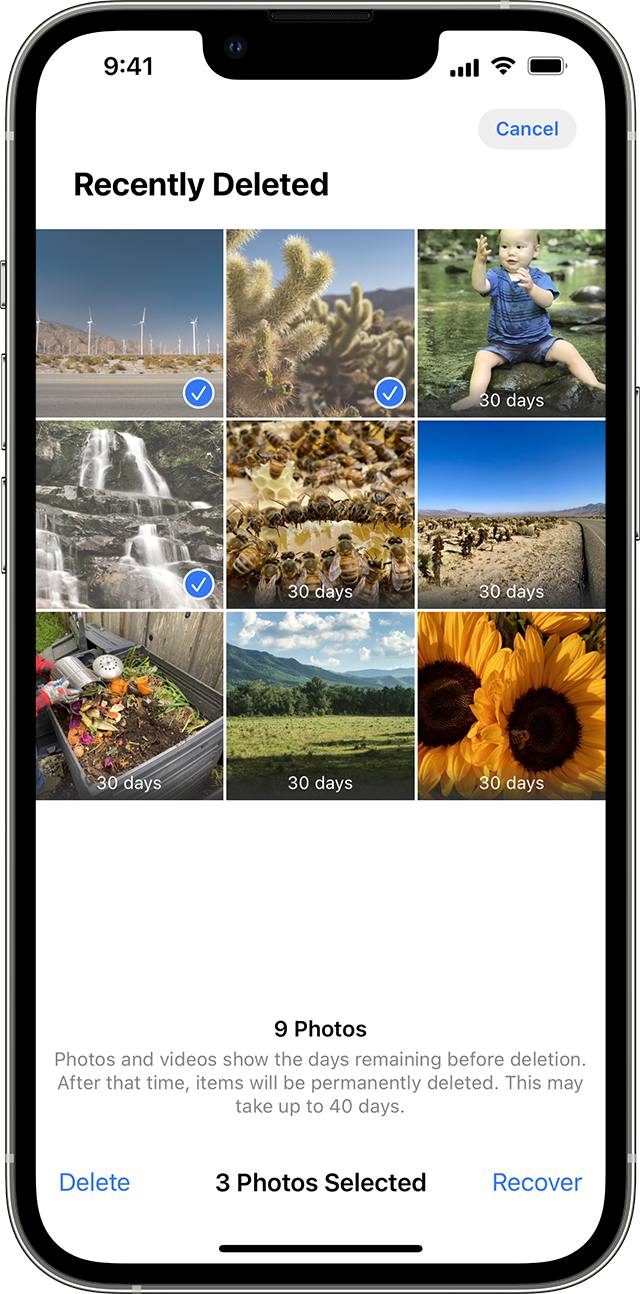
Check your Recently Deleted album
If you accidentally deleted your photo or video, it goes to the Recently Deleted album. Go to Photos > Albums, and tap Recently Deleted in the Utilities section.
On your iPhone or iPad
1. In iOS 16, iPadOS 16.1, or later, use Face ID or Touch ID to unlock your Recently Deleted album.
2. Tap a photo or video, then tap Recover. To recover multiple photos, tap Select, select your photos or videos, then tap Recover.
3. Confirm that you want to recover the photos or videos.
If you continue having difficulty, you can connect with Apple directly using either Get Support or if you're in a region without direct support options, you can also Contact Apple for support and service.
Hope that helps.
Take care.
Remote assist from two Apple support technicians was unsuccessful. The last suggestion was for me to disable and then re-enable iCloud encryption which I refused. Issue is unresolved.
Missing photos