Mute Switch

Upgraded from 11 Pro Max to a 14 Pro Max and one simple thing is making it the worst decision I ever made. On the 11 and every other iPhone I had before it I could play music and flip the mute switch and calls and texts wouldn’t interrupt the music. NOW on the 14 ALL calls make the music stop. How do I fix this WITHOUT do not disturbed??? Why would they do this?? Makes ZERO SENSE!!!

iPhone 14 Pro Max

Posted on May 25, 2023 6:05 PM

Reply
Question marked as Top-ranking reply

Posted on May 25, 2023 6:22 PM

According to Apple's documentation (below) and my experience on the iPhone 14 Pro with silent mode enabled music should still play. Ensure your volume is still turned up when listening to music as if you have silent mode enabled and volume on zero your device will make no noises.


If you still encounter this issue I would highly suggest reporting a bug to Apple directly (see below) as this is not an intended feature change for the iPhone 14 Pro.

Feedback - iPhone - Apple


Turn Ring/Silent mode on or off on your iPhone - How to put your iPhone on vibrate, ring or silent mode – Apple Support (AU)

In Ring mode, you'll hear ringtones and alerts. In Silent mode, you won't — but your iPhone can still play sounds, such as when you play music or videos.

Use Ring mode
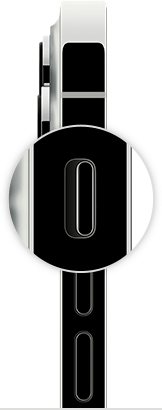
 

To put your iPhone in Ring mode, move the switch so that orange isn't being displayed. 

Use Silent mode
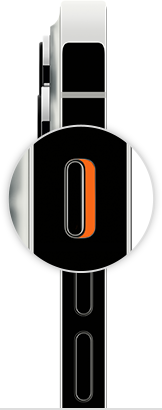
 

To put your iPhone in Silent mode, move the switch so that orange is being displayed. 

Similar questions

1 reply
Question marked as Top-ranking reply

May 25, 2023 6:22 PM in response to MusicLover711

According to Apple's documentation (below) and my experience on the iPhone 14 Pro with silent mode enabled music should still play. Ensure your volume is still turned up when listening to music as if you have silent mode enabled and volume on zero your device will make no noises.


If you still encounter this issue I would highly suggest reporting a bug to Apple directly (see below) as this is not an intended feature change for the iPhone 14 Pro.

Feedback - iPhone - Apple


Turn Ring/Silent mode on or off on your iPhone - How to put your iPhone on vibrate, ring or silent mode – Apple Support (AU)

In Ring mode, you'll hear ringtones and alerts. In Silent mode, you won't — but your iPhone can still play sounds, such as when you play music or videos.

Use Ring mode


To put your iPhone in Ring mode, move the switch so that orange isn't being displayed. 

Use Silent mode


To put your iPhone in Silent mode, move the switch so that orange is being displayed. 

This thread has been closed by the system or the community team. You may vote for any posts you find helpful, or search the Community for additional answers.

Mute Switch

Welcome to Apple Support Community
A forum where Apple customers help each other with their products. Get started with your Apple Account.