Hey morten199,
Thanks for those details. To clarify, are you saying that your child's Apple ID is showing a checkmark next to their phone number, email, or both? Also, are they able to send SMS as expected? We ask because that's required in order to activate iMessage for use with Apple ID and phone number.
Also, we're a little confused on the family configuration. If your child is added as a family member on your family, they shouldn't be showing as an organizer on theirs unless they've set up a totally separate family from you. If they have, you should have them leave their Family Sharing group and join yours. For help moving a child to another Family Sharing group, please work through these steps as they're best equipped to assist:
Invite the child to another family
To move a child to another family group, you or another guardian needs to invite them. After you send the invitation, the child's current family organizer must approve the request on their iPhone, iPad, iPod touch, or Mac. Then the child will move from their current family group to the other family group.
Invite a child from your iPhone, iPad, or iPod touch
Learn how to invite the child in-person using the steps below.
In iOS 16 or later
1. Go to Settings.
2. Tap Family.
3. Tap the Add Member button  .
.
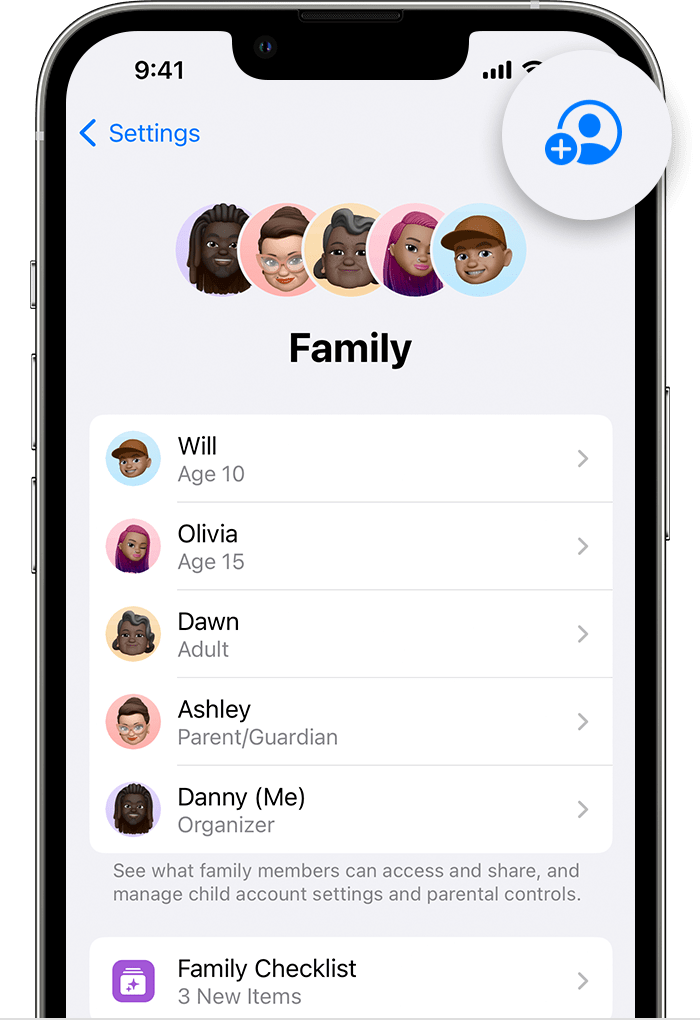
4. Tap Invite Others.
5. Tap Invite in Person.
6. Ask the child to enter their Apple ID and password. Learn what to do if the child forgot their password.
7. Follow the onscreen steps.
8. After the child's current family organizer approves the request, follow the onscreen steps to provide parental consent and verify that you're an adult.
To check the status of the request, go to Settings, tap Family, then tap the child's name.
This is outlined in more detail here: Move a child to another group using Family Sharing - Apple Support
We hope this helps out.
Take care!



