Hello The_Blue_Lamp,
According to their Release Changelogs, Minecraft added Bluetooth keyboard and mouse support for iOS with Minecraft v. 1.19.10 (Bedrock). This means you may not need to set up Switch Control to use your Bluetooth keyboard to play Minecraft.
First, check to see if you need to update Minecraft on your iPad.
1. Open the App Store.
2. Tap your profile icon at the top of the screen.
3. Scroll to see pending updates and release notes. Tap Update next to an app to update only that app, or tap Update All.
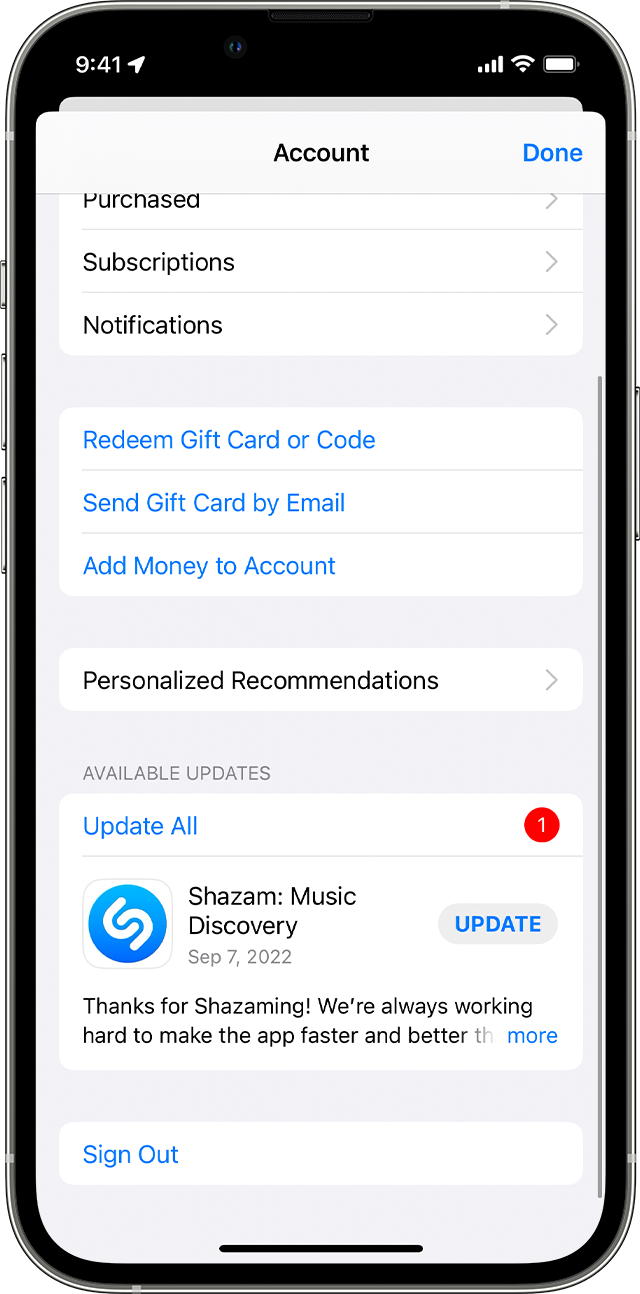
How to manually update apps on your Apple device - Apple Support
Then, connect your external keyboard and test to see if it works in other apps. If it does, but not in Minecraft, reach out to Minecraft Help directly for guidance.
If you find you need to continue with the Switch Control method, there may be some other settings that are preventing it from being enabled. Try disabling Assistive Touch and Full Keyboard Access with these paths:
Settings > Accessibility > Touch > Assistive Touch
Settings > Accessibility Settings > Accessibility > Keyboard > Full Keyboard Access
Still not able to enable Switch Control on your iPad? You can contact Apple Support directly for guidance here:
Get Support
Contact - Official Apple Support
All Our Best


