Will the photos in my albums be safe when Apple eliminates my photo stream? BTW, I do not show "photo stream". I have "recent" in my library.

Will the photos in my albums be safe when Apple eliminates my photo stream? BTW, I do not show "photo stream". I have "recent" in my library.


iPhone 11, iOS 15

Posted on May 30, 2023 9:35 AM

Reply
Question marked as Top-ranking reply

Posted on May 30, 2023 9:38 AM

Personal or shared Albums will not be affected. It is only My Photo Stream. even for that...


Enable iCloud Photos along with My Photo Stream so that your Photos from My Photo Stream are uploaded to iCloud automatically. If you already have then there is nothing to worry about. See the pic below
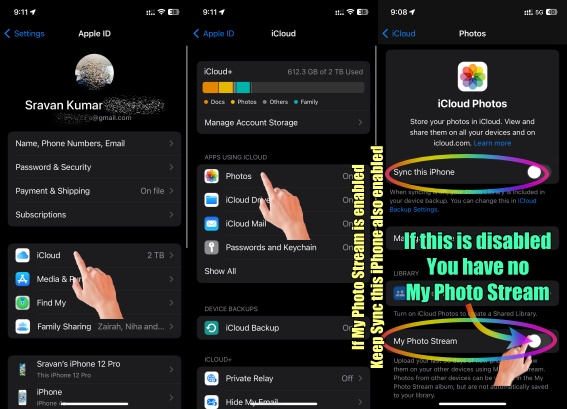


"My Photo Stream uploads your most recent photos (except Live Photos) so that you can view and import them to another device if you like. Photos are stored in My Photo Stream for 30 days and then are deleted from iCloud. To keep your photos stored in iCloud on an ongoing basis, set up and use iCloud Photos. iCloud Photos uploads all of your photos and videos to iCloud and keeps them up to date across your devices.


If you turn on both My Photo Stream and iCloud Photos on an iPhone, iPad, or iPod touch, photos that you take with that device upload to both iCloud Photos and My Photo Stream.


If you use another device with the same Apple ID that has only My Photo Stream turned on, photos that you take on that device upload only to My Photo Stream. They don't appear on any devices that have only iCloud Photos enabled."


Learn more about the differences between iCloud Photos and My Photo Stream.

2 replies
Question marked as Top-ranking reply

May 30, 2023 9:38 AM in response to LCgal

Personal or shared Albums will not be affected. It is only My Photo Stream. even for that...


Enable iCloud Photos along with My Photo Stream so that your Photos from My Photo Stream are uploaded to iCloud automatically. If you already have then there is nothing to worry about. See the pic below


"My Photo Stream uploads your most recent photos (except Live Photos) so that you can view and import them to another device if you like. Photos are stored in My Photo Stream for 30 days and then are deleted from iCloud. To keep your photos stored in iCloud on an ongoing basis, set up and use iCloud Photos. iCloud Photos uploads all of your photos and videos to iCloud and keeps them up to date across your devices.


If you turn on both My Photo Stream and iCloud Photos on an iPhone, iPad, or iPod touch, photos that you take with that device upload to both iCloud Photos and My Photo Stream.


If you use another device with the same Apple ID that has only My Photo Stream turned on, photos that you take on that device upload only to My Photo Stream. They don't appear on any devices that have only iCloud Photos enabled."


Learn more about the differences between iCloud Photos and My Photo Stream.

May 30, 2023 9:41 AM in response to LCgal

Yes. You can go to Settings ➜ Photos ➜ My Photo Stream and turn it off there if its on.


Check the setting on all your devices as its a device specific setting, can be off on some devices while its on in others.


Any photos uploaded to photo stream from one device will be visible by others, but are not automatically saved to other devices. So if you had some photos in the photo stream from one device, but want to keep them on another device, you need to manually download those to the device you want to keep them on.


If Photo Stream is turned on, you should have a "My Photo Stream Album" in the Photos app on devices that have the option turned on.

click here ➜ My Photo Stream - Apple Support


This thread has been closed by the system or the community team. You may vote for any posts you find helpful, or search the Community for additional answers.

Will the photos in my albums be safe when Apple eliminates my photo stream? BTW, I do not show "photo stream". I have "recent" in my library.

Welcome to Apple Support Community
A forum where Apple customers help each other with their products. Get started with your Apple Account.