Multiple timeseries in an XY-scatter plot (2D-point diagram)

Irregular timeseries have random frequency, so each series need their own X-axis. How du you achieve this in Numbers?


If I have a 2D-point diagram, a can have multiple series if they share the same X-axis (column). but if I switch the X-range for one serie, the others switch as well.


I I use a common X-axis, I need to have empty cells in the series. This causes other issues.

Mac mini, OS X 10.11

Posted on Jun 2, 2023 7:42 AM

Reply
Question marked as Top-ranking reply

Posted on Jun 3, 2023 12:20 AM

Hi Mimiir,


Mimiir wrote:

Also, with current solution you need NOT to use the A-column when working with multi XY. That is not intuitive.

Sorry, I forgot to mention that for XY Scatter Plots, the data must be in body cells. I was using a table where Column A happened to be a Header Column, so I avoided column A.


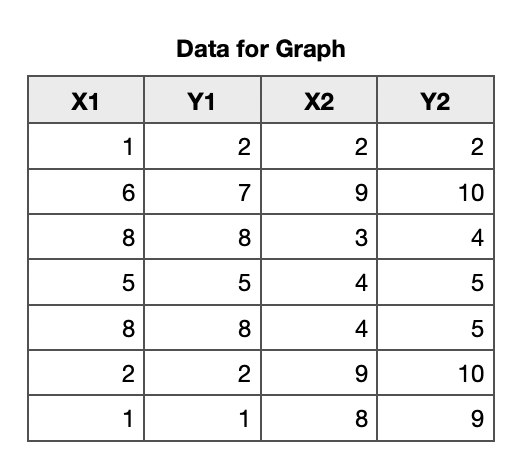
Here are the data in a table with no Header columns, and one Header Row (Row 1) for the labels.

The Numbers way with tables is to have a table for each specific purpose. This table is specifically for holding the data needed for plotting a graph. Then we can select whole rows or columns without selecting whatever else is in the table.

Mimiir wrote: A bit hard to find what to select and click to make that setting visible.

I do not know which setting you mean, so here are all the steps.

I selected whole columns: click on column label A then shift click on column label D


Insert a 2D Scatter plot. With the graph selected, click on edit Data References

The graph is Sharing X Values.

Now we need to click on the bottom left of the Numbers window and untick Share X Values.


I hope that is clearer. Please reply with questions.

Ian.

5 replies
Question marked as Top-ranking reply

Jun 3, 2023 12:20 AM in response to Mimiir

Hi Mimiir,


Mimiir wrote:

Also, with current solution you need NOT to use the A-column when working with multi XY. That is not intuitive.

Sorry, I forgot to mention that for XY Scatter Plots, the data must be in body cells. I was using a table where Column A happened to be a Header Column, so I avoided column A.


Here are the data in a table with no Header columns, and one Header Row (Row 1) for the labels.

The Numbers way with tables is to have a table for each specific purpose. This table is specifically for holding the data needed for plotting a graph. Then we can select whole rows or columns without selecting whatever else is in the table.


Mimiir wrote: A bit hard to find what to select and click to make that setting visible.

I do not know which setting you mean, so here are all the steps.

I selected whole columns: click on column label A then shift click on column label D


Insert a 2D Scatter plot. With the graph selected, click on edit Data References

The graph is Sharing X Values.

Now we need to click on the bottom left of the Numbers window and untick Share X Values.


I hope that is clearer. Please reply with questions.

Ian.

This thread has been closed by the system or the community team. You may vote for any posts you find helpful, or search the Community for additional answers.

Multiple timeseries in an XY-scatter plot (2D-point diagram)

Welcome to Apple Support Community
A forum where Apple customers help each other with their products. Get started with your Apple Account.