Why l can’t download music.

I am on family sharing, l have access to Apple music and it’s subscribed but when l try to download my phone refuses but my other colleagues can who are on this family sharing can download.

Posted on Jun 5, 2023 1:00 AM

Reply
Question marked as Top-ranking reply

Posted on Jun 7, 2023 7:30 AM

Hello washington276,


If you are having trouble accessing your Family Sharing content, the guidance below can help:


"Check your Family Sharing settings

Make sure that you're using the same Apple ID for Family Sharing and Media & Purchases. And make sure that purchase sharing is turned on. Then ask your family members to check their settings too.

On your iPhone or iPad with iOS 16 or later
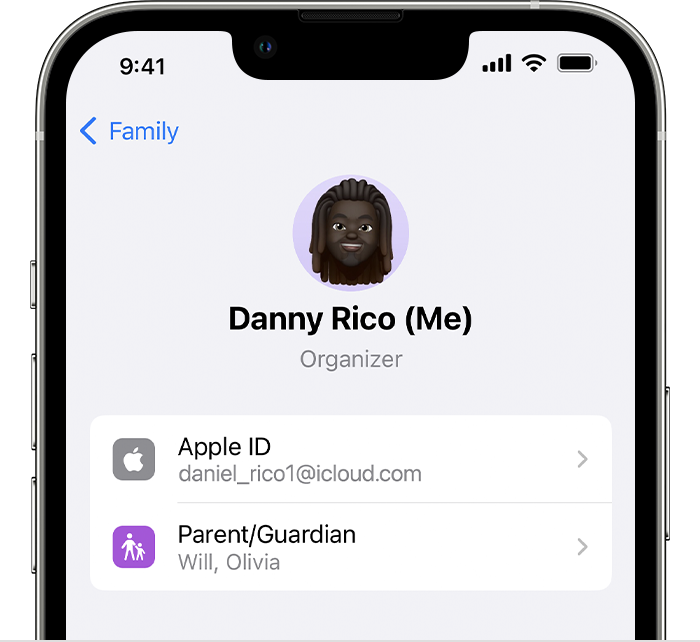
  1. Go to Settings > Family.
  2. Tap your name. 
  3. Make a note of which Apple ID is listed.
  4. Tap Purchases. 
  5. Tap Apple ID for Purchases and make sure that you're signed in with with the same Apple ID that you use for Family Sharing. If not, tap Share using secondary Apple ID and enter the Apple ID and password for that Apple ID. 

On your iPhone, iPad, or iPod touch with iOS 15 or earlier

  1. Go to Settings, tap your name, then tap Family Sharing.
  2. Tap your name. 
  3. Make a note of which Apple ID is listed. You'll need to use this Apple ID to sign in later.
  4. Tap Back to go back to Family Sharing.
  5. Tap Purchase Sharing and make sure that Share Purchases with Family is turned on.
  6. Tap Back, then tap Apple ID.
  7. Tap Media & Purchases.
  8. Tap View Account.
  9. Sign in with your Apple ID. Make sure that you sign in with with the same Apple ID that you use for Family Sharing.

"

If you can't find your family's shared content - Apple Support


Cheers.

1 reply
Question marked as Top-ranking reply

Jun 7, 2023 7:30 AM in response to washington276

Hello washington276,


If you are having trouble accessing your Family Sharing content, the guidance below can help:


"Check your Family Sharing settings

Make sure that you're using the same Apple ID for Family Sharing and Media & Purchases. And make sure that purchase sharing is turned on. Then ask your family members to check their settings too.

On your iPhone or iPad with iOS 16 or later
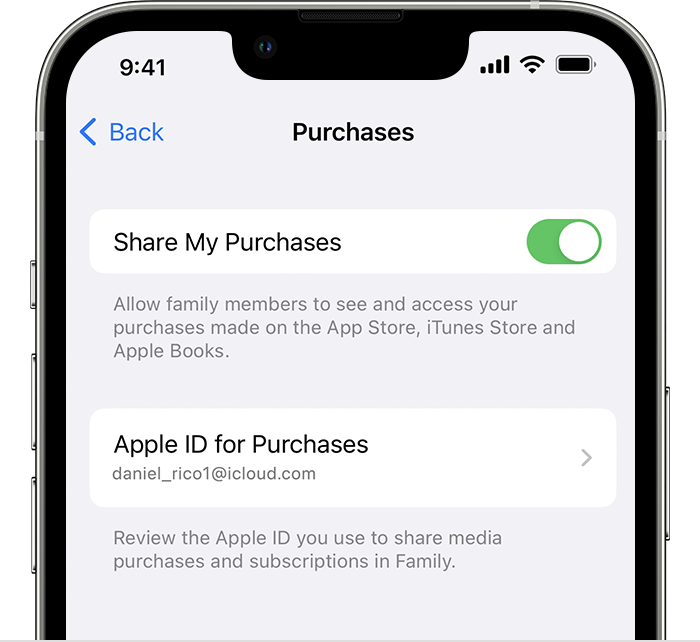
  1. Go to Settings > Family.
  2. Tap your name. 
  3. Make a note of which Apple ID is listed.
  4. Tap Purchases. 
  5. Tap Apple ID for Purchases and make sure that you're signed in with with the same Apple ID that you use for Family Sharing. If not, tap Share using secondary Apple ID and enter the Apple ID and password for that Apple ID. 

On your iPhone, iPad, or iPod touch with iOS 15 or earlier

  1. Go to Settings, tap your name, then tap Family Sharing.
  2. Tap your name. 
  3. Make a note of which Apple ID is listed. You'll need to use this Apple ID to sign in later.
  4. Tap Back to go back to Family Sharing.
  5. Tap Purchase Sharing and make sure that Share Purchases with Family is turned on.
  6. Tap Back, then tap Apple ID.
  7. Tap Media & Purchases.
  8. Tap View Account.
  9. Sign in with your Apple ID. Make sure that you sign in with with the same Apple ID that you use for Family Sharing.

"

If you can't find your family's shared content - Apple Support


Cheers.

This thread has been closed by the system or the community team. You may vote for any posts you find helpful, or search the Community for additional answers.

Why l can’t download music.

Welcome to Apple Support Community
A forum where Apple customers help each other with their products. Get started with your Apple Account.