Hello tokar86a,
Thanks for choosing the Apple Support Communities. We see you want to share the internet from your iPhone 13 to your iPhone 8. With the use of a Personal Hotspot, you wouldn't need to use Bluetooth to broadcast the internet. Below is how to set up and use Personal Hotspot. Please note, you will need to have a Personal Hotspot package from your cellular provider.
How to set up a Personal Hotspot on your iPhone or iPad - Apple Support
"A Personal Hotspot lets you share the cellular data connection of your iPhone or iPad (Wi-Fi + Cellular) when you don't have access to a Wi-Fi network.
Set up Personal Hotspot
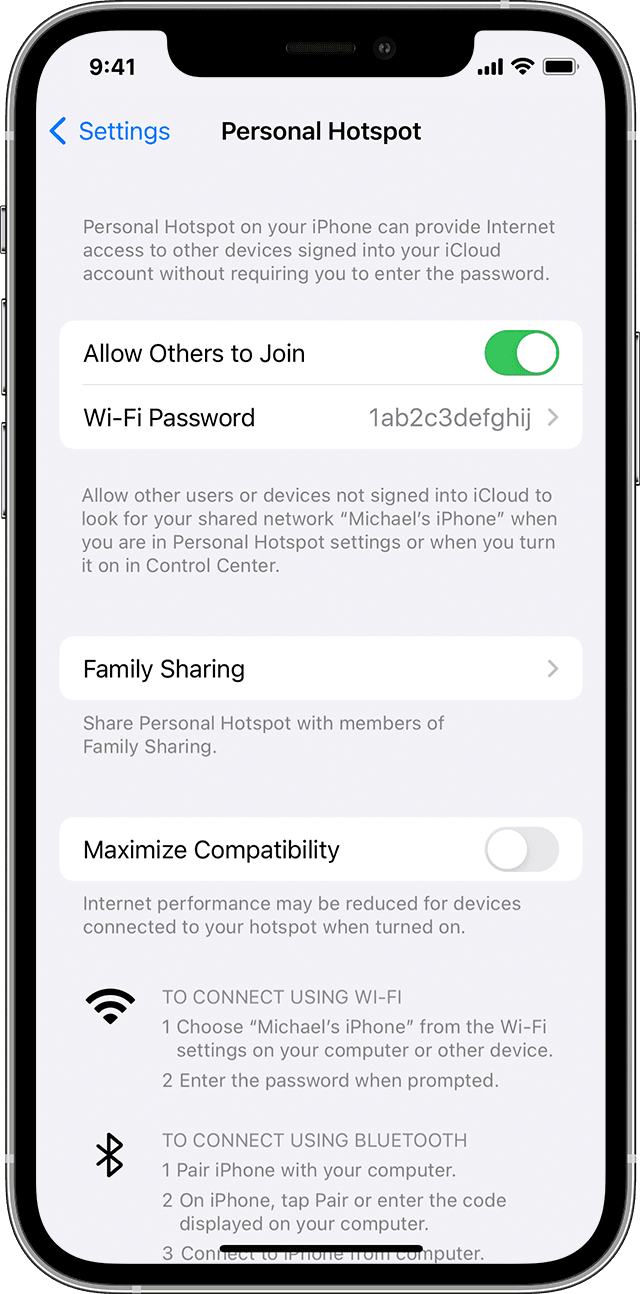
- Go to Settings > Cellular > Personal Hotspot or Settings > Personal Hotspot.
- Tap the slider next to Allow Others to Join.
If you don't see the option for Personal Hotspot, contact your carrier to make sure that you can use Personal Hotspot with your plan.

Connect to Personal Hotspot with Wi-Fi, Bluetooth, or USB
You can connect to a Personal Hotspot using Wi-Fi, Bluetooth, or USB. And with iOS 13 or later, devices that are connected to a Personal Hotspot will stay connected, even if the screen is locked, so those devices will still get notifications and messages.
When you connect a device to your Personal Hotspot, the status bar turns blue and shows how many devices have joined. The number of devices that can join your Personal Hotspot at one time depends on your carrier and iPhone model. If other devices have joined your Personal Hotspot using Wi-Fi, you can use only cellular data to connect to the internet from the host device.
Use these steps to connect:
Wi-Fi
On the device that you want to connect to, go to Settings > Cellular > Personal Hotspot or Settings > Personal Hotspot and make sure that it's on. Then verify the Wi-Fi password and name of the phone. Stay on this screen until you’ve connected your other device to the Wi-Fi network.
On the device that you want to connect, go to Settings > Wi-Fi and look for your iPhone or iPad in the list. Then tap the Wi-Fi network to join. If asked, enter the password for your Personal Hotspot.
Bluetooth
To make sure that your iPhone or iPad is discoverable, go to Settings > Bluetooth and stay on that screen. Then on your Mac, follow the manufacturer directions to set up a Bluetooth connection. Learn more about using Personal Hotspot with Bluetooth.
Personal Hotspot supports Bluetooth connections with Mac and other third-party devices. To connect another iOS device, use Bluetooth.
USB
Make sure that you have the latest version of iTunes and the Finder on your Mac. Then connect your iPhone or iPad to your computer with the USB cable that came with your device. If you see an alert that says tap "Trust This Computer?" tap Trust.
Learn more about connecting a device to your iPhone or iPad's Personal Hotspot."
We hope this helps.
Cheers!


