AirPods Pro hissing

I read some answers to why they may hiss. As suggested I pushed and the button behind the charging unit. That did not help. Then I turned noise cancellation off. That fixed it, but now I have lost that important feature. Not happy at all. Out of warranty.

Posted on Jun 6, 2023 5:37 AM

Reply
Question marked as Top-ranking reply

Posted on Jun 7, 2023 5:11 PM

Hi Eric-in-the-Box,


It sounds like you're experiencing some issues with the Active Noise Cancellation (ANC) on your AirPods Pro. According to the Apple Support article that we have linked below, there are a few things things that may impact the ANC on your AirPods. Try the steps we have outlined below. If the hissing continues, there is an Apple Service Program that may cover your AirPods for 3 years after the first retail sale of the unit.


If Active Noise Cancellation isn't working as expected on your AirPods Pro - Apple Support

1. Make sure that you have the latest software on your connected iPhone, iPad, iPod touch, or Mac.
2. Put both AirPods Pro in your ears and check that Active Noise Cancellation (ANC) is turned on.
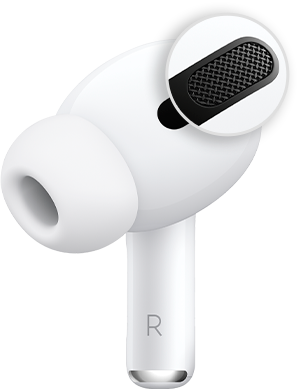
3. Clean the mesh located on the top of your AirPods Pro. Sometimes Active Noise Cancellation can be affected if debris or earwax builds up in the area shown below.
4. If this happens, you might experience: 
* A loss of bass sound
* An increase in background sounds, such as street or airplane noise

8. If Active Noise Cancellation still isn't working as expected on your AirPods Pro (1st generation), refer to AirPods Pro Service Program for Sound Issues.


Cheers!


5 replies
Question marked as Top-ranking reply

Jun 7, 2023 5:11 PM in response to Eric-in-the-Box

Hi Eric-in-the-Box,


It sounds like you're experiencing some issues with the Active Noise Cancellation (ANC) on your AirPods Pro. According to the Apple Support article that we have linked below, there are a few things things that may impact the ANC on your AirPods. Try the steps we have outlined below. If the hissing continues, there is an Apple Service Program that may cover your AirPods for 3 years after the first retail sale of the unit.


If Active Noise Cancellation isn't working as expected on your AirPods Pro - Apple Support

1. Make sure that you have the latest software on your connected iPhone, iPad, iPod touch, or Mac.
2. Put both AirPods Pro in your ears and check that Active Noise Cancellation (ANC) is turned on.
3. Clean the mesh located on the top of your AirPods Pro. Sometimes Active Noise Cancellation can be affected if debris or earwax builds up in the area shown below.
4. If this happens, you might experience: 
* A loss of bass sound
* An increase in background sounds, such as street or airplane noise

8. If Active Noise Cancellation still isn't working as expected on your AirPods Pro (1st generation), refer to AirPods Pro Service Program for Sound Issues.


Cheers!


Jun 7, 2023 8:21 PM in response to Ali_E1

Was excited to get a pair as a gift. Same issue. Did everything I could find. It's not dirt. Multiple resets doesn't help. Firmware is up to date. Noise cancellation doesn't work, period. Constant hissing in left ear and can't pass the ear test (yes, I tried all the ear sizes and all the known tricks). Only good for non-NC, so I went back to my regular old Air Pods that actually work the way they are supposed to. What a waste of my time.

Nov 28, 2023 11:20 AM in response to DisappointedWithAppleSupport

Loud rushing sound when inserting right side pod. Noise would stop after a while after inserting the left side. The problem started after 2 years and 10 months. Went through troubleshooting on a chat. No success. Advised to go to Apple store two hour drive away. Only other option was to send Airpods to Apple for roughly $250. I almost fell off my chair. A total waste of time.

This thread has been closed by the system or the community team. You may vote for any posts you find helpful, or search the Community for additional answers.

AirPods Pro hissing

Welcome to Apple Support Community
A forum where Apple customers help each other with their products. Get started with your Apple Account.