Can't open game app
I'm having trouble opening wordscapes game on my iPhoneXS Max
I'm having trouble opening wordscapes game on my iPhoneXS Max
Hello Riversoaker,
Apple has a great article that suggests these steps when you encounter an app that doesn't work as expected.
Additional guidance for each of those steps ca be found linked each option here: If an app on your iPhone or iPad stops responding, closes unexpectedly, or won’t open - Apple Support
If it still doesn't open, you'll need to connect with the developers of Wordscapes for support for more specialized support. This is the best way to find an app developer:
How to contact an app developer
1. Open the App Store on your iPhone or iPad.
2. Search for the app, then tap it. If you can't find it, tap the account buttonor your photo at the top of the screen, tap Purchased, tap "Not on this [device]," then tap the app.
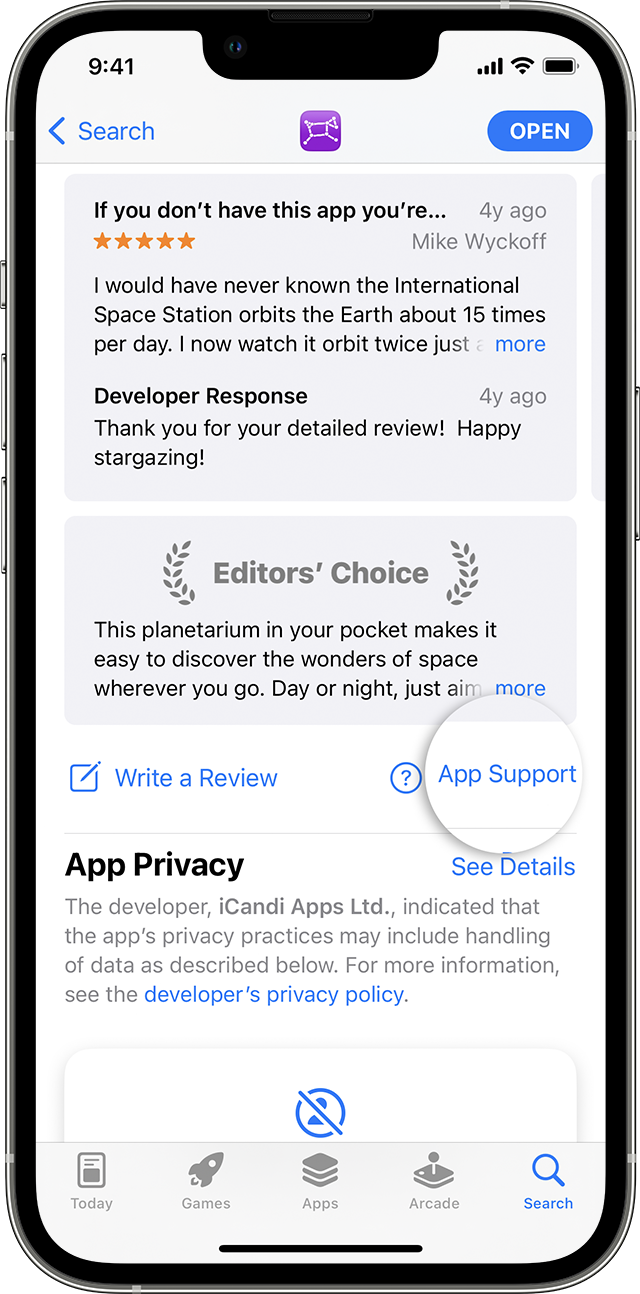
3. The app's product page appears. Scroll to the Ratings & Reviews section, then tap App Support. If you don't see App Support, make sure that you're signed in with the correct Apple ID.
All Our Best.
Hello Riversoaker,
Apple has a great article that suggests these steps when you encounter an app that doesn't work as expected.
Additional guidance for each of those steps ca be found linked each option here: If an app on your iPhone or iPad stops responding, closes unexpectedly, or won’t open - Apple Support
If it still doesn't open, you'll need to connect with the developers of Wordscapes for support for more specialized support. This is the best way to find an app developer:
How to contact an app developer
1. Open the App Store on your iPhone or iPad.
2. Search for the app, then tap it. If you can't find it, tap the account button
3. The app's product page appears. Scroll to the Ratings & Reviews section, then tap App Support. If you don't see App Support, make sure that you're signed in with the correct Apple ID.
All Our Best.
Can't open game app