
Photos are blurry
lots of my photos gone blurry and I still got lots of storage on my iPhone
iPhone 11 Pro Max
lots of my photos gone blurry and I still got lots of storage on my iPhone
iPhone 11 Pro Max
Hey sazan101,
If you tap on the blurry photo in the Photos app to view it full screen, does it remain low-res or does it then sharpen up?
If it gets sharper, make sure you don't have "Optimize iPhone Storage" selected under Settings > [your name] > iCloud > Photos. If that option is selected, this can be expected behavior as your iPhone uploads your full resolution version of your photos to iCloud but only keeps a thumbnail on the device to save space.
"Store your photos and videos in iCloud
By default, your photos and videos are stored on your device in their original, high-resolution version. This means that they use a lot of space on your iPhone, iPad, and iPod touch. With iCloud Photos, you can make more space available on your device and still have access to your entire full-resolution collection wherever you go.
Get started with iCloud Photos:
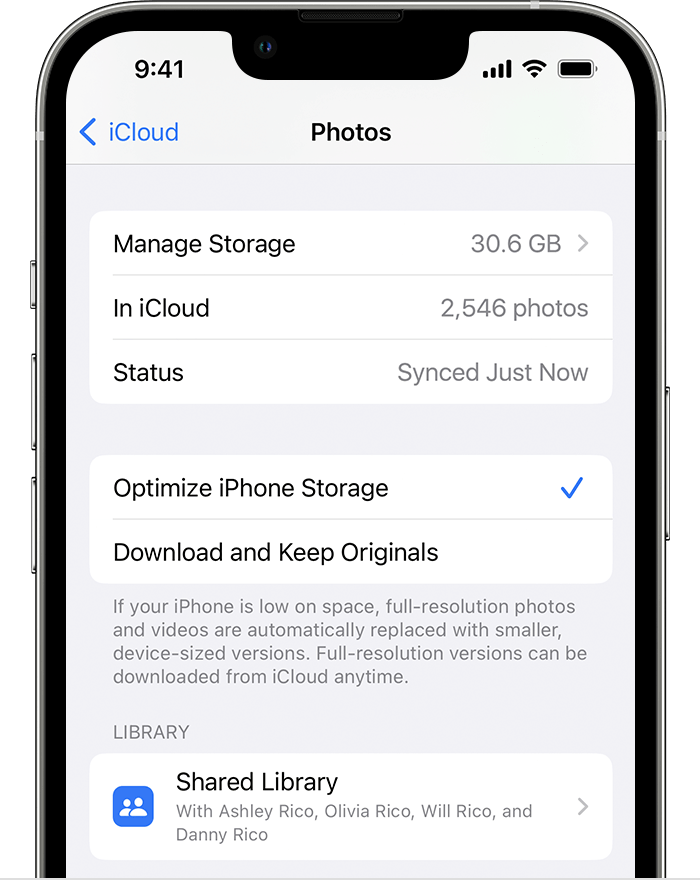
When Optimize Storage is turned on, full-resolution photos and videos are stored in iCloud, and, when needed, space-saving copies are stored on your device. And as long as you have enough space in iCloud, you can store as many photos and videos as you want."
Feel free to reply to this post if that does not resolve the issue.
Cheers!
Hey sazan101,
If you tap on the blurry photo in the Photos app to view it full screen, does it remain low-res or does it then sharpen up?
If it gets sharper, make sure you don't have "Optimize iPhone Storage" selected under Settings > [your name] > iCloud > Photos. If that option is selected, this can be expected behavior as your iPhone uploads your full resolution version of your photos to iCloud but only keeps a thumbnail on the device to save space.
"Store your photos and videos in iCloud
By default, your photos and videos are stored on your device in their original, high-resolution version. This means that they use a lot of space on your iPhone, iPad, and iPod touch. With iCloud Photos, you can make more space available on your device and still have access to your entire full-resolution collection wherever you go.
Get started with iCloud Photos:
When Optimize Storage is turned on, full-resolution photos and videos are stored in iCloud, and, when needed, space-saving copies are stored on your device. And as long as you have enough space in iCloud, you can store as many photos and videos as you want."
Feel free to reply to this post if that does not resolve the issue.
Cheers!
Photos are blurry

