Calendar app (smaller icon, not the smallest one) not showing events for tomorrow

Not sure if I am asking even the right thing.

Earlier I saw my medium-larger calendar icon showing events scheduled for tomorrow but it’s only day’s one being shown recently.

Is it because of the software update or for something else?

I appreciate your time and patience.

thanks.

iPhone SE, iOS 16

Posted on Jun 15, 2023 1:14 AM

Reply
4 replies

Jun 16, 2023 8:58 AM in response to panna81

Hi panna81,


Thanks for posting in Apple Support Communities.


It sounds like you're referring to a widget on your screen. With widgets you can choose various sizes to fit your desired look onscreen.


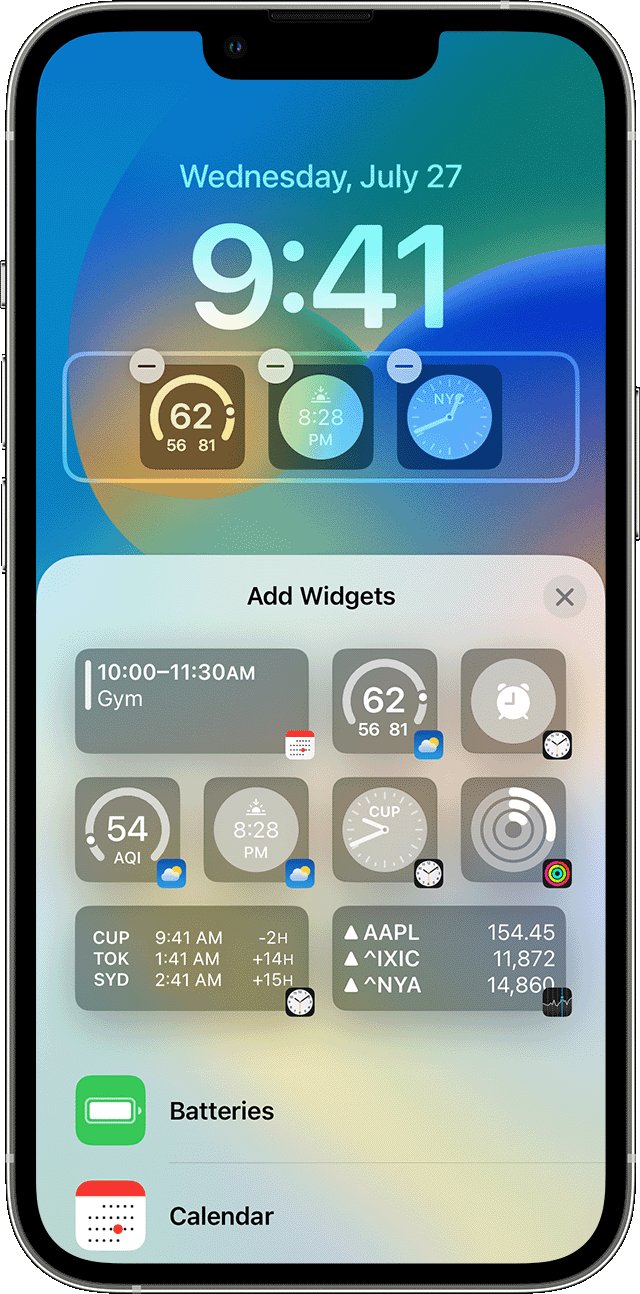
How to add widgets to your Lock Screen

With iOS 16, you can add widgets to your Lock Screen to get information at a glance — for example, the temperature, air quality, battery level, or upcoming calendar events.
An iPhone screen showing how to add widgets to Lock Screen 
1. Touch and hold the Lock Screen until the Customize button appears, then tap Customize.
2. Select Lock Screen.
3. Tap Add Widgets.
4. Tap or drag the widgets that you want to add to the Lock Screen.
5. When you're finished, tap the close button , then tap Done.
If there’s not enough room for a new widget, you can tap the Remove button  to remove a widget and make room for the one you want to add.

You can find these details and more in How to add and edit widgets on your iPhone - Apple Support.


If this doesn't address your concern, provide more specific details.


Regards.


This thread has been closed by the system or the community team. You may vote for any posts you find helpful, or search the Community for additional answers.

Calendar app (smaller icon, not the smallest one) not showing events for tomorrow

Welcome to Apple Support Community
A forum where Apple customers help each other with their products. Get started with your Apple Account.