Universal Control randomly swaps sides

I have Universal Control configured on my Primary Mac so that it's display is on the left, and my Secondary Mac is on the right. This works most of the time, I can scroll all the way to the right of my Primary Mac, and the cursor will flow over to the Secondary one with no problem, and vice versa.


However, sometimes, after I've left both and screens have locked, upon unlocking, the displays are swapped. So the machine that is physically on the right is now on the left. Because it only happens sometimes this is very confusing. I can of course go into the Displays setting on the Primary Mac and swap them back to how I want them, but this is a tedious waste of time for something that I already had set how I wanted.


How can MacOS Universal Control prevent the screens from swapping sides when I haven't changed it myself?

iMac 21.5″ 4K, macOS 12.6

Posted on Jun 15, 2023 11:33 PM

Reply

Similar questions

5 replies

Jun 17, 2023 1:02 PM in response to MaFooo

Hello MaFooo,


We understand you're having an issue with the Universal Control randomly swapping sides. We'd like to help.


Try the steps below for help with arranging the display to how you want them to be.


Let's first ensure that it is set up how you want it just to ensure that no setting was changed by mistake.


"On your Mac


  1. Choose Apple menu  > System Settings (or System Preferences).
  2. Click Displays.
  3. If using macOS Ventura or later, click the Advanced button at the bottom of the settings window.
  4. Turn on “Allow your pointer and keyboard to move between any nearby Mac or iPad.” Leave the other Universal Control settings turned on for now."


"Next follow the steps below for help arranging the displays.


Arrange your displays

Arrange your displays to adjust where your devices think they are relative to each other. You can then move the pointer more precisely in the direction of each display.

  1. On your primary Mac, choose Apple menu  > System Settings (or System Preferences).
  2. Click Displays.
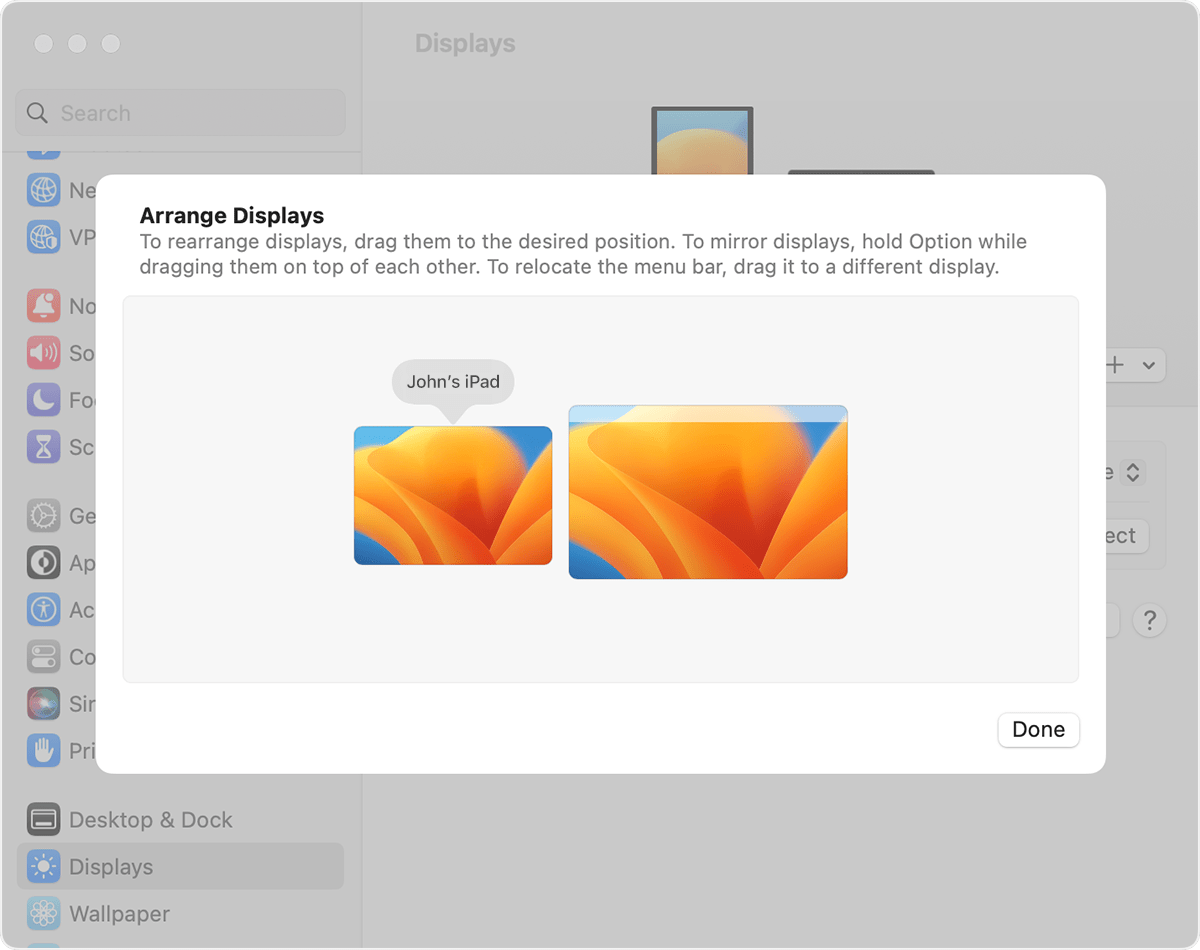
  3. If using macOS Ventura or later, click the Arrange button.
  4. The settings window shows an image representing each device's display. Drag the image of your iPad or other Mac into position relative to the other displays: to their left, to their right, or below them. A Mac display can also be positioned above other displays. Don't see your display?"


Universal Control: Use a single keyboard and mouse between Mac and iPad


Let us know if you have any questions.

Thank you for using Apple Support Communities.

Take care!

Arrange Displays in Displays settings


Jun 18, 2023 5:54 PM in response to MaFooo


Hello MaFooo,


We appreciate the update! From here, we'd recommend ensuring that your macOS version is up-to-date as it can often resolve abnormal behavior such as you're experiencing. To do that, check out: Update macOS on Mac - Apple Support


If you're already on the latest macOS version, or this doesn't resolve the behavior for you, reach out to Apple for additional troubleshooting assistance at: Get Support


Thanks.


Jun 22, 2023 7:21 PM in response to ManJor

Hmm, well since working in Software myself for 30+ years, I know that the old "just upgrade to the latest OS" is tech-support-speak for ¯\_(ツ)_/¯


I will do this of course anyway on account of some pretty severe macOS vulnerabilities disclosed recently, but I'm not holding my breath that it will fix this issue...

Jan 10, 2024 8:45 AM in response to MaFooo

I have the exact same issue. iMac and Mfac book pro. The worst part is that I'll be working on one and suddenly the focus (keyboard and mouse) moves to the other computer and the order has changed. Totally random. Whatever this advice here of "make sure to upgrade" is definitely support-speak for "I don't have a clue". If you find resolution, please post as this is a frustrating random behavior.

This thread has been closed by the system or the community team. You may vote for any posts you find helpful, or search the Community for additional answers.

Universal Control randomly swaps sides

Welcome to Apple Support Community
A forum where Apple customers help each other with their products. Get started with your Apple Account.