My iPhone may have been hacked

I have reason to believe my phone has been hacked. I recently lost it and I believe my ex got ahold of it.

There isn't a apple store near me anymore.


Is there another way I can find out?


[Re-Titled by Moderator]

iPhone 11, iOS 16

Posted on Jun 19, 2023 12:52 AM

Reply
Question marked as Top-ranking reply

Posted on Jun 19, 2023 11:29 AM

The first thing you should do if you have not done it already is change your Apple ID password and also your device Passcode. He will not be able to access your phone if he does not know these credentials.


Go to Settings > [your name on top] > Password & Security. Review the "Trusted Phone Numbers" and remove the ones that are not yours.


Make sure there are no other devices associated with you Apple ID that are not yours by going to Settings > [your name on top]. Scroll to the bottom to review the devices. At that same page, select "Find My" to see if anyone in the "Friends" section is allowed to view your location. You can select them and choose "Stop Sharing My Location".


As for apps installed, review the apps on your phone and delete any third party apps that you do not use.


He also should not be part of Family Sharing. This support article shows how to shut it off.

Leave Family Sharing - Apple Support

6 replies
Question marked as Top-ranking reply

Jun 19, 2023 11:29 AM in response to MsCinderella7

The first thing you should do if you have not done it already is change your Apple ID password and also your device Passcode. He will not be able to access your phone if he does not know these credentials.


Go to Settings > [your name on top] > Password & Security. Review the "Trusted Phone Numbers" and remove the ones that are not yours.


Make sure there are no other devices associated with you Apple ID that are not yours by going to Settings > [your name on top]. Scroll to the bottom to review the devices. At that same page, select "Find My" to see if anyone in the "Friends" section is allowed to view your location. You can select them and choose "Stop Sharing My Location".


As for apps installed, review the apps on your phone and delete any third party apps that you do not use.


He also should not be part of Family Sharing. This support article shows how to shut it off.

Leave Family Sharing - Apple Support

Jun 19, 2023 12:56 AM in response to MsCinderella7

Hack or Prank?


It is highly unlikely that skilled hackers would choose to invest their time and resources into monitoring an unknown person's device and sending texts. Firstly, hacking requires a certain level of expertise, knowledge, and tools, which can be quite valuable assets. A proficient hacker typically has a specific agenda, such as gaining unauthorized access to sensitive information, financial gain, or advancing their own personal or political interests.


Monitoring your iPhone would not yield any substantial benefits for a hacker. It would be a trivial and unproductive pursuit that lacks any significant value or purpose. Additionally, hacking activities are often motivated by tangible gains, such as financial rewards, access to valuable data, or the ability to manipulate systems for personal or ideological motives. Monitoring someone's device or sending texts would not offer any meaningful advantage or serve a legitimate purpose but pranks would.


Moreover, hacking is an inherently risky activity that can have serious legal consequences. Engaging in unauthorized access, surveillance, or invasion of privacy is illegal in most jurisdictions. Skilled hackers typically operate with more calculated precision, targeting high-value entities or systems that present greater opportunities for achieving their objectives. The risks associated with hacking a device would far outweigh any potential benefits, making it an illogical and unprofitable endeavor.


In summary, hackers typically focus their efforts on more lucrative targets that align with their motives and offer substantial rewards. Investing time and resources into monitoring a device would be an inefficient and unproductive use of their skills, knowledge, and tools.


To protect your devices and personal information, it is crucial to follow good security practices such as using strong and unique passwords, keeping your software up to date, being cautious with email attachments and links, and ensuring that your devices have appropriate security measures in place.


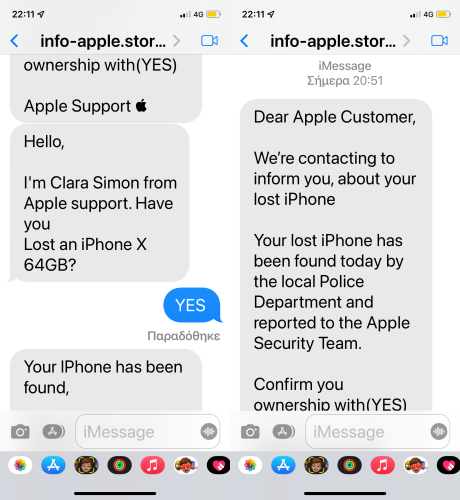
Beware of Phishing!: Be careful and be smart to --> Recognize and avoid phishing messages, phoney support calls ...

It (Phishing) may appear as the image given below.


Gain control of your Apple ID

If your Apple ID password has been changed by someone else, reset your password. Go to appleid.apple.com to update any personal or security information that isn't correct or that you don't recognize.27-Mar-2023


If you think your Apple ID has been compromised


Jun 19, 2023 12:56 AM in response to MsCinderella7

If you feel an unauthorized person/app is remotely using, controlling or monitoring your device, then that is possible only if you have done one or more of the following Don'ts...


  1. Don't hand over an iPhone to kids or to a stranger without Enabling Guided Access
  2. Don't share Apple IDs
  3. Don't Jailbreak
  4. Don't share sensitive information pertaining to your device
  5. Don't give in to Phishing
  6. Don't plug in your device in Airports and Public places through third-party cables and trust the device. Beware of Juice Jacking. (Especially in India)
  7. Don't leave your iPhone unlocked and unattended in public places like offices, schools, malls, etc.


If one of the above is true then quickly change the Apple ID Password and Return iPhone settings to their defaults.


Jun 19, 2023 1:48 PM in response to MsCinderella7

If your computer uses the same Apple ID as your phone, then it will show up there on your phone. You can verify that it is your computer by making sure the name is the same. To see your computer name on your computer, go to  > System Settings > General > About > Name. That name should match what you see on your iPhone.


Having Find My shut off will eliminate your device being tracked, so that is probably the most secure solution. If it was on, when you go to Settings > [your name on top] > Find My, you would see the people that can track your location under the "Friends" section on bottom. It may not show the "Friends" section with it off. The obvious benefit to having Find My turned on is if you lost your phone, you would be able to see its location and report it as lost so no one else could delete the data and use it as their own device.


If you believe your ex could have access to your computer, you would want to make sure it is secured with a PIN or Touch ID if it is capable. That would prevent him from changing your Apple ID password or any other settings related to the account.

Jun 19, 2023 12:16 PM in response to Mac Jim ID

Thank you. I've reviewed it all.

no other devices associated with you Apple ID- There are two that have my name on them. They say they are my computer. Why is my computer attached to this and how do I know for sure this is my computer?


Find My- I don't see how to add or remove anyone from this. How do I do this? I shut it off a week prior to me loosing it but I need to keep it on. I didn't realize I can add people to this so they can help me find my phone.


I turned it off because I Thought he can track me this way

This thread has been closed by the system or the community team. You may vote for any posts you find helpful, or search the Community for additional answers.

My iPhone may have been hacked

Welcome to Apple Support Community
A forum where Apple customers help each other with their products. Get started with your Apple Account.


