I don’t see my shortcuts on Apple Watch
I don’t see my shortcuts on Apple Watch
I don’t see my shortcuts on Apple Watch
Hey AndrewNeedHelp,
We'd be happy to help out. We understand you're unable to see shortcuts you've created on your Apple Watch.
To get started, make sure you've restarted both your Apple Watch and your iPhone its paired with. Then, go to the Shortcuts app and let us know what you see. If you still don't see your shortcuts, we'd suggest unpairing your Apple Watch from your iPhone and setting it back up again in order to reestablish a good connection between the two devices.
For more info on using Shortcuts on Apple Watch, check out: Use shortcuts on Apple Watch - Apple Support
If you end up needing to unpair and erase your Apple Watch, then set it back up again, work through the steps here:
How to unpair and erase your Apple Watch if you have your iPhone
1. Keep your Apple Watch and iPhone close together as you unpair them.
2. Open the Apple Watch app on your iPhone.
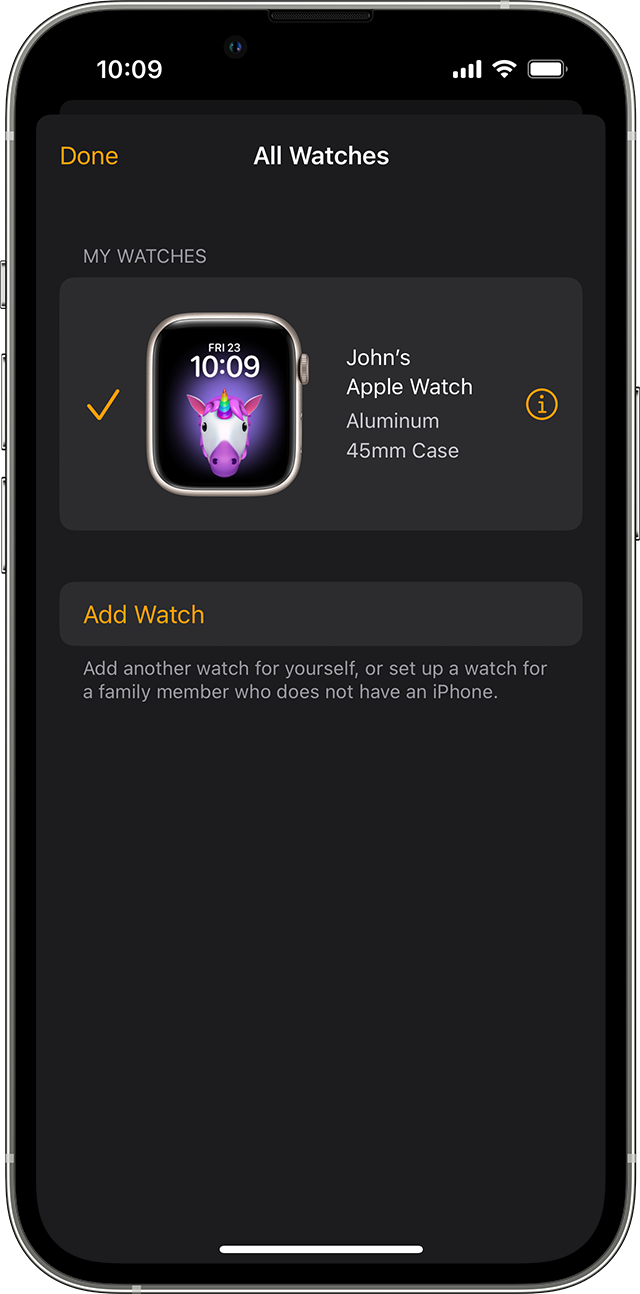
3. Go to the My Watch tab and tap All Watches.
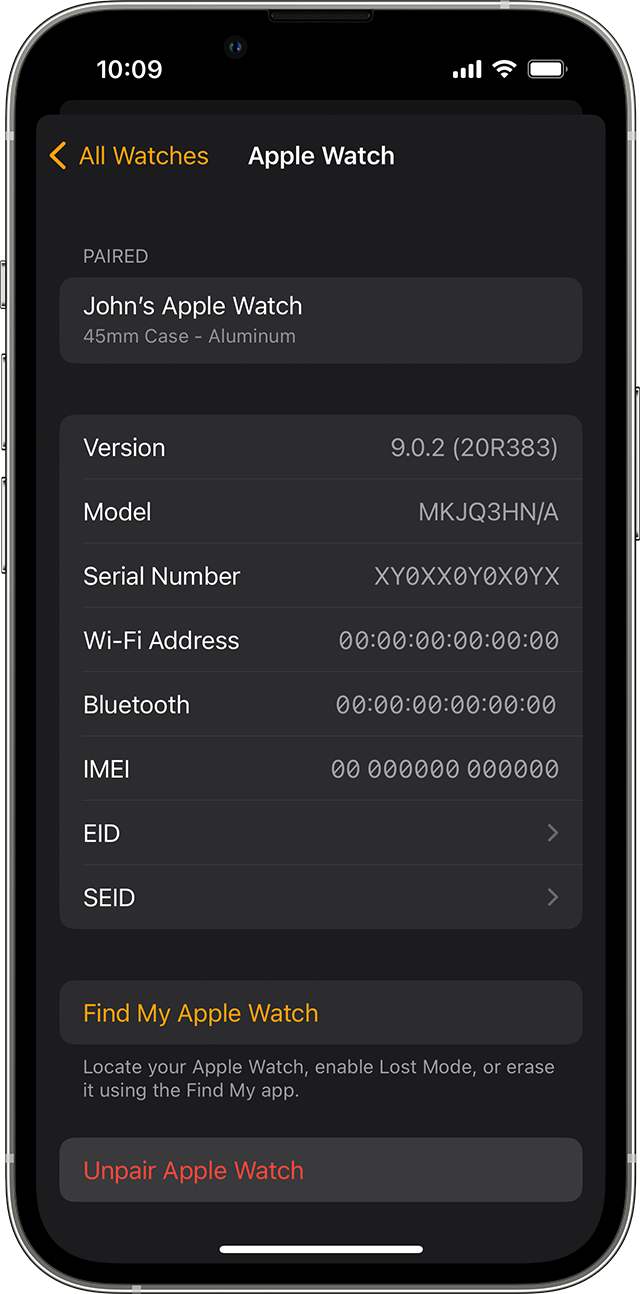
4. Tap the info buttonnext to the watch that you want to unpair.
5. Tap Unpair Apple Watch.
6.
7. Tap Unpair [your Apple Watch name].
8. For GPS + Cellular models, choose whether to keep or remove your cellular plan.
* If you want to pair your Apple Watch and iPhone again, keep your plan.
* If you don't want to pair your Apple Watch and iPhone again, remove your plan. If you aren't going to pair with a different watch or iPhone, you might need to contact your carrier to cancel your cellular subscription.
9. Type your Apple ID password to disable Activation Lock, then tap Unpair.
Before erasing all content and settings on your Apple Watch, your iPhone creates a new backup of your Apple Watch. You can use the backup to restore a new Apple Watch. After your Apple Watch unpairs, you'll see the Start Pairing message.
Now you can set up your Apple Watch again or turn it off if you're selling it or giving it away.
For more info, review: Unpair and erase your Apple Watch - Apple Support
We hope this helps out.
Take care!
Hey AndrewNeedHelp,
We'd be happy to help out. We understand you're unable to see shortcuts you've created on your Apple Watch.
To get started, make sure you've restarted both your Apple Watch and your iPhone its paired with. Then, go to the Shortcuts app and let us know what you see. If you still don't see your shortcuts, we'd suggest unpairing your Apple Watch from your iPhone and setting it back up again in order to reestablish a good connection between the two devices.
For more info on using Shortcuts on Apple Watch, check out: Use shortcuts on Apple Watch - Apple Support
If you end up needing to unpair and erase your Apple Watch, then set it back up again, work through the steps here:
How to unpair and erase your Apple Watch if you have your iPhone
1. Keep your Apple Watch and iPhone close together as you unpair them.
2. Open the Apple Watch app on your iPhone.
3. Go to the My Watch tab and tap All Watches.
4. Tap the info button
5. Tap Unpair Apple Watch.
6.
7. Tap Unpair [your Apple Watch name].
8. For GPS + Cellular models, choose whether to keep or remove your cellular plan.
* If you want to pair your Apple Watch and iPhone again, keep your plan.
* If you don't want to pair your Apple Watch and iPhone again, remove your plan. If you aren't going to pair with a different watch or iPhone, you might need to contact your carrier to cancel your cellular subscription.
9. Type your Apple ID password to disable Activation Lock, then tap Unpair.
Before erasing all content and settings on your Apple Watch, your iPhone creates a new backup of your Apple Watch. You can use the backup to restore a new Apple Watch. After your Apple Watch unpairs, you'll see the Start Pairing message.
Now you can set up your Apple Watch again or turn it off if you're selling it or giving it away.
For more info, review: Unpair and erase your Apple Watch - Apple Support
We hope this helps out.
Take care!
I don’t see my shortcuts on Apple Watch