Old Ipod Query

I recently picked up a Ipod Classic 4th Gen to replace a damaged 7th Gen that I had. I can't sync my 7th Gen to my iTunes because its broken. Is there a way I could get my library onto the 4th Gen or will I have to create a new account to do so? Any help greatly appreciated, I can't find nothing on this particular issue online. Thank you

iPod Classic

Posted on Jun 21, 2023 11:09 AM

Reply
Question marked as Top-ranking reply

Posted on Jun 21, 2023 12:01 PM

You have to tell iTunes to Sync with a new (to you) iPod.


Connect the iPod to your computer and select the iPod's icon once iTunes shows the icon at the top, just below the menu bar:


That shows you the Device/Settings/Summary pane.

  • Click on the Device/Settings/Music pane (1.):
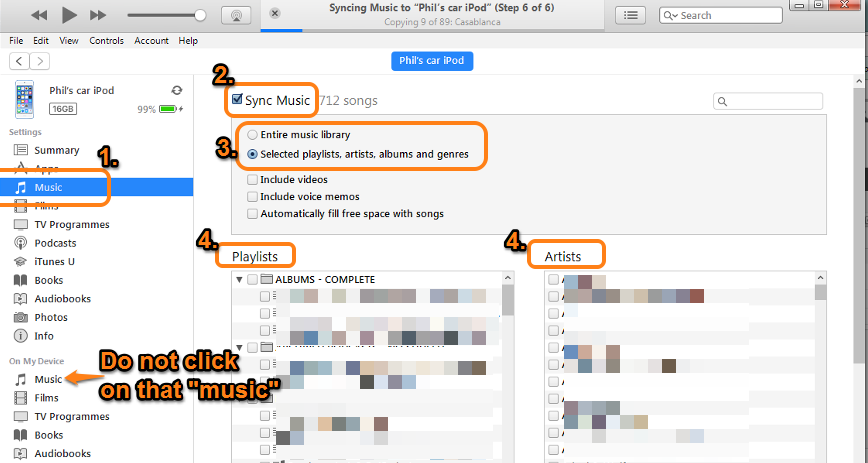

  • click on the Sync Music box (2.) to add the tick (check mark)
  • click on the Entire music library radio button (3.). Note that section 4 will not be displayed
  • click on the Sync (or Apply) button in the lower right corner of the iTunes window (not shown in the screenshot). At this point, if the iPod has been synchronised with a different iTunes Library, you will see warning that the existing media on the iPod will be deleted and replaced by the content of your iTunes Library


If these steps do not resolve the issue, please let us know which step failed to work as expected and mention what did happen.

4 replies
Question marked as Top-ranking reply

Jun 21, 2023 12:01 PM in response to Repoman84

You have to tell iTunes to Sync with a new (to you) iPod.


Connect the iPod to your computer and select the iPod's icon once iTunes shows the icon at the top, just below the menu bar:


That shows you the Device/Settings/Summary pane.

  • Click on the Device/Settings/Music pane (1.):


  • click on the Sync Music box (2.) to add the tick (check mark)
  • click on the Entire music library radio button (3.). Note that section 4 will not be displayed
  • click on the Sync (or Apply) button in the lower right corner of the iTunes window (not shown in the screenshot). At this point, if the iPod has been synchronised with a different iTunes Library, you will see warning that the existing media on the iPod will be deleted and replaced by the content of your iTunes Library


If these steps do not resolve the issue, please let us know which step failed to work as expected and mention what did happen.

This thread has been closed by the system or the community team. You may vote for any posts you find helpful, or search the Community for additional answers.

Old Ipod Query

Welcome to Apple Support Community
A forum where Apple customers help each other with their products. Get started with your Apple Account.