I need to know how I can get ads ext off my iPhone 14 where they are getting my info

I need to know how to get meta stuff off my iPhone 14 they are getting info n sharing ext messing up my bank info

iPhone 14, iOS 16

Posted on Jun 24, 2023 8:13 AM

Reply
1 reply

Jun 25, 2023 12:28 PM in response to Mommagirl17

Hello Mommagirl17,


Thanks for choosing the Apple Support Communities. We see you are concerned about apps and websites potentially getting your info on your iPhone. We can help.


We suggest following these steps which will help you protect your info:


Stop sharing with people and apps with Safety Check on iPhone - Apple Support


"When you want to explore sharing in more detail, use Manage Sharing & Access to review and reset information you’re sharing with people, review and reset the information apps have access to, and update your device and Apple ID security.

  1. Go to Settings > Privacy & Security > Safety Check.
  2. Tap Manage Sharing & Access.
  3. Progress is saved as you go.
  4. Do one of the following to stop sharing information with other people:
    • Tap People, select people in the list, review the information shared with people, then decide which information you want to stop sharing with selected people.
    • Tap Information, select apps in the list, review the information shared with people, then decide which information you want to stop sharing with selected people.

5. Do one of the following to stop sharing information with other apps:
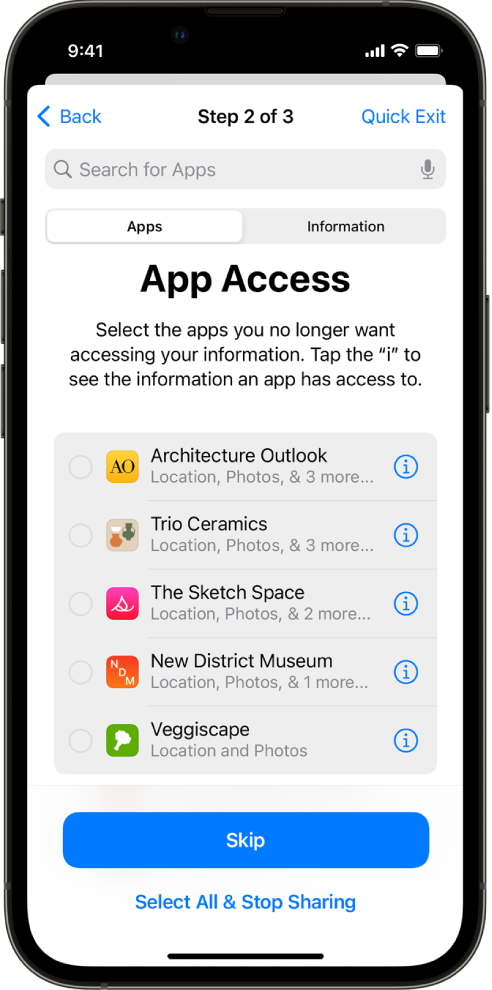
  • Tap Apps, select apps in the list, review the information shared with them, then decide which information you want to stop sharing with the selected apps.

A Safety Check screen showing information shared with specific apps.

    • Tap Information, select the information being shared in the list, review the information shared with apps, then decide which information you want to stop sharing with the selected apps.

6. Tap Continue, then do any of the following:

    • Review and remove devices signed into your account.
    • Review and update trusted phone numbers.
    • Change your Apple ID password.
    • Update your emergency contacts.
    • Update your device passcode, or your Face ID or Touch ID information.

7. Click Done.


When you’ve finished, verify that you’ve stopped sharing.

Important: Review the list of additional considerations when using Safety Check that isn’t directly managed by your iPhone or Apple ID."


We hope this helps.


Cheers!


This thread has been closed by the system or the community team. You may vote for any posts you find helpful, or search the Community for additional answers.

I need to know how I can get ads ext off my iPhone 14 where they are getting my info

Welcome to Apple Support Community
A forum where Apple customers help each other with their products. Get started with your Apple Account.