
How do I update my iPhone Smart Watch is 2 to my iPhone 14
How do I update my iPhone Smart Watch OS2 to my iPhone 14 pro max
iPhone 14 Pro Max, iOS 16
How do I update my iPhone Smart Watch OS2 to my iPhone 14 pro max
iPhone 14 Pro Max, iOS 16
Greetings Richman60,
If you are asking how to update your Apple Watch, follow these steps:
"Update your Apple Watch using your iPhone
You can wait until Apple Watch notifies you when a new update is available. Tap Update Tonight in the notification, then go to your iPhone to confirm that you want to update overnight. At the end of the day, leave your Apple Watch and iPhone charging overnight so the update can complete.
Or you can update your Apple Watch with your iPhone manually:
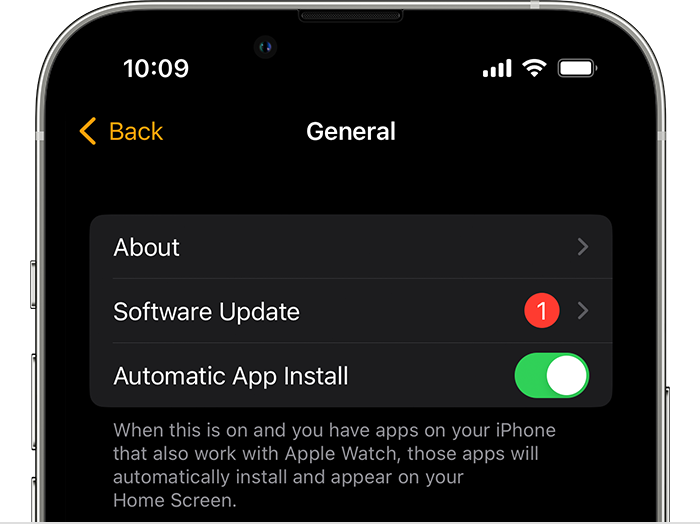
3. Download the update. If asked for your iPhone passcode or Apple Watch passcode, enter it.
4. Wait for the progress wheel to appear on your Apple Watch. It could take from several minutes to an hour for the update to complete. " Update your Apple Watch
If we have an incorrect understanding of the issue, consider offering more details to help the community to guide you to a resolution.
We hope this helps!
Sincerely.
Greetings Richman60,
If you are asking how to update your Apple Watch, follow these steps:
"Update your Apple Watch using your iPhone
You can wait until Apple Watch notifies you when a new update is available. Tap Update Tonight in the notification, then go to your iPhone to confirm that you want to update overnight. At the end of the day, leave your Apple Watch and iPhone charging overnight so the update can complete.
Or you can update your Apple Watch with your iPhone manually:
3. Download the update. If asked for your iPhone passcode or Apple Watch passcode, enter it.
4. Wait for the progress wheel to appear on your Apple Watch. It could take from several minutes to an hour for the update to complete. " Update your Apple Watch
If we have an incorrect understanding of the issue, consider offering more details to help the community to guide you to a resolution.
We hope this helps!
Sincerely.
How do I update my iPhone Smart Watch is 2 to my iPhone 14

