2 Monitors attached to MacBook Air M2

I've connected 2 monitors to my MacBook Air M2 via a port. Both monitors work, however the image in the same on both. In the display settings, only 1 monitor is detected. How do I detect both monitors so that I can extend the across all screens. Thanks

MacBook Air, macOS 13.0

Posted on Jun 26, 2023 7:47 PM

Reply
Question marked as Top-ranking reply

Posted on Oct 27, 2023 12:10 PM

A DisplayLink adaptor is not a dock. It essentially creates a virtual displays which will allow for two external monitors. In fact on my M2 MacBook Air, I have run 3 external monitors, two from the DisplayLink adaptor, and the third from a USB C hub. The adaptor I have is a Plugable USBC-6950U, available on Amazon

57 replies

Feb 10, 2024 8:29 AM in response to Rob_3837

Rob, can you tell me if you can do this with the laptop closed? Can you view two displays of a mac air m2 laptop while it is set aside and docked? My goal is to have a usb hub with mouse, printer, keyboard, webcam etc., and work from two 27 inch monitors. I don't really want to use my laptop screen unless I'm mobile and only have the laptop with me. Thank you

Jul 3, 2024 1:05 AM in response to merikiwebber

I have also been frustrated by this. I solved it by connecting to a TV with AirPlay. That gives me a third screen. However, the resolution on the TV is not good enough for computer work - I am considering buying a higher-resolution Airplay TV but am not sure what would work.


Has anyone else tried this? You connect to Airplay and then select an additional Monitor in the Displays panel on System Settings. Is there a recommendation for a good monitor/TV?


The other issue is that you can't stream Netflix or Amazon shows while the TV is connected.

Oct 15, 2024 7:47 PM in response to Servant of Cats

Appreciate that! I was in fact speaking about the 27" 5K Display.


I am going to get the M3 MacBook Air more than likely then. With the lid closed, do you happen to know what the resolution is on the first display VS what it drops to on the 2nd display? I'm most likely just going to use the 2nd monitor for Excel / Apple Music so resolution isn't too crucial although I splurged on the Studio Display so I'm hoping it still looks good.


TIA! PS, I'm a servant to many cats as well haha!!

Oct 15, 2024 11:18 PM in response to Chrisincolor

Chrisincolor wrote:

I was in fact speaking about the 27" 5K Display.

I am going to get the M3 MacBook Air more than likely then.


Other notes:


  • A M3 MacBook Air has two USB4 / Thunderbolt ports. You will need to use both of them to connect two 27" Apple 5K Studio Displays. 5K video takes a large amount of bandwidth, the Studio Display doesn't offer any Thunderbolt daisy-chaining ports – and even Thunderbolt docks with the ability to split a Thunderbolt chain might not support two 5K displays, or might not support them with refresh rates that you would want to use.


  • A 27" Apple 5K Studio Display has three downstream USB-C (USB) ports. Two displays would give you six ports for connecting USB devices. If you needed more ports, you could get a Thunderbolt dock and put it between the Mac and one display. Keep in mind that either way, video data would take priority and limit the maximum bandwidth left over for drives and such.

Dec 29, 2024 12:36 PM in response to ssnaveenprakash

Dell - S2722QC 27.0" 4K IPS LED UHD - AMD FreeSync - VESA - Monitor (USB-C, HDMI)


Looks great, not super high refresh rate but for many that isn’t an issue, if you want high refresh rate, 4k AND OLED - it’s going to be $$$, but if that’s not an issue look at the LGs. I love the Dell 4K - my MBA M2 looks amazing… you can actually read text lol and not blurry at all. I used the USB so it charges my laptop and powers it up.
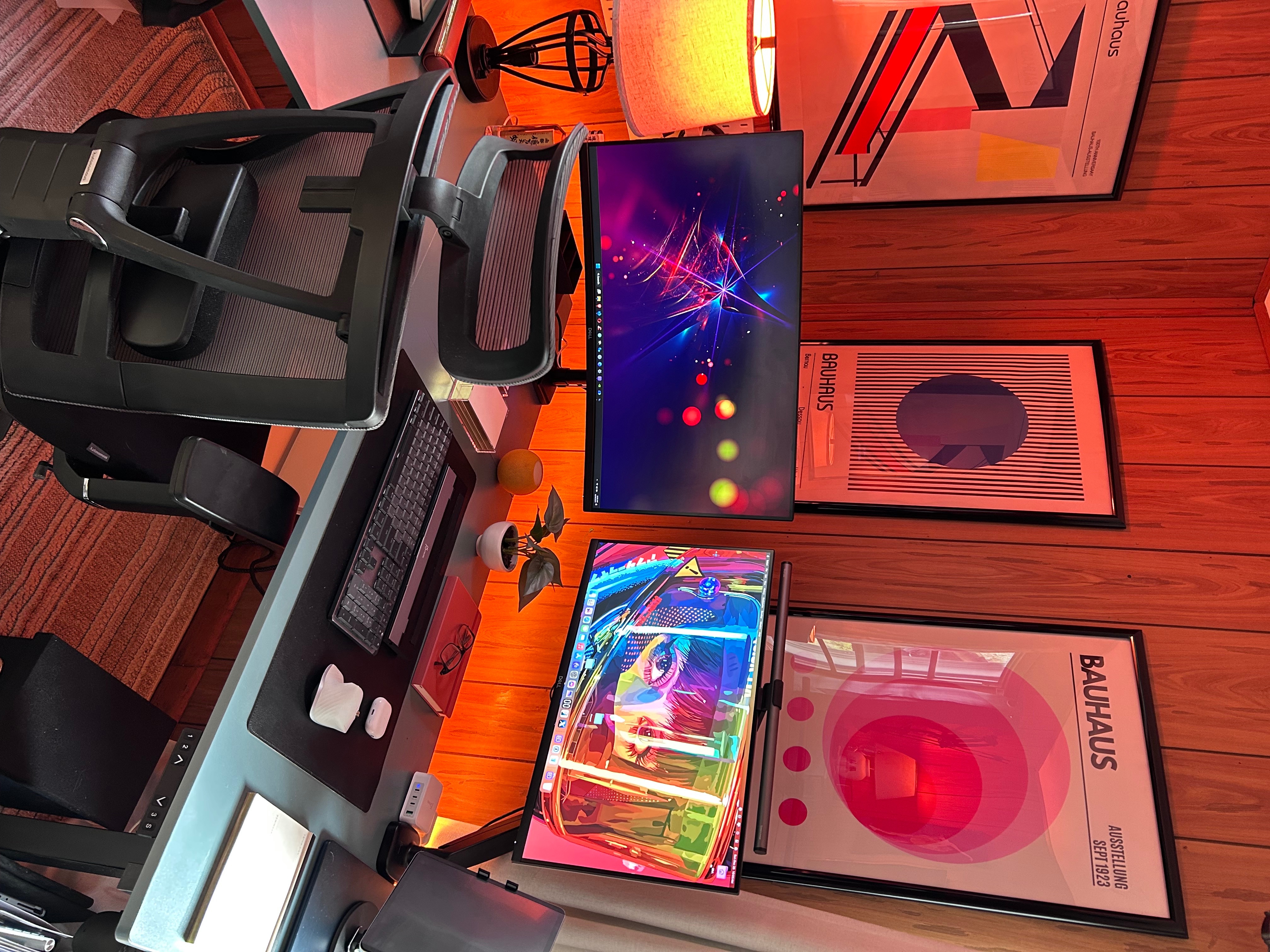

oops- maybe I shouldn’t reply via iPad lol. The one on the right (with the monitor light, is one of the 4Ks I mentioned. Best Buy will price match and I found a flash deal for $180 and they honored it, even so, it’s on sale and a good price in my opinion…

Jan 7, 2025 7:05 AM in response to bketch708

Does using the Plugable USBC-6950U with the Displaylink driver enable you to have two monitors with extended displays but to also have the option to leave your laptop open as well?


I don't want to have to buy a mic and camera set up if I want to do video calls while using external monitors. Ideally I would like to have the option to have my laptop open and use it as a 3rd extended display, or even have it open and mirror one of the external monitors. That way I could do video calls but still have a workspace for doing things while the call is running and everyone can still see and hear me without having to sort out an external camera and mic situation. Do you know if this is possible with the Plugable USBC-6950U set up?


I'm not very tech savvy so researching this is kind of overwhelming.

Jan 7, 2025 7:07 AM in response to Rob_3837

Does using the Plugable USBC-6950U with the Displaylink driver enable you to have two monitors with extended displays but to also have the option to leave your laptop open as well?


I don't want to have to buy a mic and camera set up if I want to do video calls while using external monitors. Ideally I would like to have the option to have my laptop open and use it as a 3rd extended display, or even have it open and mirror one of the external monitors. That way I could do video calls but still have a workspace for doing things while the call is running and everyone can still see and hear me without having to sort out an external camera and mic situation. Do you know if this is possible with the Plugable USBC-6950U set up?


I'm not very tech savvy so researching this is kind of overwhelming.

This thread has been closed by the system or the community team. You may vote for any posts you find helpful, or search the Community for additional answers.

2 Monitors attached to MacBook Air M2

Welcome to Apple Support Community
A forum where Apple customers help each other with their products. Get started with your Apple Account.
