AirPods Pro skip track doesn't work as expected

When listening to a repeating track on my iMac, double clicking the AirPods Pro doesn't skip to the next track, it just repeats the same track. Triple clicking also restarts the same track instead of going to the previous track.


However, if I double click and then triple click as soon as the track restarts then it jumps forward to the next track.


On my iPhone and iPad, with a repeating track, double and triple clicking behave just as expected with non-repeating tracks, jumping ahead or behind one track.


Is this normal or is there a fix?


Thanks!

iMac 27″ 5K, macOS 13.4

Posted on Jun 28, 2023 7:12 AM

Reply
6 replies

Jun 29, 2023 1:54 PM in response to niwashikun

Hey there and welcome to Apple Support Communities niwashikun,


We can certainly understand your concern and can help provide some insight.


We recommend checking out these steps on how to configure the double tap actions on your device to fit your needs.


" Change the double-tap action on AirPods (1st and 2nd generation)

You can choose what you want to happen when you double-tap one of your AirPods (1st and 2nd generation):

  1. Open your charging case.
  2. With your AirPods in your ears and connected to your iPhone, iPad, or iPod touch, go to Settings > Bluetooth. Alternatively, you can go to Settings > AirPods.
  3. Tap the More Info button  next to your AirPods.
  4. Select the left or right AirPod to choose which AirPod you'd like to double-tap for Siri, playing or pausing audio content, or skipping between tracks. "


For additional information, check out this link: Change the settings of your AirPods and AirPods Pro - Apple Support


These steps will help ensure your device is working with ease and can fix common issues like the ones you’re experiencing.


Kindest regards!


Jun 29, 2023 6:20 PM in response to niwashikun

Hi niwashikun,


Thanks for trying that. Upon further review, it does appear that the options available to you will vary depending on which AirPods Pro model is in use. Here are instructions for how to use the controls on both generations:


"AirPods Pro (1st generation) controls

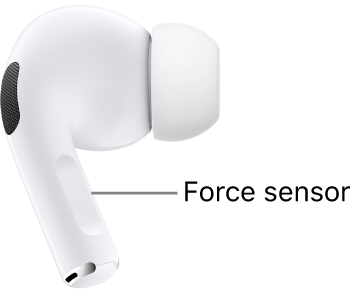
The location of the force sensor on AirPods Pro (1st generation), along the stem of each of your AirPods.

With the force sensor on the stem of both AirPods Pro (1st generation), you can do any of the following:

  • Play and pause audio: Press the stem. To resume playback, press it again.
  • Play the next track: Double-press the stem.
  • Play the previous track: Triple-press the stem.
  • Answer a call: When you receive a call, press the stem.
  • Switch between Noise Cancellation and Transparency mode: You can set either of your AirPods to perform this action when you press and hold the stem. See Change settings for AirPods Pro.
  • Activate Siri: You can set either of your AirPods to perform this action when you press and hold the stem. See Set up Siri.

AirPods Pro (2nd generation) controls

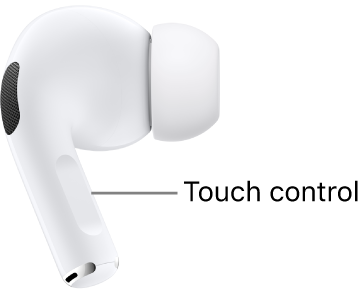
The location of the Touch control on AirPods Pro (2nd generation), along the stem of each of your AirPods.

With the Touch control on the stem of both AirPods Pro (2nd generation), you can do any of the following:

  • Play and pause audio: Press the stem. To resume playback, press it again.
  • Play the next track: Double-press the stem.
  • Play the previous track: Triple-press the stem.
  • Answer a call: When you receive a call, press the stem.
  • Adjust volume: Lightly swipe up or down on the stem.
  • Switch between Noise Cancellation and Transparency mode: You can set either of your AirPods to perform this action when you press and hold the stem. See Change settings for AirPods Pro.
  • Activate Siri: You can set either of your AirPods to perform this action when you press and hold the stem. See Set up Siri."


Pause, skip, and adjust volume with your AirPods and AirPods Pro - Apple Support


The behavior for tapping on AirPods Pro cannot be managed in Settings. If you'd like to see changes made to this feature, we'd suggest leaving feedback for Apple at this link:


Product Feedback - Apple


Cheers!


Jun 30, 2023 9:21 AM in response to Jeff_W.

Hi Jeff,

Thanks for the reply.


To clarify, this is not an issue of me not knowing how to use the AirPods.

This is an issue of the AirPods behaving differently on different devices under the same circumstances and behaving differently on the same device under different circumstances.


Specifically:

1- On iPhone with track not repeating:

      • double-click: skips ahead to next track
      • triple-click: skips back to previous track


2- On iPhone with track repeating:

      • double-click: skips ahead to next track
      • triple-click: skips back to previous track


3- On iMac with track not repeating:

      • double-click: skips ahead to next track
      • triple-click: skips back to previous track


**This is the different one**


4- On iMac with track repeating:

      • double-click skips BACK to beginning of current track
      • triple-click also skips BACK to beginning of current track
      • !! double-click followed immediately by triple-click SKIPS AHEAD TO THE NEXT TRACK!!
      • !! triple-click followed immediately by double-click SKIPS AHEAD TO THE NEXT TRACK!!


These AirPods are 1st generation, which means there is no adjustment to control double/triple-clicking.

(The only exception is in Podcast App settings which allows you to choose between Next/Previous Episodes and Forward/Back within Episode. These controls have no effect on the issue I'm asking about.)


Thanks for any insights into how to make #4 match #1-3!


Sep 15, 2023 8:22 AM in response to Chris_C1

Thanks for trying to help.

I went to Apple Support and after following their instructions I ended up with no macOS and my mac couldn't find my HD. Asked at MacRumors and discovered the info Apple gave me caused my fusion drive split. MacRumors folks helped to re-fuse the drive and hook up an external SSD to improve the speed and performance of my mac.

Kudos to MacRumors. Apple Support.....not so much.

This thread has been closed by the system or the community team. You may vote for any posts you find helpful, or search the Community for additional answers.

AirPods Pro skip track doesn't work as expected

Welcome to Apple Support Community
A forum where Apple customers help each other with their products. Get started with your Apple Account.