App store can't connect to the internet
I can update apps from pressing my account icon, but no apps or app details are loading in app store. It says can't connect after loading for a while.
iPad, iPadOS 16
I can update apps from pressing my account icon, but no apps or app details are loading in app store. It says can't connect after loading for a while.
iPad, iPadOS 16
Your WiFi Router may be unexpectedly blocking internet access for some Apple resources. A restart of your WiFi Router will likely clear the connection issue.
To restart you home router, disconnect power - then wait at least 30 seconds before restarting. When you router has rebooted (which may take several minutes), force-restart your iPad:
Force restart iPad (models with Face ID or with Touch ID in the top button)
If your iPad doesn’t have the Home button, do the following:
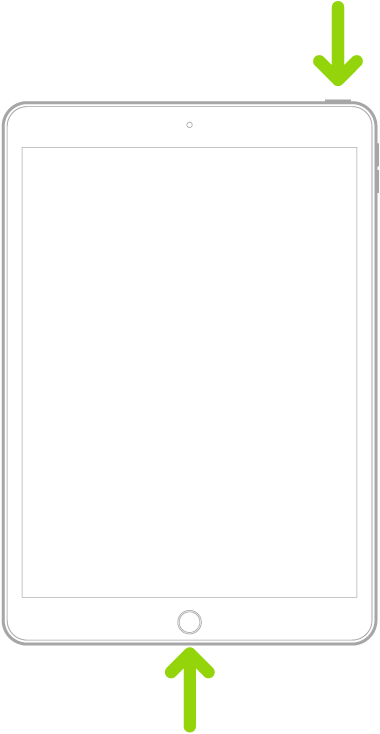
Force restart iPad (models with the Home button)
Press and hold the top button and the Home button at the same time. When the Apple logo appears, release both buttons.
Otherwise, a change of DNS server settings may help. I suggest using one of the following DNS services - for which IPv4 and IPv6 server addresses are listed:
Quad9 (recommended)
9.9.9.9
149.112.112.112
2620:fe::fe
2620:fe::9
OpenDNS
208.67.222.222
208.67.220.220
2620:119:35::35
2620:119:53::53
Cloudflare
1.1.1.1
1.0.0.1
2606:4700:4700::1111
2606:4700:4700::1001
Your WiFi Router may be unexpectedly blocking internet access for some Apple resources. A restart of your WiFi Router will likely clear the connection issue.
To restart you home router, disconnect power - then wait at least 30 seconds before restarting. When you router has rebooted (which may take several minutes), force-restart your iPad:
Force restart iPad (models with Face ID or with Touch ID in the top button)
If your iPad doesn’t have the Home button, do the following:
Force restart iPad (models with the Home button)
Press and hold the top button and the Home button at the same time. When the Apple logo appears, release both buttons.
Otherwise, a change of DNS server settings may help. I suggest using one of the following DNS services - for which IPv4 and IPv6 server addresses are listed:
Quad9 (recommended)
9.9.9.9
149.112.112.112
2620:fe::fe
2620:fe::9
OpenDNS
208.67.222.222
208.67.220.220
2620:119:35::35
2620:119:53::53
Cloudflare
1.1.1.1
1.0.0.1
2606:4700:4700::1111
2606:4700:4700::1001
Please restart your iPad, if that doesn’t work turn on airplane mode, and turn it back off, still no connection then log out of AppStore and log back in, I’m sorry your having this problem but rest assured we’ll get it fixed
App store can't connect to the internet