MacBook Air 2020, M1 freezing multiple times!

My MacBook Air 2020, M1 keeps freezing every now and then! I force restarted (multiple times) using the power button, still frozen and it doesn’t allow me to login because my keyboard and cursor are frozen. Its a comparatively new computer (bought in 2021 December) and barely used. Any suggestions?

MacBook Air 13″, macOS 13.0

Posted on Jun 28, 2023 11:46 AM

Reply
Question marked as Top-ranking reply

Posted on Jun 30, 2023 7:21 AM

Hi PreeRa,


Thanks for posting in Apple Support Communities.


It sounds like your Mac randomly stops responding. Next steps would be to run a health check on your disk using Disk Utility to identify and repair any errors.


Before proceeding, make sure that you have a current backup of your Mac, in case you need to recover damaged files or Disk Utility finds errors that it can't repair.

Open Disk Utility

In general, you can just open Disk Utility from the Utilities folder of your Applications folder. However, if your Mac doesn't start up all the way, or you want to repair the disk your Mac starts up from, open Disk Utility from macOS Recovery:
1. Determine whether you're using a Mac with Apple silicon, then follow the appropriate steps:
* Apple silicon: Turn on your Mac and continue to press and hold the power button until you see the startup options window. Click the gear icon labeled Options, then click Continue.
* Intel processor: Turn on your Mac, then immediately press and hold these two keys until you see an Apple logo or other image: Command (⌘) and R.
4. You may be asked to select a user you know the password for. Select the user, then click Next and enter their administrator password.
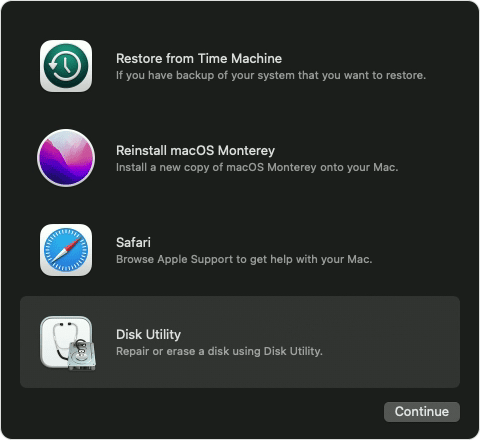
5. From the utilities window in macOS Recovery, select Disk Utility and click Continue.
6. macOS Recovery options with Disk Utility selected

Find these and continue with the steps in How to repair a Mac disk with Disk Utility - Apple Support.


Regards.


1 reply
Question marked as Top-ranking reply

Jun 30, 2023 7:21 AM in response to PreeRa

Hi PreeRa,


Thanks for posting in Apple Support Communities.


It sounds like your Mac randomly stops responding. Next steps would be to run a health check on your disk using Disk Utility to identify and repair any errors.


Before proceeding, make sure that you have a current backup of your Mac, in case you need to recover damaged files or Disk Utility finds errors that it can't repair.

Open Disk Utility

In general, you can just open Disk Utility from the Utilities folder of your Applications folder. However, if your Mac doesn't start up all the way, or you want to repair the disk your Mac starts up from, open Disk Utility from macOS Recovery:
1. Determine whether you're using a Mac with Apple silicon, then follow the appropriate steps:
* Apple silicon: Turn on your Mac and continue to press and hold the power button until you see the startup options window. Click the gear icon labeled Options, then click Continue.
* Intel processor: Turn on your Mac, then immediately press and hold these two keys until you see an Apple logo or other image: Command (⌘) and R.
4. You may be asked to select a user you know the password for. Select the user, then click Next and enter their administrator password.
5. From the utilities window in macOS Recovery, select Disk Utility and click Continue.
6. macOS Recovery options with Disk Utility selected

Find these and continue with the steps in How to repair a Mac disk with Disk Utility - Apple Support.


Regards.


This thread has been closed by the system or the community team. You may vote for any posts you find helpful, or search the Community for additional answers.

MacBook Air 2020, M1 freezing multiple times!

Welcome to Apple Support Community
A forum where Apple customers help each other with their products. Get started with your Apple Account.