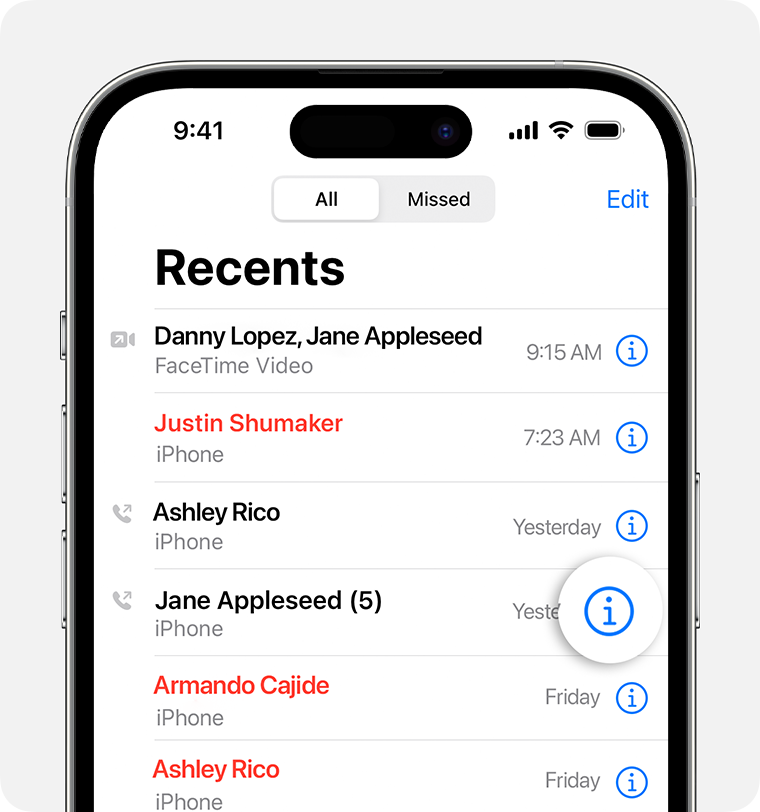
Facetime Details should include Date, Time, Duration of Call for Legal Reasons

Hi Apple community,

As a father who has been subject to parental alienation by an angry-and-diabolical mother, I finally managed to get daily Facetime with my Kids. Thanks to the American justice system which remains impartial and helpful as always. I would like to record these calls and submit a summary log to the judge.

An iPhone Only shows Time at the top of the iPhone at all times. When any App is open, especially Apps such as Facetime, or Phone or Google-Voice etc, if the Date appears at the top, it would be great.

What is the point of having "yesterday", "Tuesday" in the Phone app "Recents" ?


[Image Edited by Moderator to Remove Personal Information]


iPhone 14 Plus, iOS 16

Posted on Jun 29, 2023 4:22 PM

Reply
Question marked as Top-ranking reply

Posted on Jun 29, 2023 5:13 PM

Hello,


A couple of things could help you retain the information you are looking to log.


First, the image you included is showing the call history after selecting edit. The normal screen has information buttons that show the information you are looking for. You could take screenshots of that information after you complete the FaceTime Video Chats to retain the information without recording the call itself.


View and delete the call history on your iPhone - Apple Support

"Find more details about call history

When viewing Recents, tap the More Info button next to the call to view information about call length, time of call, and whether the call was incoming or outgoing.

Your carrier might have more information about deleted calls or older call history.

"


If you were to record the FaceTime video calls the resulting screen recording file would have the date it was recorded as well as the start time.


I hope this helps.

1 reply
Question marked as Top-ranking reply

Jun 29, 2023 5:13 PM in response to Shrek-TheOgre

Hello,


A couple of things could help you retain the information you are looking to log.


First, the image you included is showing the call history after selecting edit. The normal screen has information buttons that show the information you are looking for. You could take screenshots of that information after you complete the FaceTime Video Chats to retain the information without recording the call itself.


View and delete the call history on your iPhone - Apple Support

"Find more details about call history

When viewing Recents, tap the More Info button next to the call to view information about call length, time of call, and whether the call was incoming or outgoing.

Your carrier might have more information about deleted calls or older call history.

"


If you were to record the FaceTime video calls the resulting screen recording file would have the date it was recorded as well as the start time.


I hope this helps.

This thread has been closed by the system or the community team. You may vote for any posts you find helpful, or search the Community for additional answers.

Facetime Details should include Date, Time, Duration of Call for Legal Reasons

Welcome to Apple Support Community
A forum where Apple customers help each other with their products. Get started with your Apple Account.