Hi Harvey_hernandez,
If you forgot your Apple ID, Apple ID Password, and you're looking for help with pairing your Apple Watch to your iPhone, we recommend that you try the steps in the links below.
If you forgot your Apple ID email address or phone number - Apple Support
See if you're already signed in with your Apple ID
Check to see if you're signed in on your device. Or check if you're signed in to Apple apps or services
On your iPhone, iPad, or Apple Watch
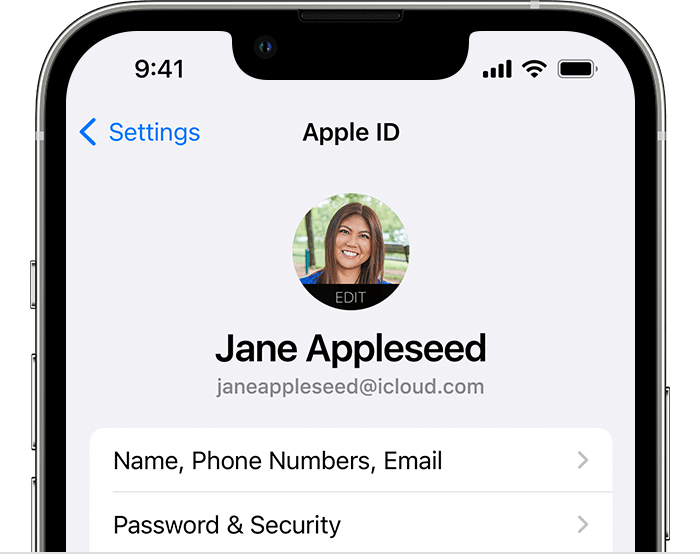
Tap Settings, then tap your name.
Other ways to find your Apple ID
* Check if you're signed in to the App Store, FaceTime, or Messages on your iPhone, iPad, or Mac, or check if you're signed in to iTunes for Windows on a PC.
* Go to iCloud.com or appleid.apple.com and see if your Apple ID prefills on the sign-in screen.
* If you're part of a Family Sharing group, you can ask a family member to check their Family Sharing settings for your Apple ID.
If you forgot your Apple ID password - Apple Support
Reset your Apple ID password on your iPhone or other trusted Apple device
1. Go to Settings.
2. Tap your name > Password & Security > Change Password.
3. Follow the onscreen instructions to reset your password.

You can also follow this process on a trusted iPad, iPod touch, or Apple Watch.
To reset your password on your trusted Mac, choose Apple menu > System Settings (or System Preferences) > Sign in with your Apple ID (or Apple ID). Then click Password & Security, Change Password, and follow the onscreen instructions.
If you have a new Apple device
If you have a new Apple device or an Apple device that you aren't signed in to with your Apple ID, you can select "Forgot password or don't have an Apple ID?" wherever the option appears.
During device setup, you can find the "Forgot password or don't have an Apple ID?" option on the Apple ID sign-in screen.
After setup, you can find the "Forgot password or don't have an Apple ID?" option in Settings:
* iPhone, iPad, or iPod touch: Go to the Settings app and tap Sign in to your iPhone. Then tap "Forgot password or don't have an Apple ID?" and follow the onscreen instructions.
* Mac: Choose Apple menu > System Settings (or System Preferences). Click Sign in with your Apple ID (or Apple ID), then click "Forgot Apple ID or password?" and enter your Apple ID.
Set up and pair your Apple Watch with iPhone - Apple Support
Turn on, pair, and set up your Apple Watch
1. Put your Apple Watch on your wrist. Adjust the band or choose a band size so your Apple Watch fits closely but comfortably on your wrist.
For information about changing the band on your Apple Watch, see Remove, change, and fasten Apple Watch bands.
2. To turn on your Apple Watch, press and hold the side button until you see the Apple logo.
3. Bring your iPhone near your Apple Watch, wait for the Apple Watch pairing screen to appear on your iPhone, then tap Continue.
Or open the Apple Watch app on your iPhone, then tap Pair New Watch.

4. Tap Set Up for Myself.
5. When prompted, position your iPhone so that your Apple Watch appears in the viewfinder in the Apple Watch app. This pairs the two devices.
6. Tap Set Up Apple Watch, then follow the instructions on your iPhone and Apple Watch to finish setup.
To learn more about your Apple Watch while it’s syncing, tap Get to Know Your Watch. You can learn what’s new, view Apple Watch tips, and read this user guide, right on your iPhone. After your Apple Watch is set up, you can find this information by opening the Apple Watch app on your iPhone, then tapping Discover.

We recommend the steps above because they will show you what to do if you accidentally forgot your Apple ID, Apple ID password, and how to pair your Apple Watch with your iPhone.
Please do not hesitate to reach back out to us if you have questions or need any additional support.
Thanks for using the Apple Support Communities.
Cheers!


