How to fix my iphone display pink line?
My mobile display pink line problem how to fix my problem solution please
iPhone 12 mini, 16
My mobile display pink line problem how to fix my problem solution please
iPhone 12 mini, 16
Hello Sagariforgod,
Is the pink line on the display persisting after a standard restart of the device? This can help to give it a quick refresh: Restart your iPhone - Apple Support
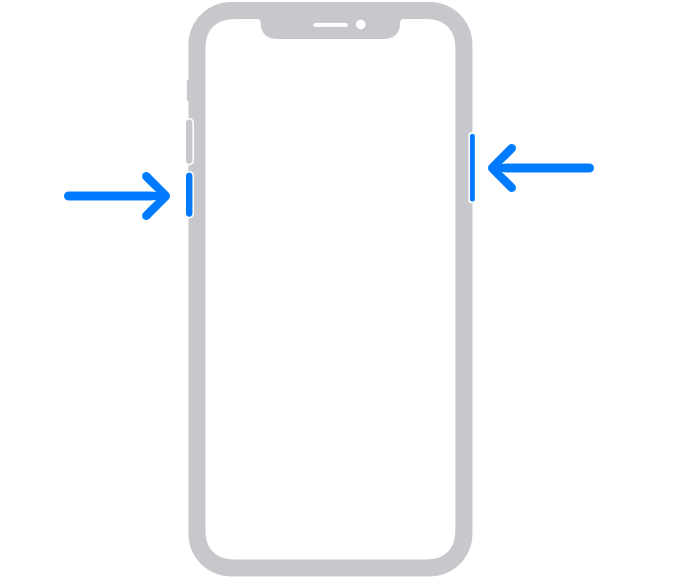
1. Press and hold either volume button and the side button until the power-off slider appears.
2.
3. Drag the slider, then wait 30 seconds for your device to turn off. If your device is frozen or unresponsive, force restart your device.
4. To turn your device back on, press and hold the side button (on the right side of your iPhone) until you see the Apple logo.
If it does still persist after the restart, as well as with no accessories connected, then this could indicate a possible hardware-related issue. This page can help locate any nearby Apple Authorized Service Providers or Apple Stores to get it inspected: Find Locations - Apple
Cheers.
Hello Sagariforgod,
Is the pink line on the display persisting after a standard restart of the device? This can help to give it a quick refresh: Restart your iPhone - Apple Support
1. Press and hold either volume button and the side button until the power-off slider appears.
2.
3. Drag the slider, then wait 30 seconds for your device to turn off. If your device is frozen or unresponsive, force restart your device.
4. To turn your device back on, press and hold the side button (on the right side of your iPhone) until you see the Apple logo.
If it does still persist after the restart, as well as with no accessories connected, then this could indicate a possible hardware-related issue. This page can help locate any nearby Apple Authorized Service Providers or Apple Stores to get it inspected: Find Locations - Apple
Cheers.
How to fix my iphone display pink line?