My son's apple watch
Hello I need help to download apps on my son apple watch, it says it's requiring a phone and I have his Apple Watch connected to my phone!
Apple Watch SE
Hello I need help to download apps on my son apple watch, it says it's requiring a phone and I have his Apple Watch connected to my phone!
Apple Watch SE
Hey there tihama272,
Thanks for reaching out to Apple Support Communities. We're happy to provide some assistance.
You can download apps from the Watch itself or through the paired iPhone. Take a look at the steps here on how you can download apps on your Apple Watch:
Download apps on your Apple Watch - Apple Support
How to get apps
Use the iPhone that's paired with the watch, or use the App Store on the watch.
Get apps from the App Store on your Apple Watch
1. Press the Digital Crown to see the Home screen, then tap the App Store.
2. Tap Search to find apps using Scribble or Dictation or scroll down to discover featured apps and curated app collections.
3. Tap an app to see its description, ratings and reviews, screenshots, release notes, and more.
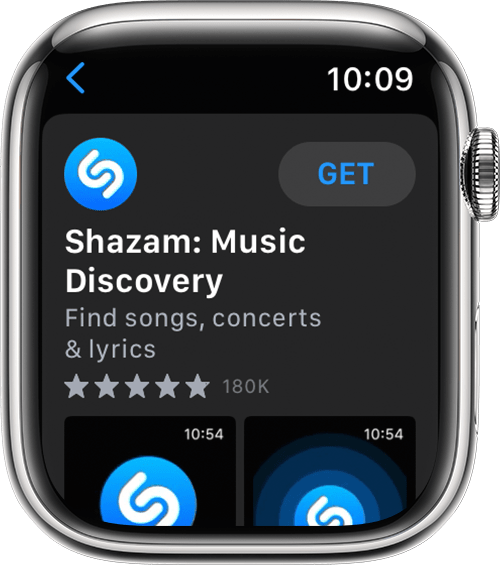
4. Tap the price or tap Get.
5.
6. When prompted, double-click the side button under the Digital Crown to download and install the app.
In the App Store, if an app has a Get button instead of a price, the app is free. You won't be charged for downloading a free app. Some free apps offer in-app purchases and subscriptions that you can buy. Subscriptions and in-app purchases give you access to more features, content, and more. Learn more about in-app purchases and subscriptions.
Get apps with the iPhone that's paired with the Apple Watch
1. On your iPhone, open the Watch app.
2. Tap the My Watch tab.
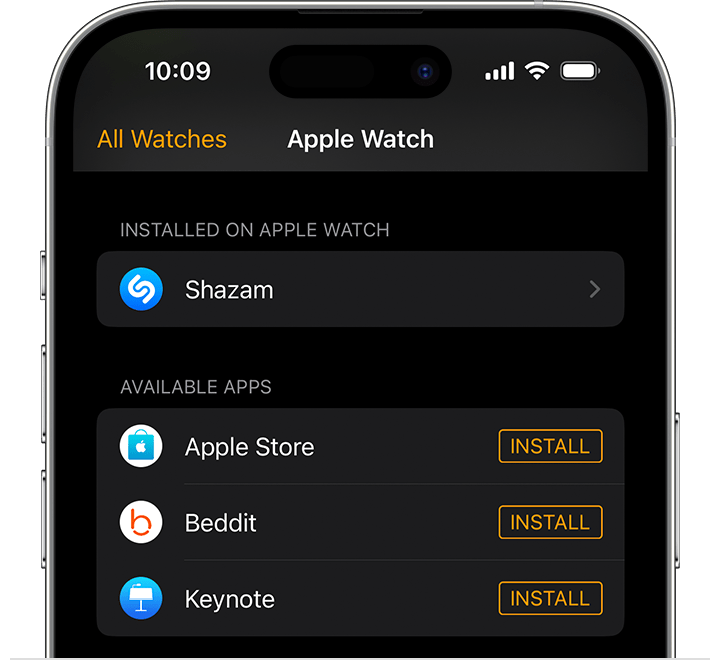
3. Scroll to the app that you want to add. Apps that you can install appear in the Available Apps section.
4.
5. To add an app to your watch, tap Install.
If you can't find an app
* On your Apple Watch, apps appear on your Home screen. Press the Digital Crown to see the Home screen.
* If you don't see an app on the Home screen, you can see a list of apps that you bought and redownload them. When you redownload an app, you don't have to pay for it again.
* Some watchOS apps are not currently available in every region or language. If you can't find the app in the App Store or on your Home screen, see if the app is supported in your region.
Keep us posted.
Have a great day!
Hey there tihama272,
Thanks for reaching out to Apple Support Communities. We're happy to provide some assistance.
You can download apps from the Watch itself or through the paired iPhone. Take a look at the steps here on how you can download apps on your Apple Watch:
Download apps on your Apple Watch - Apple Support
How to get apps
Use the iPhone that's paired with the watch, or use the App Store on the watch.
Get apps from the App Store on your Apple Watch
1. Press the Digital Crown to see the Home screen, then tap the App Store.
2. Tap Search to find apps using Scribble or Dictation or scroll down to discover featured apps and curated app collections.
3. Tap an app to see its description, ratings and reviews, screenshots, release notes, and more.
4. Tap the price or tap Get.
5.
6. When prompted, double-click the side button under the Digital Crown to download and install the app.
In the App Store, if an app has a Get button instead of a price, the app is free. You won't be charged for downloading a free app. Some free apps offer in-app purchases and subscriptions that you can buy. Subscriptions and in-app purchases give you access to more features, content, and more. Learn more about in-app purchases and subscriptions.
Get apps with the iPhone that's paired with the Apple Watch
1. On your iPhone, open the Watch app.
2. Tap the My Watch tab.
3. Scroll to the app that you want to add. Apps that you can install appear in the Available Apps section.
4.
5. To add an app to your watch, tap Install.
If you can't find an app
* On your Apple Watch, apps appear on your Home screen. Press the Digital Crown to see the Home screen.
* If you don't see an app on the Home screen, you can see a list of apps that you bought and redownload them. When you redownload an app, you don't have to pay for it again.
* Some watchOS apps are not currently available in every region or language. If you can't find the app in the App Store or on your Home screen, see if the app is supported in your region.
Keep us posted.
Have a great day!
My son's apple watch