Screen time keep unlocking itself

I have a strict set up on screen time on my kids iPhone. This week it keep unlocking itself to no set time or apps. And I have to go back in to reset it. I can keep doing this every 30 mins. They have to have the phone for emergency but I shouldn’t have to reset restrictions to every 30 mins. Help me out. What is going on?

iPhone 14 Pro, iOS 16

Posted on Jul 1, 2023 7:11 PM

Reply
Question marked as Top-ranking reply

Posted on Jul 30, 2023 10:41 AM

Number 1, ask your child if they are doing anything nefarious to alter the settings. Trust is important with this one.


If that is not possible, there are instances where kids have avoided the screen time limit by:

  • Deleting app and reinstalling. When an app is deleted, it will also delete the limits set on it. After it has been deleted, they could reinstall it and not have any limits on it until you set it up again. To avoid this, go to Screen Time > Contents > Privacy Restrictions > iTunes & App Store Purchases, and change the Installing and Deleting app settings to Don't Allow.
  • They know your Passcode. It is possible they have watched you enter your passcode or even recorded the screen on their device while they had you enter the passcode for some made up reason. You know the screen is being recorded, when the time on top has a red box around it. You can stop allowing screen recording by going to Screen Time > Content & Privacy Restrictions > Content Restrictions > Screen Time Recording.


If those don't work, you may need to change their Apple ID Password and not give it to them and then go to Screen Time > Content & Privacy Restrictions > Account Changes and change that to Don't Allow. You can remove the apps that they are abusing and they will still be able to use the phone for emergency situations.

24 replies
Question marked as Top-ranking reply

Jul 30, 2023 10:41 AM in response to Sea08batman

Number 1, ask your child if they are doing anything nefarious to alter the settings. Trust is important with this one.


If that is not possible, there are instances where kids have avoided the screen time limit by:

  • Deleting app and reinstalling. When an app is deleted, it will also delete the limits set on it. After it has been deleted, they could reinstall it and not have any limits on it until you set it up again. To avoid this, go to Screen Time > Contents > Privacy Restrictions > iTunes & App Store Purchases, and change the Installing and Deleting app settings to Don't Allow.
  • They know your Passcode. It is possible they have watched you enter your passcode or even recorded the screen on their device while they had you enter the passcode for some made up reason. You know the screen is being recorded, when the time on top has a red box around it. You can stop allowing screen recording by going to Screen Time > Content & Privacy Restrictions > Content Restrictions > Screen Time Recording.


If those don't work, you may need to change their Apple ID Password and not give it to them and then go to Screen Time > Content & Privacy Restrictions > Account Changes and change that to Don't Allow. You can remove the apps that they are abusing and they will still be able to use the phone for emergency situations.

Jul 31, 2023 1:49 PM in response to Map-Pin

There is a bug in Screen Time that is resetting App Limits. The tips were provided by other users and bypassing app limits can still be done by deleting the apps to reset app limits, then reinstalling and not related to the bug, so in this case not allowing the apps to be deleted is still the solution. According to Apple the bug that they are working on only affects when the limits are set on the Organizer device and still work correctly when applied on the childs device. Are you seeing the limits working correctly when applied on the childs device?


Hopefully the bug will be resolved soon.

Jul 31, 2023 6:03 AM in response to Mac Jim ID

This is a bug that was introduced a few iOS versions ago.

Its not kids bypassing thing, or parents not configuring things properly.


I have used screen time with my kinds since its inception, and only now am I seeing the "disappearing limits" is a issue that Apple needs to solve.


I have an open case with them, we've screen shared to make sure everything is "right".., we are trying various options, with zero success so far.

Jul 1, 2023 8:11 PM in response to Sea08batman

You should pay attention to two commonly overlooked aspects...


  1. Configuring device restrictions for your child's device.
  2. Setting up a screen time passcode on your own device for your child.



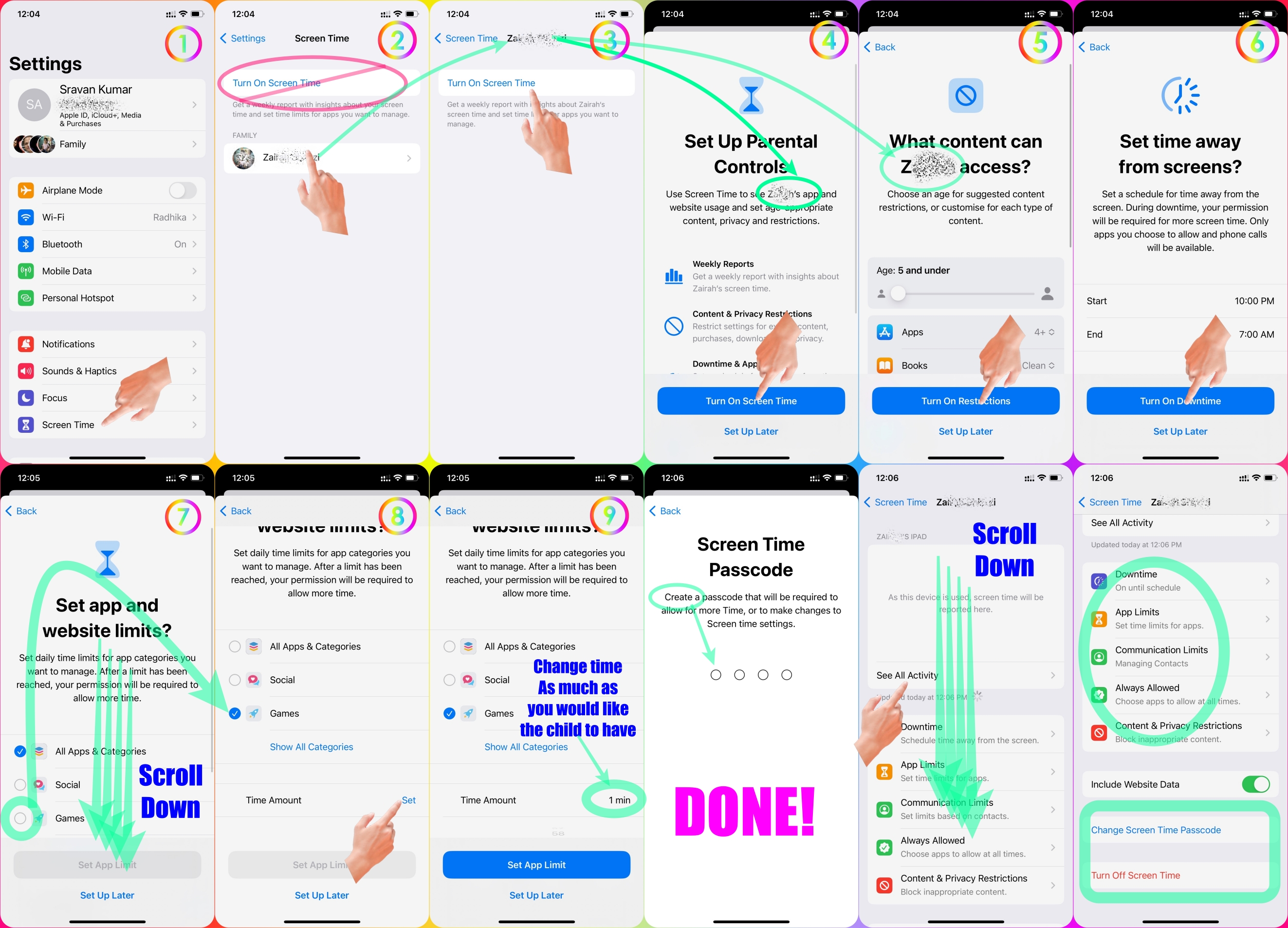
Set Screen Time Restrictions for your Child in your Family using Parental Control.


Please see the pic below which is self-explanatory.


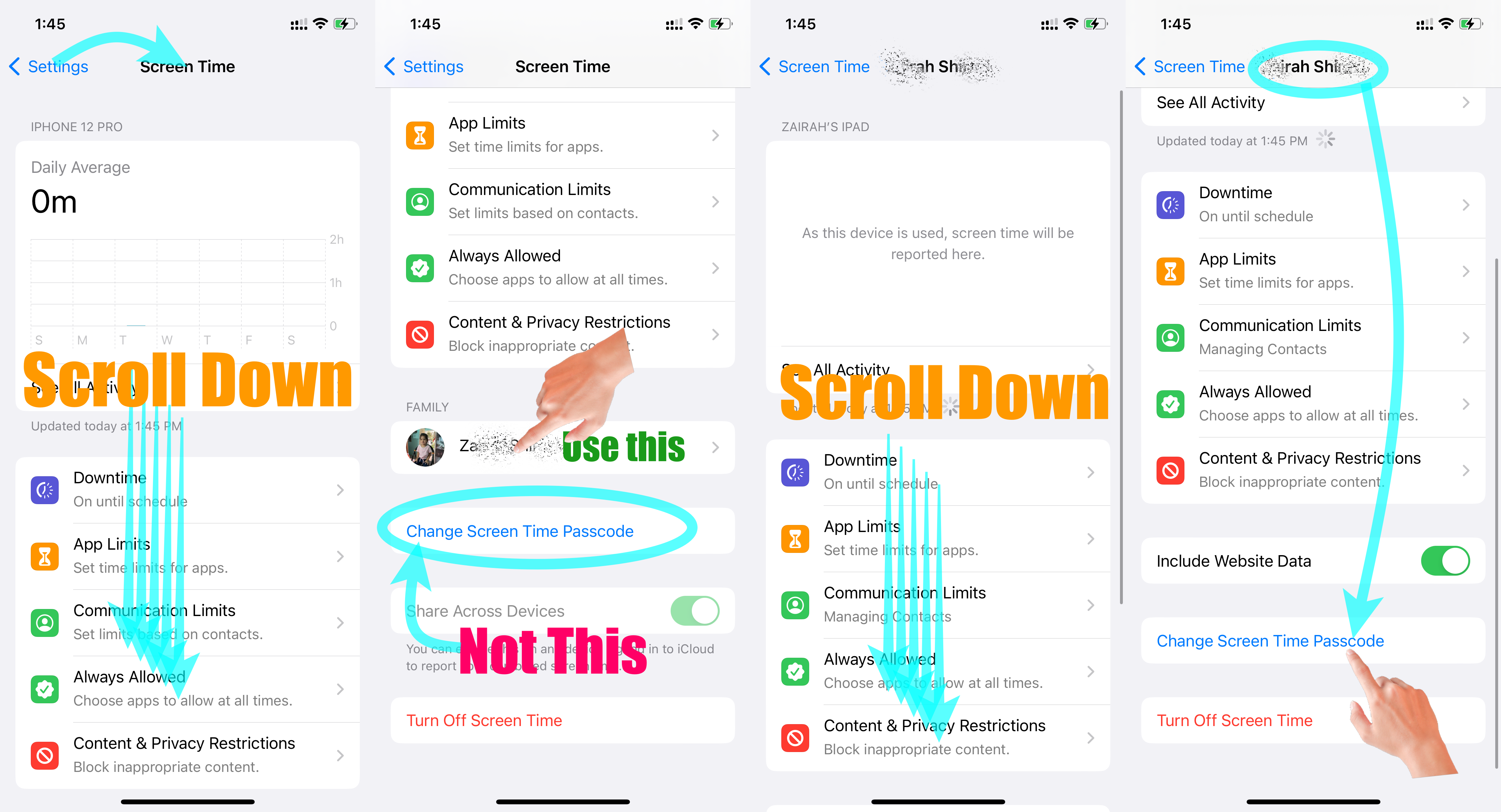
Set Screen Time Passcode for your child's device through your device.


Please see the pic below which is self-explanatory.


Go to Settings and tap Screen Time. Tap Content & Privacy Restrictions and enter your Screen Time passcode. Tap Content Restrictions, then tap Web Content. Choose Unrestricted Access, Limit Adult Websites, or Allowed Websites Only.


Use parental controls on your child's iPhone, iPad, and iPod ...


Set up parental controls with Family Sharing on iPhone

  1. Go to Settings > [your name] > Family Sharing > Screen Time.
  2. Tap the name of a child in your family group, tap Turn On Screen Time, then follow the onscreen instructions.


Set up parental controls with Family Sharing on iPhone


Jul 4, 2023 8:25 AM in response to Sea08batman

My child insists that he is not deactivating screen time (apparently there is a bug that allows kids to deactivate it), but screen time app limits are eliminated several times a day. If it is my child deactivating it, that is a problem. If my child is not deactivating it, that creates a different trust problem. Either way, this needs to be fixed. The person who replied above, and repeatedly, about setting up screen time, makes it hard to actually find any meaningful discussion of the problem. I have had screen time effectively setup for years on my child’s account. This change is a recent problem, and not a setup problem.

This thread has been closed by the system or the community team. You may vote for any posts you find helpful, or search the Community for additional answers.

Screen time keep unlocking itself

Welcome to Apple Support Community
A forum where Apple customers help each other with their products. Get started with your Apple Account.