iPhone 13 Overheating after iOS Update

Anyone else experiencing overheating since last update to iOS 16.5.1?


My iPhone 13 max has been mostly perfect. It has the basic issues that all phones have however I noticed two issues since this last update to 16.5.1.


1) my battery dies fast

2) my phone overheats while just sitting there.


I turned off my phone and turned it back on. Not using it and it not plugged in, it overheated.


if I plug it in while on, I get… charging will resume later, your device is too hot. (But I just plugged it it)


[Re-Titled by Moderator]

Posted on Jul 3, 2023 8:08 AM

Reply
Question marked as Top-ranking reply

Posted on Jul 3, 2023 8:31 AM

What I did is given below

  1. Took a backup on iCloud (Which I do regularly)
  2. Logged out of the Apple ID
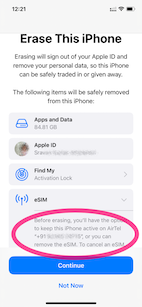
  3. Erase --> Erase iPhone - Apple Support (IN)
    1. Keep eSIM Data was the option I chose (See the pic)
    2. .
  4. Set up my iPhone and restored it from iCloud Backup
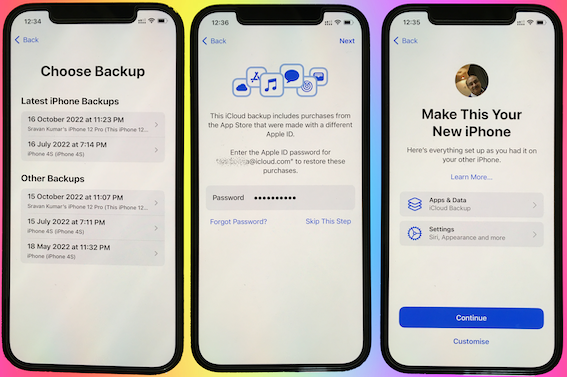

I continued to have the same issue with the heating.


I repeated the above steps but this time I did not restore from the iCloud Backup. I set it up as a new iPhone.


Waited for 3 days. There is no heating issue, now.


Conclusion.:

  • There is no hardware issue!
  • This is not an iOS 16.0.3 issue
  • Some Apps or iPhone storage and some settings may be heating up the device.


Action Plan:

  • I will now slowly get my all data back one by one.
  • Using the elimination process I will try to find out which app or settings were causing this...


Now the heating issue isn't there anymore. I am adding apps one by one and keeping tab on the heating issue.



My experience says this is purely caused by some third-party app that you may have installed.


I am not aware of the ambient temperature in which you are using the iPhone. However --> Keeping iPhone, iPad, and iPod touch within acceptable ...


Store the device where the temperature is between -20º and 45º C (-4º to 113º F). Don’t leave the device in your car, because temperatures in parked cars can exceed this range.


Use iOS devices where the ambient temperature is between 0º and 35º C (32º to 95º F). Low- or high-temperature conditions might cause the device to change its behavior to regulate its temperature. Using an iOS device in very cold conditions outside of its operating range might temporarily shorten battery life and could cause the device to turn off. Battery life will return to normal when you bring the device back to higher ambient temperatures. Using an iOS device in very hot conditions can permanently shorten battery life.


92 replies

Jul 29, 2023 12:29 PM in response to davisdd6

davisdd6 wrote:

I am going back to an Android phone. Tired of all the constant apple updates & my phone overheating all the time. 😁

Good plan. Android phones don’t have any of those messy updates that fix security vulnerabilities, so you won’t be bothered (except by hackers getting into your phone and stealing your data).


And you will find that Android phones also get hot when charging or doing heavy work.

Aug 12, 2023 9:16 PM in response to Lawrence Finch

sure,genius(I hope you agree that is a factual statement), when you live in a big city like you obviously do and don't have to drive 80 to 100 miles just to find an Apple facility, and you haven't had phone service for 24 hours because your phone shut down because it overheated-again like it had several times in the since they ridiculous obviously(and yes, that's factual) operating system update is the only time that it has ever overheated-don't be a smart donkey, if you can't say something nice to people like me on the Internet then come see me face-to-face. I hope you can read a GPS to find your way here though, because you will never get here following a GPS-I do not even have phone service in my own house with my own cell phone other than because I have spectrum Wi-Fi to talk on-so much for T-Mobile's phone system-and after 23 years with Sprint, I always thought they had the worst system there was(the only reason I stayed was because they did have all in one), so I have VerizonTower on my property in my backyard and I have no phone service until I get close enough to the house so spectrum connects me. Barking up the wrong tree dude-come visit though I would love to speak to you face to face. I do not believe in ranting and raving on the Internet, but for you I made an exception(that's a factual statement to-you can check it out with all of my grandkids who have masters degrees including in computer engineering). I feel sorry that I got this email with your statement in it, I do not have enough techie training nor education in these devices to understand why I would get such an email, but I felt compelled to at least respond so that you know there is at least one other idiot out here. And have a good day.

Aug 19, 2023 2:18 PM in response to Northstarbrian

I still on IOS 16.5.1, and since that update, my 14 Pro Max will randomly claim my phone is overheating but it only gives this warning when my phone is connected to the charger. It only does this when the screen is closed and the phone is just laying there charging. So when I go to use the phone, it will display the message that basically says (I can’t remember the exact wording) that “iPhone will temporarily pause charging until phonebreturns to normal” or something to that effect. But the phone doesn’t even feel “warm”, let alone “hot”…. My 14 Pro Max, that I’ve had since June, hasn’t literally overheated or been “hot” to the touch since I got it. Prior to that, my 13 Pro Max only got “hot” to the touch from overheating ONCE, and that was while on I was vacationing in Daytona Beach, FL and it was HOT AF and I accidentally left the phone in the car for a bit.


As far as battery goes, I don’t think my 14 Pro Max has experienced any battery drain issues. Not that I’ve noticed at least. I try and keep my phone charged at all times to at LEAST 50%. When it reaches 50%, I connect to the Lightening Charger until it’s at least at the 90%, and usually I continue to use the phone while it’s charging. I also keep it connected to the charger overnight every night.

Aug 25, 2023 5:04 PM in response to Az1994

Az1994 wrote:

I got a 13 pro. Same thing when I’m watching YouTube for too long it over heats. Or TikTok. My Phone never got wet or repaired, That’s unfair because I still owe my phone

Define “overheat”. There is only ONE meaning with respect to an iPhone: An overheated iPhone will shut down completely and display a message saying it cant be used until it cools off. If that doesn’t happen it may be warm, but it has not overheated.

Oct 6, 2023 10:36 PM in response to Northstarbrian

So, the magnet in my phone exploded out of the back, causing it to shatter in a curled shape. This is what AT&T told me. However, because the iPhone is an Apple product, you know how that goes. So, unless I want it fixed, I'm going to have to pretty much pay for another phone or pay to get it fixed while I'm still making payments on a broken phone. But I didn't realize there was an update in July, because that's exactly when my phone started indicating it was overheating, even when it wasn't hot outside, and the phone itself wasn't hot. The battery would also die quickly, to the point where its dying two times a day. Now, it's gotten worse; my phone will be at 25%, then it'll restart as if it died, turn back on at 1%, die again, turn back on, and then be at 10%. It's definitely getting worse, and I'm absolutely frustrated with Apple. I'm going back to Android next.

Oct 7, 2023 8:07 AM in response to aisslynn

aisslynn wrote:

So, the magnet in my phone exploded out of the back, causing it to shatter in a curled shape. This is what AT&T told me. However, because the iPhone is an Apple product, you know how that goes. So, unless I want it fixed, I'm going to have to pretty much pay for another phone or pay to get it fixed while I'm still making payments on a broken phone. But I didn't realize there was an update in July, because that's exactly when my phone started indicating it was overheating, even when it wasn't hot outside, and the phone itself wasn't hot. The battery would also die quickly, to the point where its dying two times a day. Now, it's gotten worse; my phone will be at 25%, then it'll restart as if it died, turn back on at 1%, die again, turn back on, and then be at 10%. It's definitely getting worse, and I'm absolutely frustrated with Apple. I'm going back to Android next.

Sorry to hear about your problem. What did Apple say when you contacted them about this defect?

Nov 16, 2023 8:57 AM in response to adambeeabdul

adambeeabdul wrote:

iOS 14.8 later how to download

There is no possible way to download iOS 14.8. It is no longer supported.


Go to Settings/General/About and note the iPhone Model Name, then check its version compatibility from this list:


  • iPhone XR, XS, SE 2nd or 3rd edition, iPhone 11 and newer: You can update to iOS 17.1.1
  • iPhone 8, and iPhone X you can update to 16.7.2
  • Any iPhone series 6S and 7, and original SE: You can update to 15.8
  • iPhone 5S or 6: You cannot update to iOS 13 or higher; you can update only to iOS 12.5.7
  • iPhone 5: You can update only to 10.3.4
  • iPhone 5C: You can update only to 10.3.3
  • iPhone 4S: You can update only to 9.3.6
  • iPhone 4: You can update only to 7.1.2


If your phone is eligible to be updated go to Settings/General/Software Update and follow the instructions.

Feb 24, 2024 7:22 AM in response to Northstarbrian

iPhone 13 Overheating after iOS Update

Anyone else experiencing overheating since last update to iOS 17.4.


my phone is just sitting on my bed, not my charger and I pick it up to use it and the glass is extremely hot. I also have a case on it and I can feel the heat through the back of the case as well. Have never an issue with my iPhone. What is going on??


I have had an iPhone since the first one ever came out and now seriously thinking of switching to android because iPhones are NO LONGER durable as they used to be when they were made with metal. The glass on it (front and back) is easy to break, even with a case on it, it’s ridiculous! I mean seriously whose bright idea was this to make a glass back?

Jul 20, 2024 7:35 PM in response to Northstarbrian

Ah! Literally same here!!

I JUST bought the iPhone 13 and got it 6/25/24. It’s been almost a month and i noticed after maybe 2 weeks that it started to overheat. I figured huh, maybe it’s because I’m in a hot environment, etc. but no. Even when i would put my phone on the charger, the block itself started to overheat too! And now it’s to the point where the cord itself will overheat at the port ends. And when I’m using it while it’s charging, the charging pot gets hot too, along with the left side of the phone near the SIM tray.


im glad I’m not the only one who’s experiencing this. I thought I was going crazy Lol.

Aug 18, 2024 3:37 AM in response to Northstarbrian

My one over heats during mild use, over heated to the extent a red warning came on & the phone shut down. Went through the horrendous apple process of resolving & they find every excuse to justify heating. From the Sun to my Apps and Phone network provider. I am not a heavy user, do not stream

and my main function is to communicate. No point in making a complaint, apparently Apple ignore them.

This thread has been closed by the system or the community team. You may vote for any posts you find helpful, or search the Community for additional answers.

iPhone 13 Overheating after iOS Update

Welcome to Apple Support Community
A forum where Apple customers help each other with their products. Get started with your Apple Account.