How to move purchased song that says downloaded in iTunes but it is not a choice in my settings for ringtones?

Purchased a song and can see it says "downloaded" in ITunes app but it does not show up in my settings to use as a ringtone choice?

iPhone 14 Plus, iOS 16

Posted on Jul 3, 2023 11:17 AM

Reply
Question marked as Top-ranking reply

Posted on Jul 4, 2023 2:00 PM

Hello 56-23,


Thank you for reaching out to Apple Support Communities, and we'll be happy to help in any way we can. We understand you're having issues with using a purchased song as a ringtone. Try the steps here to see if they resolve the issue: Use tones and ringtones with your iPhone or iPad - Apple Support


"Learn how to change the sound that plays when you get a call, text, email, or other notification on your iPhone or iPad. Choose from a variety of built-in sounds or buy ringtones from the iTunes Store.


Change your ringtone

  1. Go to Settings > Sounds & Haptics.
  2. Under Sounds and Haptic Patterns, tap the sound that you want to change.
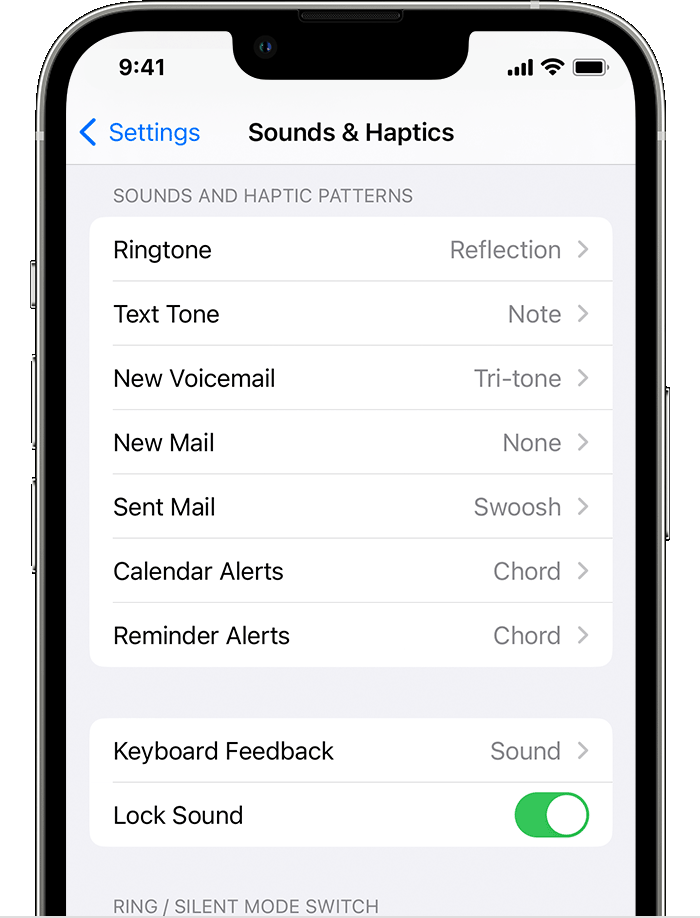
  3. Tap a ringtone or alert tone to hear it and set it as the new sound.

Set a ringtone or text tone for a contact

  1. Open the Contacts app and tap a person's name.
  2. In the upper-right corner of the person's contact card, tap Edit.
  3. Tap Ringtone or Text Tone, then choose a new sound.

Buy ringtones from the iTunes Store

  1. Open the iTunes Store app.
  2. Tap  More.
  3. Tap Tones. 
  4. Find a ringtone that you want to buy, then tap the price.
  5. Choose an option to automatically set the ringtone. Or tap Done to decide later.
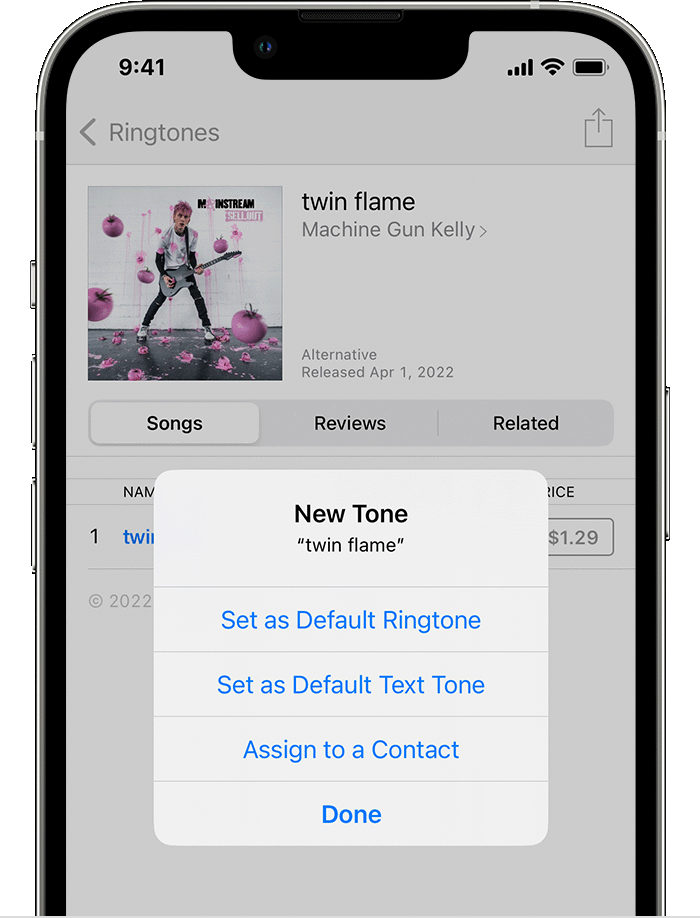
  6. You might need to enter your Apple ID password to complete your purchase.

Store availability and features might vary by country or region. Learn what's available in your country or region.

Ringtones on iTunes aren't full songs; they're just snippets.

Redownload ringtones purchased with your Apple ID

  1. Go to Settings > Sounds & Haptics.
  2. Under Sounds and Haptic Patterns, tap any sound.
  3. Tap Download All Purchased Tones. You might not see this option if you already downloaded all the tones that you purchased or if you haven't purchased any tones.
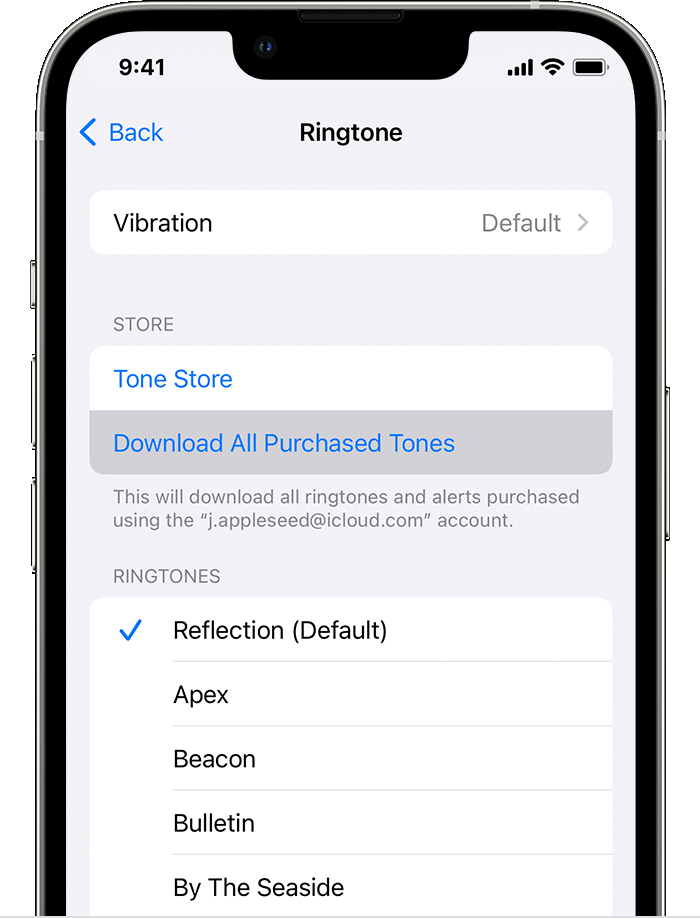
You might not be able to redownload some previously purchased tones."


If the option isn't available, you wouldn't be able to use the song as a ringtone.


We hope this helps.


Cheers!


1 reply
Question marked as Top-ranking reply

Jul 4, 2023 2:00 PM in response to 56-23

Hello 56-23,


Thank you for reaching out to Apple Support Communities, and we'll be happy to help in any way we can. We understand you're having issues with using a purchased song as a ringtone. Try the steps here to see if they resolve the issue: Use tones and ringtones with your iPhone or iPad - Apple Support


"Learn how to change the sound that plays when you get a call, text, email, or other notification on your iPhone or iPad. Choose from a variety of built-in sounds or buy ringtones from the iTunes Store.


Change your ringtone

  1. Go to Settings > Sounds & Haptics.
  2. Under Sounds and Haptic Patterns, tap the sound that you want to change.
  3. Tap a ringtone or alert tone to hear it and set it as the new sound.

Set a ringtone or text tone for a contact

  1. Open the Contacts app and tap a person's name.
  2. In the upper-right corner of the person's contact card, tap Edit.
  3. Tap Ringtone or Text Tone, then choose a new sound.

Buy ringtones from the iTunes Store

  1. Open the iTunes Store app.
  2. Tap  More.
  3. Tap Tones. 
  4. Find a ringtone that you want to buy, then tap the price.
  5. Choose an option to automatically set the ringtone. Or tap Done to decide later.
  6. You might need to enter your Apple ID password to complete your purchase.

Store availability and features might vary by country or region. Learn what's available in your country or region.

Ringtones on iTunes aren't full songs; they're just snippets.

Redownload ringtones purchased with your Apple ID

  1. Go to Settings > Sounds & Haptics.
  2. Under Sounds and Haptic Patterns, tap any sound.
  3. Tap Download All Purchased Tones. You might not see this option if you already downloaded all the tones that you purchased or if you haven't purchased any tones.

You might not be able to redownload some previously purchased tones."


If the option isn't available, you wouldn't be able to use the song as a ringtone.


We hope this helps.


Cheers!


This thread has been closed by the system or the community team. You may vote for any posts you find helpful, or search the Community for additional answers.

How to move purchased song that says downloaded in iTunes but it is not a choice in my settings for ringtones?

Welcome to Apple Support Community
A forum where Apple customers help each other with their products. Get started with your Apple Account.