
can messages be copied and saved?
Can messages be copied and saved ?
Can messages be copied and saved ?
Hi there DouglasP71,
You can copy a message and then paste it into another app, like Notes, to save it. To copy a message press and hold your finger on the message you want to copy and you'll see a menu appear like the one in the photo below:
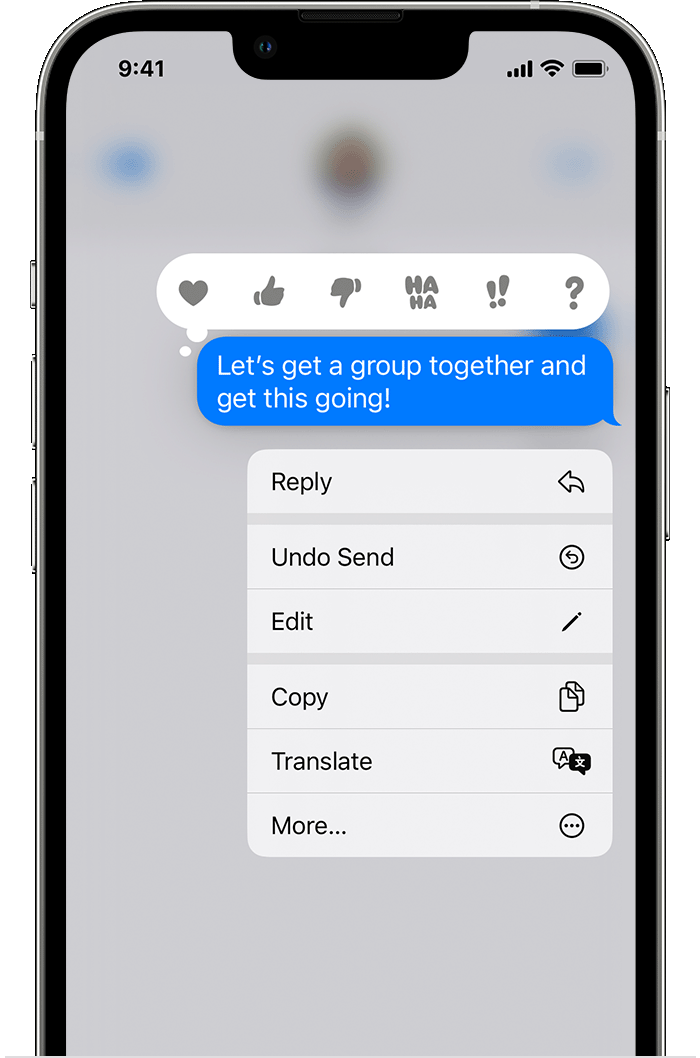
You'll find this photo and more information about using Messages in this support article: Use Messages on your iPhone or iPad - Apple Support
Also, you can turn on Messages in iCloud to save your messages in iCloud. Follow the steps in this link to do so: Set up iCloud for Messages on all your devices - Apple Support
Take care.
Hi there DouglasP71,
You can copy a message and then paste it into another app, like Notes, to save it. To copy a message press and hold your finger on the message you want to copy and you'll see a menu appear like the one in the photo below:
You'll find this photo and more information about using Messages in this support article: Use Messages on your iPhone or iPad - Apple Support
Also, you can turn on Messages in iCloud to save your messages in iCloud. Follow the steps in this link to do so: Set up iCloud for Messages on all your devices - Apple Support
Take care.
can messages be copied and saved?

