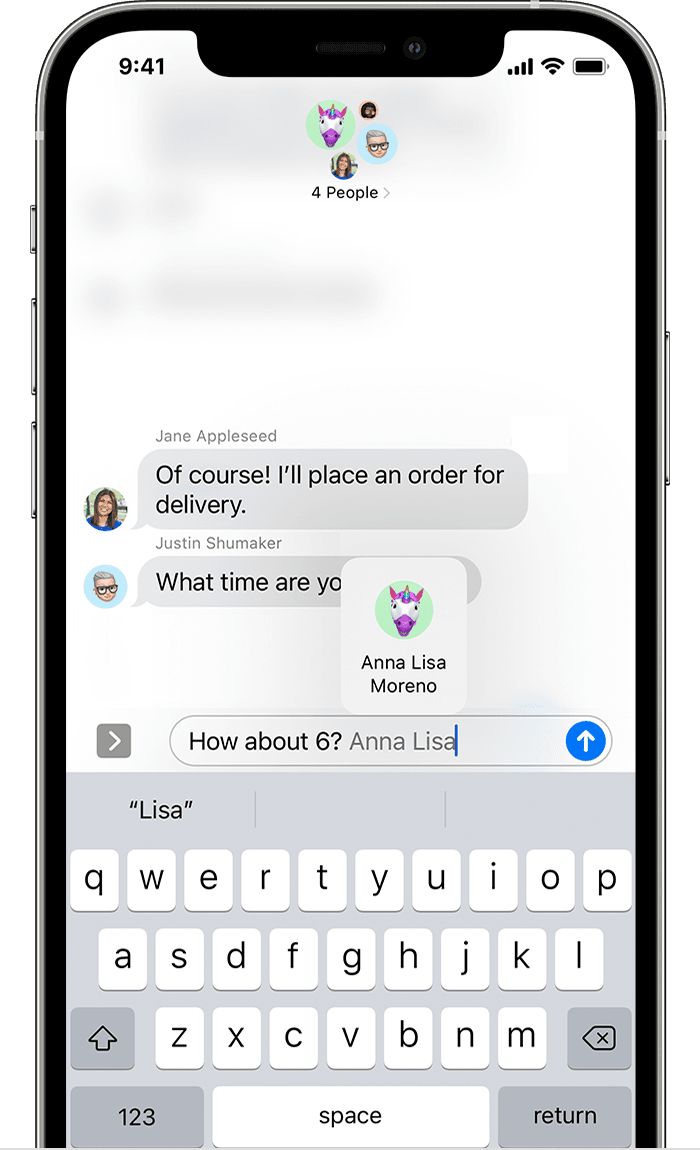
text messages on iphone
how to stop names from contacts highlighted in blue in text messages
iPhone SE, iOS 14
how to stop names from contacts highlighted in blue in text messages
iPhone SE, iOS 14
Hello DB7564,
Thanks for getting back to us with those additional details. From what you're describing, it looks like you are referring to the mention feature when sending a message on your iPhone. For more information, check this out:
How to use mentions
1. Open a Messages conversation.
2. Type a contact's name, then tap the name when it appears. Or type @ followed by their name.
Depending on your contact's settings, a mention can notify them even if they've muted the conversation. To change this notification setting, go to Settings > Messages, then turn Notify Me on or off.
Reply to specific messages on your iPhone, iPad, and iPod touch
If that's not what you're experiencing, let us know more about this behavior, and we'll do our best to assist.
Cheers.
Hey there and welcome to Apple Support Communities DB7564,
We can certainly understand your concern and can help provide some insight.
We recommend checking out these links for more information on how to block phone numbers, contacts, and emails on your iPhone or iPad.
Let us know if that helps and kindest regards!
You misunderstood my question:
There has apparently been a change on the iphone so that, in the past few months, when I send a text message to one of my contacts, their name comes out printed in blue or in bold in the text message. I prefer this not happen and would like to change my phone back to the way it had been where names of contacts are not printed differently in text messages.
text messages on iphone