Hello BobF0711,
Welcome to Apple Support Communities!
We'd like to help with syncing all of your music from iTunes to your phone.
Let's ensure that you have sync library turned on and if it is turned on there are other things that we can check to find out why not all music is syncing to your phone.
"First, check these things
- Are all of your devices connected to the internet?
- Do you have an active subscription to Apple Music?
- Are all of your devices signed in with the same Apple ID that you use with your Apple Music subscription?
- Is Sync Library turned on for all of your devices?
Check the cloud status of songs on your Mac or PC
- On your Mac, open the Apple Music app. On your PC, open iTunes, choose Music from the pop-up menu, then click Library.
- In the sidebar, select Songs.
- In the menu bar, choose View > Show View Options.
- Select Cloud Status and Cloud Download.
Look for the following statuses next to your songs to learn what to do.
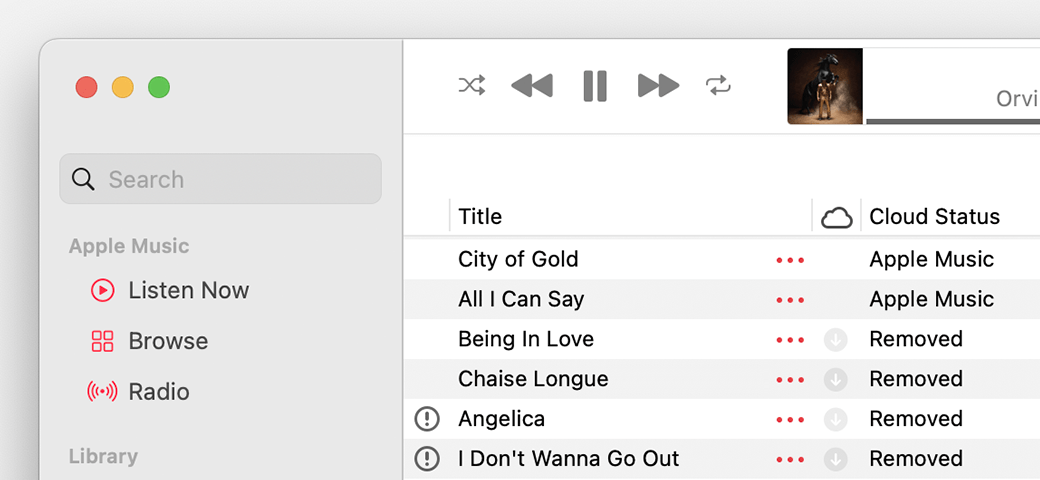
Waiting
The song won’t appear on your other devices because it’s waiting to upload. Choose File > Library > Update Cloud Library. Then check if the song appears on your other devices.
Removed
The song was deleted from another device that has Sync Library turned on. If you want the song to appear on your other devices, click the arrow  next to the song, then click Add to Cloud Music Library."
More troubleshooting steps can be found in this article: If songs are missing from your music library after you turn on Sync Library
Let us know if you have any questions.
Thank you for using Apple Support Communities.
Take care!


