Trying to update my WhatsApp and it’s not recognising my appleid. It is coming up with an old one. Please are you able to help.

Trying to update my WhatsApp and it’s not recognising my appleid. It is coming up with an old one. Please are you able to help.

iPhone 7, iOS 15

Posted on Jul 8, 2023 9:55 AM

Reply
Question marked as Top-ranking reply

Posted on Jul 9, 2023 12:05 PM

Hello Sabiesparkle,


Can you let us know more about what you're experiencing, so we can assist you? For example, does this only happen when trying to update that specific app, or does it happen with all apps? Do you experience any issues downloading new apps, or only with updating? Is the correct Apple ID account signed in on your device?


The above details will help us plan how to proceed.


Please check out this link, which will guide you through how to ensure the correct Apple ID account is signed in on your device, so we can make sure there aren't any issues there: Sign in with your Apple ID


Sign in on your iPhone, iPad, or iPod touch

1. Open the Settings app.
2. Tap Sign in to your [device].
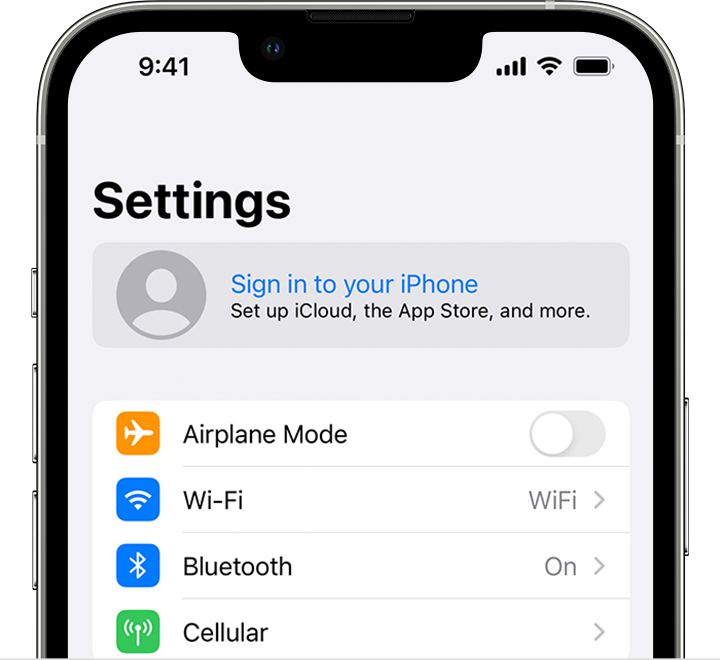
On iPhone, sign in to your Apple ID in the Settings app
3. Enter your Apple ID and password.
4. If prompted, enter the six-digit verification code sent to your trusted device or phone number and complete sign in.

If you're already signed in to iCloud on the iPhone paired with your Apple Watch, you will automatically be signed in to that Apple ID. Learn more about how to set up and sign in to your Apple Watch


Thanks!

Similar questions

1 reply
Question marked as Top-ranking reply

Jul 9, 2023 12:05 PM in response to Sabiesparkle

Hello Sabiesparkle,


Can you let us know more about what you're experiencing, so we can assist you? For example, does this only happen when trying to update that specific app, or does it happen with all apps? Do you experience any issues downloading new apps, or only with updating? Is the correct Apple ID account signed in on your device?


The above details will help us plan how to proceed.


Please check out this link, which will guide you through how to ensure the correct Apple ID account is signed in on your device, so we can make sure there aren't any issues there: Sign in with your Apple ID


Sign in on your iPhone, iPad, or iPod touch

1. Open the Settings app.
2. Tap Sign in to your [device].
On iPhone, sign in to your Apple ID in the Settings app
3. Enter your Apple ID and password.
4. If prompted, enter the six-digit verification code sent to your trusted device or phone number and complete sign in.

If you're already signed in to iCloud on the iPhone paired with your Apple Watch, you will automatically be signed in to that Apple ID. Learn more about how to set up and sign in to your Apple Watch


Thanks!

This thread has been closed by the system or the community team. You may vote for any posts you find helpful, or search the Community for additional answers.

Trying to update my WhatsApp and it’s not recognising my appleid. It is coming up with an old one. Please are you able to help.

Welcome to Apple Support Community
A forum where Apple customers help each other with their products. Get started with your Apple Account.
