Apple Music family sharing not connecting

Previously had Apple Music apart of a family sharing the member sharing had to send a new invite to the family and now when I play a search and play a song it can not connect. I delete and download again. The others members have no problem.

iPhone 12, iOS 16

Posted on Jul 8, 2023 11:07 PM

Reply
Question marked as Top-ranking reply

Posted on Jul 10, 2023 8:26 AM

Hello realtor224,


Thank you for reaching out to Apple Support Communities, and we'll be happy to help in any way we can. We understand you're having issues with accessing a shared subscription to Apple Music. Verify the family sharing settings are still active and are sharing the content you want to: If you can't find your family's shared content - Apple Support


On your iPhone or iPad with iOS 16 or later
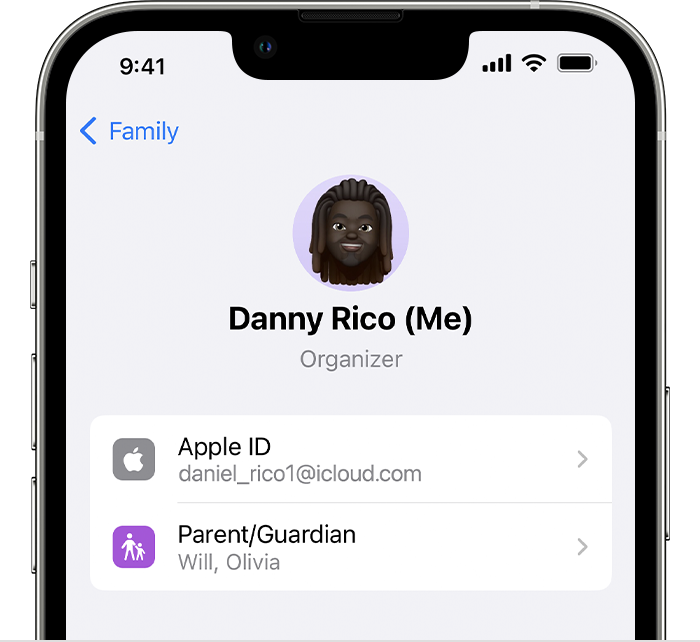
1. Go to Settings > Family.
2. Tap your name. 
3. Make a note of which Apple ID is listed.
4. Tap Purchases. 
5. Tap Apple ID for Purchases and make sure that you're signed in with with the same Apple ID that you use for Family Sharing. If not, tap Share using secondary Apple ID and enter the Apple ID and password for that Apple ID. 


On your iPhone, iPad, or iPod touch
1. Go to Settings > [your name].
2. Tap Media & Purchases.
3. Tap Sign Out.
4. Tap Media & Purchases again.
5. Tap Not [your name]?, then sign in with the Apple ID that you use for Family Sharing.


We hope this helps.


Cheers!


1 reply
Question marked as Top-ranking reply

Jul 10, 2023 8:26 AM in response to realtor224

Hello realtor224,


Thank you for reaching out to Apple Support Communities, and we'll be happy to help in any way we can. We understand you're having issues with accessing a shared subscription to Apple Music. Verify the family sharing settings are still active and are sharing the content you want to: If you can't find your family's shared content - Apple Support


On your iPhone or iPad with iOS 16 or later
1. Go to Settings > Family.
2. Tap your name. 
3. Make a note of which Apple ID is listed.
4. Tap Purchases. 
5. Tap Apple ID for Purchases and make sure that you're signed in with with the same Apple ID that you use for Family Sharing. If not, tap Share using secondary Apple ID and enter the Apple ID and password for that Apple ID. 


On your iPhone, iPad, or iPod touch
1. Go to Settings > [your name].
2. Tap Media & Purchases.
3. Tap Sign Out.
4. Tap Media & Purchases again.
5. Tap Not [your name]?, then sign in with the Apple ID that you use for Family Sharing.


We hope this helps.


Cheers!


This thread has been closed by the system or the community team. You may vote for any posts you find helpful, or search the Community for additional answers.

Apple Music family sharing not connecting

Welcome to Apple Support Community
A forum where Apple customers help each other with their products. Get started with your Apple Account.