icloud

my new macbook air is synced to my phone but it must be also synced to my moms phone as receiving messages/contacts are different in the phone and the mac. how do i only have my phone synced to the macbok?

MacBook Air (M2, 2023)

Posted on Jul 11, 2023 10:28 PM

Reply
Question marked as Top-ranking reply

Posted on Jul 11, 2023 11:14 PM

With the limited information that you have provided, I had to guess the problems faced by you. Some of it can be understood by reading below


If you want to keep mom's iPhone independent of your devcie then best would be to have a separate Apple ID for your Mom.


Otherwise, there are basically three types of sharing

  1. Text Message and
  2. Calls on the other device

iCloud Photos & Messages: iCloud now keeps your entire messages history updated and available on all your devices — even when you set up a new device. Learn how to keep all your messages in iCloud.
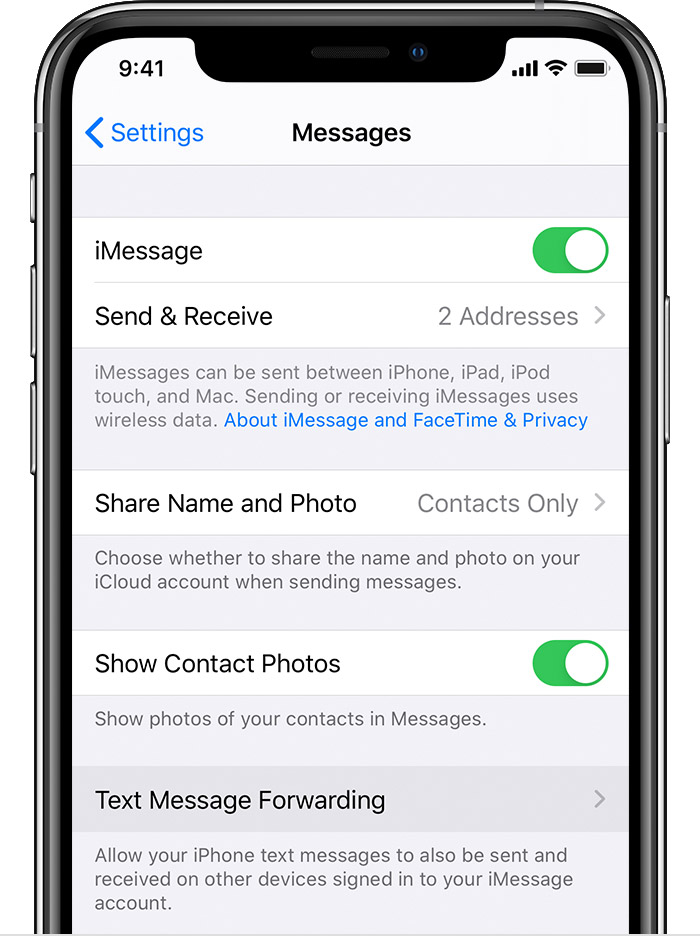


  1. Set up text message forwarding
    1. On your iPhone, iPad, or iPod touch, go to Settings > Messages > Send & Receive. On your Mac, open Messages, choose Messages > Preferences, then click iMessage. Make sure that you're signed in to iMessage with the same Apple ID on all your devices.
    2. On your iPhone, go to Settings > Messages > Text Message Forwarding.*
    3. Choose which devices can send and receive text messages from your iPhone. If you're not using two-factor authentication for your Apple ID, a verification code appears on each of your other devices: enter that code on your iPhone.


1 reply
Question marked as Top-ranking reply

Jul 11, 2023 11:14 PM in response to usernameeeeeeeeeeeee88

With the limited information that you have provided, I had to guess the problems faced by you. Some of it can be understood by reading below


If you want to keep mom's iPhone independent of your devcie then best would be to have a separate Apple ID for your Mom.


Otherwise, there are basically three types of sharing

  1. Text Message and
  2. Calls on the other device

iCloud Photos & Messages: iCloud now keeps your entire messages history updated and available on all your devices — even when you set up a new device. Learn how to keep all your messages in iCloud.
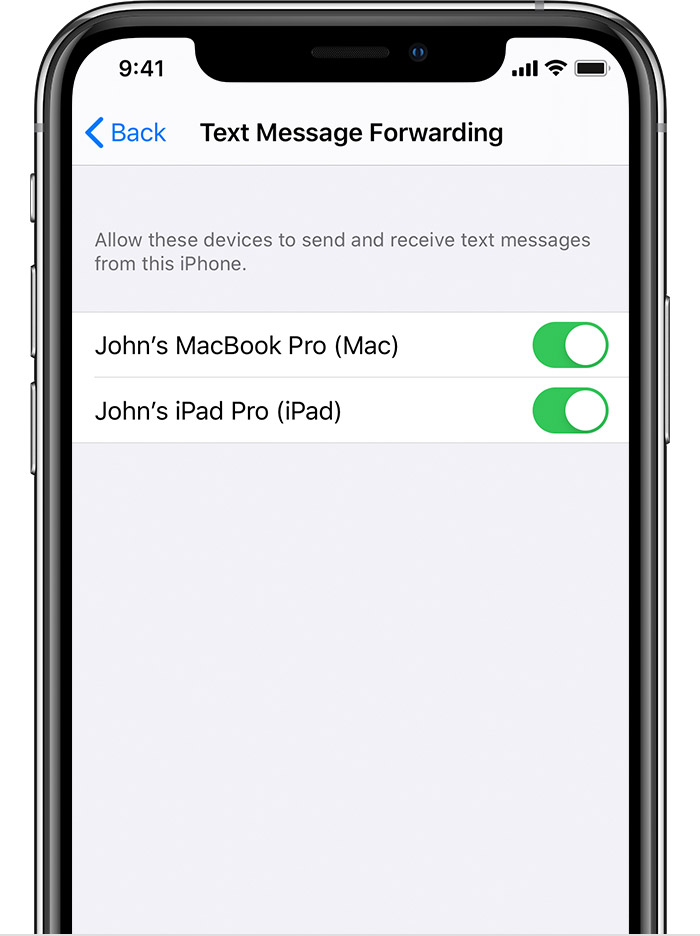


  1. Set up text message forwarding
    1. On your iPhone, iPad, or iPod touch, go to Settings > Messages > Send & Receive. On your Mac, open Messages, choose Messages > Preferences, then click iMessage. Make sure that you're signed in to iMessage with the same Apple ID on all your devices.
    2. On your iPhone, go to Settings > Messages > Text Message Forwarding.*
    3. Choose which devices can send and receive text messages from your iPhone. If you're not using two-factor authentication for your Apple ID, a verification code appears on each of your other devices: enter that code on your iPhone.


This thread has been closed by the system or the community team. You may vote for any posts you find helpful, or search the Community for additional answers.

icloud

Welcome to Apple Support Community
A forum where Apple customers help each other with their products. Get started with your Apple Account.
