Unable to watch Netflix in a picture-in-picture mode on iPhone

I can’t get Netflix app to play in Picture in Picture, I’ve changed the PiP setting multiple times, reset the phone, updated everything’s and deleted and reinstalled the app nothing is working.


[Re-Titled by Moderator]

iPhone 8, iOS 16

Posted on Jul 17, 2023 10:01 AM

Reply
Question marked as Top-ranking reply

Posted on Jul 17, 2023 10:43 AM

I finally figured it out and it is totally unintuitive. There is no icon to tap on to do this.


When you are watching a video, swipe up from the bottom of the screen and the video will go into PIP mode.

31 replies

Jul 17, 2023 10:13 AM in response to Jayfork

Please contact Netflix.


Currently, the Apple TV app has this feature for sure.


If your video player app (YouTube) doesn’t support PIP right now, then you may have to wait for the developer to update the app compatible with iOS 14 with PiP.


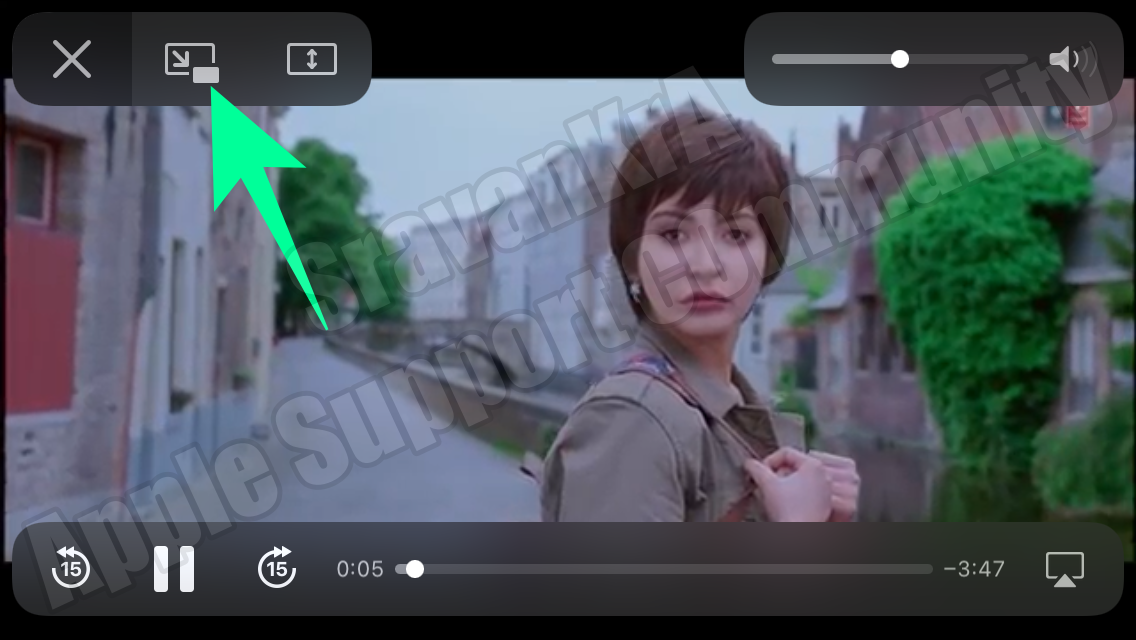
Alternatively, you may go to youtube.com in Safari, play a video, and make it full screen. Now you can select the newly-added PIP button on an iPhone running iOS 14, and the video will pop out from the page. You can change tabs or navigate to different apps, and the video will keep running in the PIP.


See the pic below, a snapshot was taken on iPhone SE 1st Gen iOS 14.0.1

Jul 21, 2023 5:00 PM in response to Jayfork

I just thought about this again, and maybe I’m describing the process incorrectly. I have an iPhone XR and it looks like you have an iPhone 8 so I’m not sure it works the same way on both models.


When I start a show in the Netflix app, it goes into landscape mode and plays that way automatically. When I say swipe up from the bottom of the screen, I am talking about the bottom in landscape mode, not the bottom in Portrait mode. When I swipe up, it is not a swipe up all the way off the screen. It’s a swipe about two thirds of the way up the screen and then I let go.


Aug 25, 2023 7:38 PM in response to Jayfork

Jayfork wrote:

Yeah I understand what you mean it just doesn’t work like that for me. It just brings up the menu with the volume/brightness etc on it. I tried calling Netflix and the tech support lady, didn’t understand the concept of Picture in Picture and then tried to convince me that it’s not possible with Netflix at all. So I honestly just dgaf anymore I cancelled my subscription anyway. But thanks for trying

If you’re getting the menu with the volume/brightness etc on it, that’s the Control Center. That you get from swiping from the top of the screen, not the bottom. What you need to do is open Netflix, start watching something, when you are watching it you swipe from the bottom like you are going to the Home Screen. This should automatically open up the window for you to watch it when your phone is searching for or opening other apps. Just swipe, don’t swipe to the middle and pause as this will bring up the switcher which doesn’t do what you are looking for. You need to take your phone to the Home Screen without stopping or pausing the video.

Aug 25, 2023 7:33 PM in response to tabathay2k

EXACTLY! I’ve been sharing accounts with family and have just now decided to get mine. I opted for the Basic plan (wt ads, I don’t care..have time to make a bathroom or snack run) BUT I realized some shows are now missing, and my PiP won't work! By the way, this is not stated anywhere in their contract. C’mon Netflix, that’s a lowball…

I think Apple should push back. 1-It’s not the same with Google Play; 2-Tgey messing with Apple’s brand

Jul 22, 2023 12:53 AM in response to Demo

Yeah I understand what you mean it just doesn’t work like that for me. It just brings up the menu with the volume/brightness etc on it. I tried calling Netflix and the tech support lady, didn’t understand the concept of Picture in Picture and then tried to convince me that it’s not possible with Netflix at all. So I honestly just dgaf anymore I cancelled my subscription anyway. But thanks for trying

Jul 22, 2023 8:02 AM in response to Jayfork

I’m sorry I wasn’t able to help. I wanted to show you a couple of screenshots of what I can do on my phone. You can’t see the image on the one screenshot. I think that is a Netflix thing that disallows the image being captured. This is from the Tom Hanks movie, A Man Called Otto. You can see the closed captioning here.


This shows the video is playing PIP.


This thread has been closed by the system or the community team. You may vote for any posts you find helpful, or search the Community for additional answers.

Unable to watch Netflix in a picture-in-picture mode on iPhone

Welcome to Apple Support Community
A forum where Apple customers help each other with their products. Get started with your Apple Account.


