Split Keyboard and Fixed position volume controls for iPad Pro 11" M2

Apple, please return Split Keyboard and Fixed position volume controls for iPad Pro 11" M2

Its impossible, delete lovely features all my life with iPads, but only 120Hz 11inch model - is PRO M2.

Why remove Split Keyboard? (Even Accesibility) Why i cant find Fixed position volume controls in settings on iPad Pro 11" M2? Its a bug, i hope (both 16 and 17 OS)

I consider myself a Pro. This Pro device is great, but the removal of familiar features loved by many years of using the iPad's hints that Pros do not need these features? Pro should not be distracted from work because of minor inconveniences. Developers, please listen.

iPad Pro

Posted on Jul 18, 2023 1:37 AM

Reply
Question marked as Top-ranking reply

Posted on Jul 23, 2023 8:31 AM

The Split Keyboard has never been available for any iPad model with a screen greater than 10.5”. As such, Split Keyboard is only available for these models of iPad:


  • iPad mini (5th generation and later)
  • iPad (5th generation to 9th generation)
  • iPad Air (3rd generation)
  • iPad Pro 9.7-inch
  • iPad Pro 10.5-inch


The iPad User Guide, an often overlooked source of information, details availability of this feature:

Use a split keyboard - Apple Support


Dynamic volume controls were introduced with release of iPadOS 15.4 onwards. The “logic” behind dynamic volume controls is such that regardless of the screen orientation, the relative function remains constant - as follows:


  • When the physical buttons are positioned on a vertical edge of the iPad, the uppermost button will always increase the volume. Conversely, lower button will decrease the volume.


  • When the physical buttons are positioned on a horizontal edge of then iPad, the button on the right will increase the volume - while the button on the left will decrease the volume.
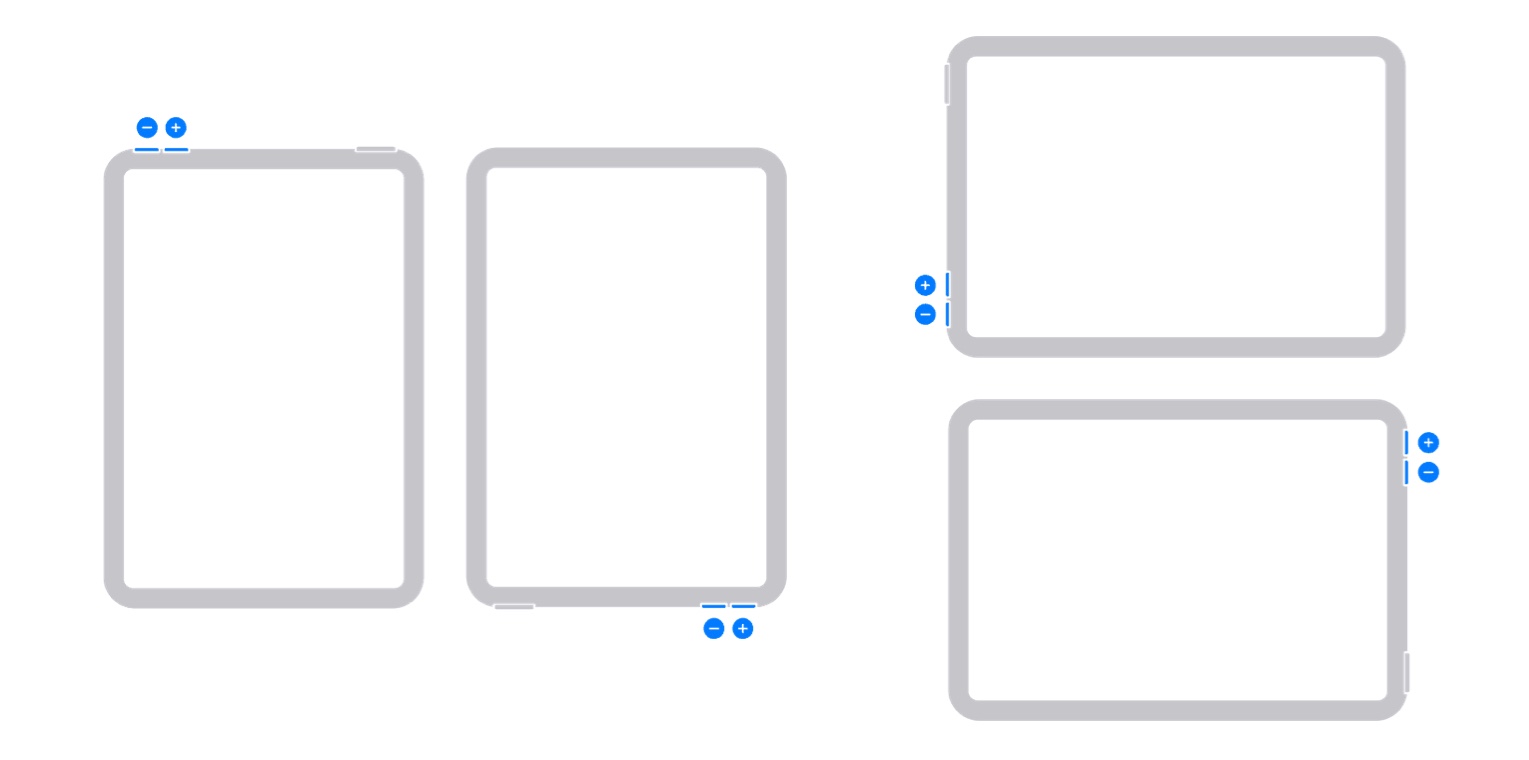


When the “penny drops”, the feature makes sense.


For reasons known only to Apple, the ability to disable this feature is not available for any new models of iPad and iPad Pro that have since been launched - these models being:

  • iPad Air5
  • iPad mini6
  • fourth generation iPad Pro 11”
  • sixth generation iPad Pro 12.9”
  • iPad10


This is documented within this recently updated Apple Support document:

Use the Home, side, and other buttons on your iPad - Apple Support


Apple invite submission of constructive comments and feature requests via its Product Feedback pages. If you would like to see the ability to disable dynamic volume control functions for your iPad, this would be the most appropriate channel through which to make your voice heard:

Feedback - iPad - Apple



3 replies
Question marked as Top-ranking reply

Jul 23, 2023 8:31 AM in response to Stolov

The Split Keyboard has never been available for any iPad model with a screen greater than 10.5”. As such, Split Keyboard is only available for these models of iPad:


  • iPad mini (5th generation and later)
  • iPad (5th generation to 9th generation)
  • iPad Air (3rd generation)
  • iPad Pro 9.7-inch
  • iPad Pro 10.5-inch


The iPad User Guide, an often overlooked source of information, details availability of this feature:

Use a split keyboard - Apple Support


Dynamic volume controls were introduced with release of iPadOS 15.4 onwards. The “logic” behind dynamic volume controls is such that regardless of the screen orientation, the relative function remains constant - as follows:


  • When the physical buttons are positioned on a vertical edge of the iPad, the uppermost button will always increase the volume. Conversely, lower button will decrease the volume.


  • When the physical buttons are positioned on a horizontal edge of then iPad, the button on the right will increase the volume - while the button on the left will decrease the volume.


When the “penny drops”, the feature makes sense.


For reasons known only to Apple, the ability to disable this feature is not available for any new models of iPad and iPad Pro that have since been launched - these models being:

  • iPad Air5
  • iPad mini6
  • fourth generation iPad Pro 11”
  • sixth generation iPad Pro 12.9”
  • iPad10


This is documented within this recently updated Apple Support document:

Use the Home, side, and other buttons on your iPad - Apple Support


Apple invite submission of constructive comments and feature requests via its Product Feedback pages. If you would like to see the ability to disable dynamic volume control functions for your iPad, this would be the most appropriate channel through which to make your voice heard:

Feedback - iPad - Apple



Dec 3, 2023 9:59 AM in response to Stolov

I totally agree, Stolov. The split keyboard gives accessibility to use the iPad in portrait orientation, hold it in both hands and type with thumbs. Now it is not possible to reach the centre characters on the keyboard - I've been trying for days and now I have serious thumb joint pain. As far as I am concerned this is a downgrade in functionality and a reduction in accessibility.

I called Apple the other day and they told me that I must escalate the issue. Perhaps you too could give your feedback and if we all do this then they might listen.

This thread has been closed by the system or the community team. You may vote for any posts you find helpful, or search the Community for additional answers.

Split Keyboard and Fixed position volume controls for iPad Pro 11" M2

Welcome to Apple Support Community
A forum where Apple customers help each other with their products. Get started with your Apple Account.