Hi bdrum99,
A Numbers table is a grid of cells arranged in Rows and Columns.
As a general rule, values in each column are in the same category, named in the header row(s) of that column,
and the values in each row are directly related to the category in that row of the Header column(s).
The first five columns of your table follow this model, although they do not include a name for each category.
Column A contains the date of each action.
Column B (in rows 5 to 8) contains the name of the party receiving money in the recorded transaction.
Column C records the purpose of the expenditure
Column D records the amount of the transaction, and
Column E records the method of payment.
The transaction in row 3 does not match the categories used in the rest of the rows, but the replacement of 'payee' with 'purpose' is readily understood in this single row.
Columns G and H are 'summary' calculations.
There is no direct relation between the data on each row and the Dates in that row of column A, the parties on that row of column B, or the purpose listed on that row of column C.
If you want to keep them on the same table as the 'daily expenses', you could create the space for the data that would be recorded in "the new row just above row 6 and only in columns G and H" by moving the data currently in cells G4, H4, G5 and H5 up one row from their current positions, and using the resulting empty cells G5 and H5 to contain what you want in the now open space 'just above row 6 in columns G and H.
While this is a simple and workable solution to what you've described, my own choice would be to follow the models provided in the templates supplied with Numbers, and move the Summary calculations to a second table.
Using the data displayed on your example, I set up the model shown below. Using the data displayed in your screen shot, I was unable to obtain the same results as yours for the Project Ledger. Your sample appears to be missing some data regarding the total costs.
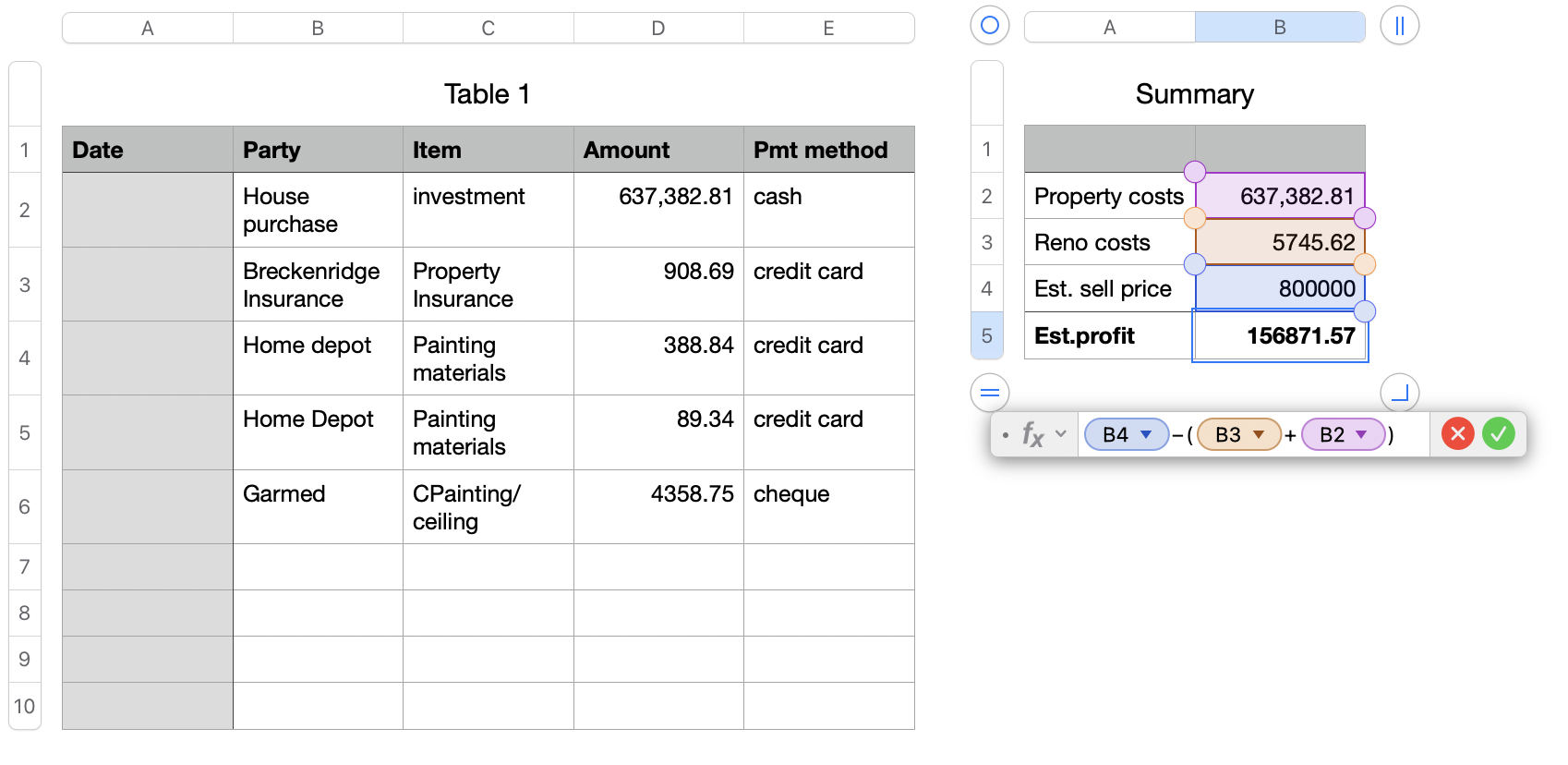
With the missing data included, this example should return the correct values.
Regards,
Barry


