unable to authorize a third computer for itunes even though i only have two authorized.
unable to authorize a third computer for itunes even though i only have two authorized.
Windows, Windows 10
unable to authorize a third computer for itunes even though i only have two authorized.
Windows, Windows 10
Hello Fireball2474,
Thank you for using Apple Support Communities.
You can authorize up to five computer to play iTunes Store purchases. If you are unable to authorize an additional one, it may be because you have an old computer that you have forgotten about still authorized. You can take a look at the information in this article to see how many computers are authorized, and then deauthorize the ones no longer in use. To include ones you no longer have access to.
See how many computers are authorized
1. Open the Apple Music app or Apple TV app.
2. Choose Account > Account Settings.
3. Sign in with your Apple ID and password. Forgot your Apple ID?
4. At the top of your Account Information page, look next to Computer Authorizations to see how many computers are authorized.
How to authorize or deauthorize your Mac
1. Open the Apple Music app or Apple TV app. In the menu bar, choose Account and make sure that you're signed in with your Apple ID.
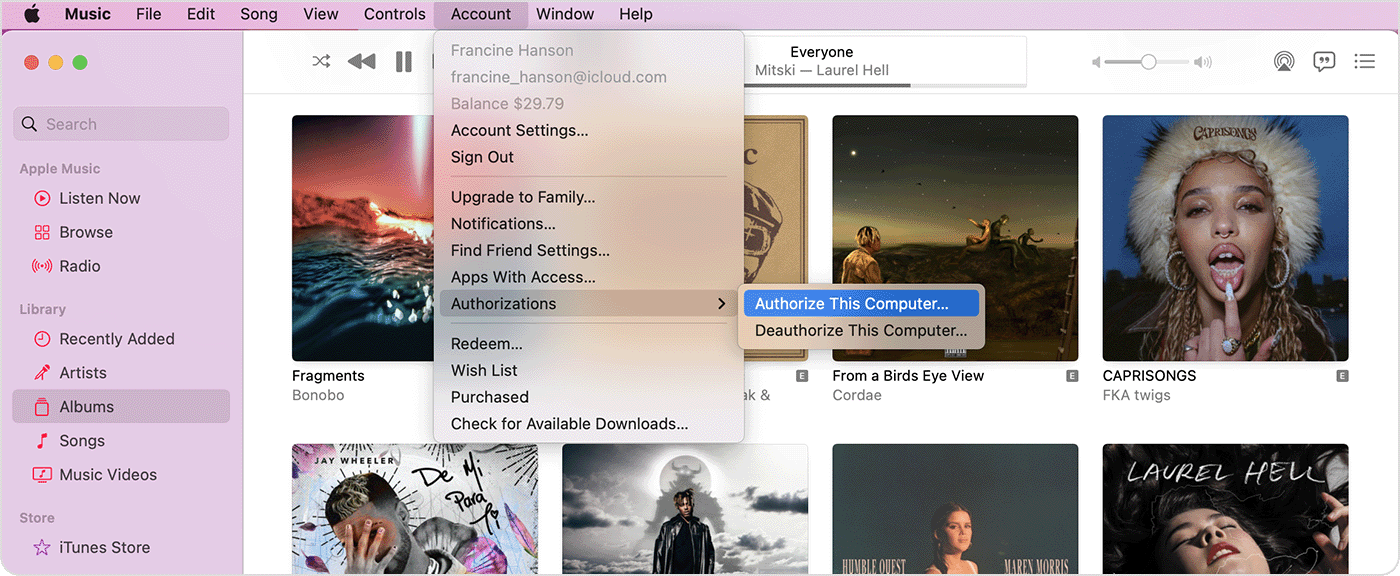
2. Choose Account > Authorizations, then choose Authorize This Computer or Deauthorize This Computer.
3.
4. Sign in with your Apple ID and password. Forgot your Apple ID?
5. Click Authorize or Deauthorize.
Authorize or deauthorize your computer for iTunes Store purchases
Best regards.
Hello Fireball2474,
Thank you for using Apple Support Communities.
You can authorize up to five computer to play iTunes Store purchases. If you are unable to authorize an additional one, it may be because you have an old computer that you have forgotten about still authorized. You can take a look at the information in this article to see how many computers are authorized, and then deauthorize the ones no longer in use. To include ones you no longer have access to.
See how many computers are authorized
1. Open the Apple Music app or Apple TV app.
2. Choose Account > Account Settings.
3. Sign in with your Apple ID and password. Forgot your Apple ID?
4. At the top of your Account Information page, look next to Computer Authorizations to see how many computers are authorized.
How to authorize or deauthorize your Mac
1. Open the Apple Music app or Apple TV app. In the menu bar, choose Account and make sure that you're signed in with your Apple ID.
2. Choose Account > Authorizations, then choose Authorize This Computer or Deauthorize This Computer.
3.
4. Sign in with your Apple ID and password. Forgot your Apple ID?
5. Click Authorize or Deauthorize.
Authorize or deauthorize your computer for iTunes Store purchases
Best regards.
unable to authorize a third computer for itunes even though i only have two authorized.