Would I loose the content I have in the cloud when I unsubscribe from apple one premium in order to change the region of my App Store?

I just moved from Spain to the US. I want to change the region on my App Store but I must unsubscribe from apple one. Would I loose my files from iCloud? If so, what could I do in order to change the region and not loosing my files of iCloud?

iPhone 14, iOS 16

Posted on Jul 19, 2023 3:48 PM

Reply
Question marked as Top-ranking reply

Posted on Jul 20, 2023 5:04 PM

Hello EnriqueGallego,


We would like to see howw we can help you with transfering to a different country. You will not lose your data stored in iCloud as you are retaining the same Apple ID account. It looks like you are coming from the perfect link for this issue, just to be sure to follow all of the steps: Change your Apple ID country or region - Apple Support


"What to do before you change your country or region


Use your iPhone or iPad to change your region

  1. Open the Settings app. 
  2. Tap your name, then tap Media & Purchases.
  3. Tap View Account. You might be asked to sign in.
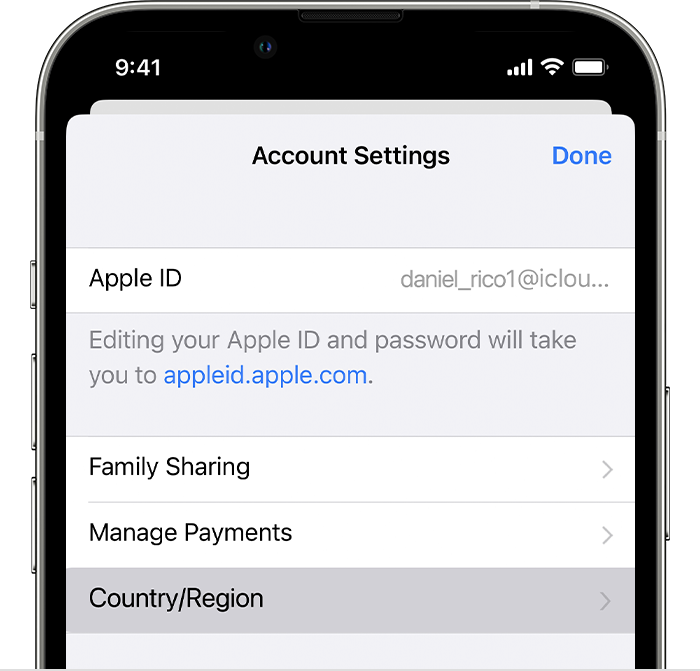
  4. Tap Country/Region.

iPhone showing Country/Region in Account Settings.


5.Tap Change Country or Region.

6.Tap your new country or region, then review the Terms & Conditions.

7.Tap Agree in the upper-right corner, then tap Agree again to confirm.

8.Select a payment method and enter your new payment information and billing address, then tap Next. You must enter a valid payment method for your new country or region."


Cheers!


1 reply
Question marked as Top-ranking reply

Jul 20, 2023 5:04 PM in response to EnriqueGallego

Hello EnriqueGallego,


We would like to see howw we can help you with transfering to a different country. You will not lose your data stored in iCloud as you are retaining the same Apple ID account. It looks like you are coming from the perfect link for this issue, just to be sure to follow all of the steps: Change your Apple ID country or region - Apple Support


"What to do before you change your country or region


Use your iPhone or iPad to change your region

  1. Open the Settings app. 
  2. Tap your name, then tap Media & Purchases.
  3. Tap View Account. You might be asked to sign in.
  4. Tap Country/Region.

iPhone showing Country/Region in Account Settings.


5.Tap Change Country or Region.

6.Tap your new country or region, then review the Terms & Conditions.

7.Tap Agree in the upper-right corner, then tap Agree again to confirm.

8.Select a payment method and enter your new payment information and billing address, then tap Next. You must enter a valid payment method for your new country or region."


Cheers!


This thread has been closed by the system or the community team. You may vote for any posts you find helpful, or search the Community for additional answers.

Would I loose the content I have in the cloud when I unsubscribe from apple one premium in order to change the region of my App Store?

Welcome to Apple Support Community
A forum where Apple customers help each other with their products. Get started with your Apple Account.