Can’t reboot after cleaning disc iMac 2011

I’m selling my 2011 iMac which worked fine yesterday. Today I followed the instructions on the apple site to clean my ID and erase the disc. After the final step when reinstalling Sierra it got stuck. I tried different things when rebooting but now I can’t get out of the flashing question mark folder. None of the reboot methods get me anywhere. Any help much appreciated.

iMac 21.5″, macOS 10.12

Posted on Jul 27, 2023 10:51 AM

Reply
Question marked as Top-ranking reply

Posted on Jul 27, 2023 12:08 PM

Ok thanks. As inconvenient as it may appear to be, by far your best option is to find that Mac's original, grey, System Install DVD.


If you can't find it your next best option would be to purchase a retail, white Mac OS X Snow Leopard DVD from a reputable aftermarket source.


It must be in a white box bearing an image of a snow leopard:
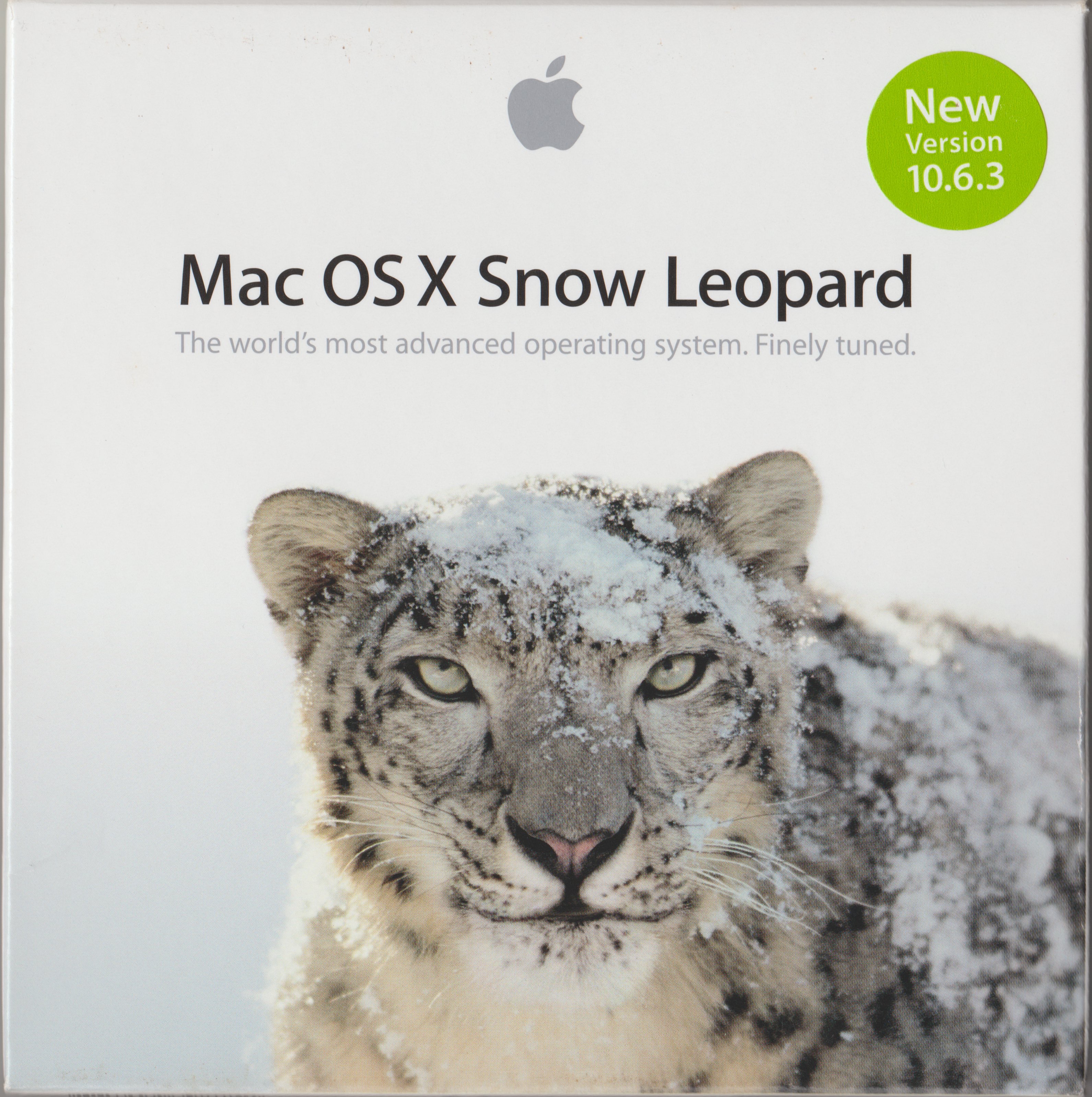


Apple no longer sells them. No authorized download sources exist, so if you find a site offering it to download it is a scam.


Boot from that disc and install Snow Leopard.


Then: at your option, update OS X using  > Software Update. That gives you the App Store. Then, update to the latest version your Mac can run through the App Store. Refer to How to download and install macOS - Apple Support.


Lastly: If you are selling that Mac, the lack of any installed operating will not deter a knowledgeable buyer — and you should not consider selling that Mac to anyone other than that. A neophyte will just be frustrated and disappointed and angry and will blame you, leading to nothing but misery all around.


8 replies
Question marked as Top-ranking reply

Jul 27, 2023 12:08 PM in response to Hn7728

Ok thanks. As inconvenient as it may appear to be, by far your best option is to find that Mac's original, grey, System Install DVD.


If you can't find it your next best option would be to purchase a retail, white Mac OS X Snow Leopard DVD from a reputable aftermarket source.


It must be in a white box bearing an image of a snow leopard:


Apple no longer sells them. No authorized download sources exist, so if you find a site offering it to download it is a scam.


Boot from that disc and install Snow Leopard.


Then: at your option, update OS X using  > Software Update. That gives you the App Store. Then, update to the latest version your Mac can run through the App Store. Refer to How to download and install macOS - Apple Support.


Lastly: If you are selling that Mac, the lack of any installed operating will not deter a knowledgeable buyer — and you should not consider selling that Mac to anyone other than that. A neophyte will just be frustrated and disappointed and angry and will blame you, leading to nothing but misery all around.

Jul 27, 2023 11:08 AM in response to Hn7728

Presumably you followed Erase and reformat a storage device in Disk Utility on Mac - Apple Support, specifically the first bullet point in its Step 2. If I am mistaken about that assumption please stop here and identify exactly which Apple Support instructions you followed.


Following those instructions eventually leads you to Erase and reinstall macOS in Use macOS Recovery on an Intel-based Mac - Apple Support. Identify the specific numbered step at which you are getting stuck. Describe what you see.


It would also help if you were to identify your specific model iMac: Identify your iMac model - Apple Support. There are two distinct variants of 21.5" 2011 model iMacs. "Mid 2011" models shipped with operating system installation media that must accompany them from cradle to grave. "Late 2011" models did not, and do not require them. Positively identifying a Mac makes it more attractive to knowledgeable purchasers of used equipment.

Jul 27, 2023 4:25 PM in response to Hn7728

... I put it in, it made some sounds but then ejected it....


That can be a sign of a dirty optical drive, not a dead one. You can get optical drive cleaning disks for US$5-15 at most electronics or home entertainment retailers, even some office "superstores."


What gives me hope is that the slot-load optical drive used in that model has, I believe, a fail-safe device. If the drive actually fails, a "fence" deploys internally to prevent users from stuffing more disks into a dead drive. If yours accepted the disk....well, cleaning might be all it needs. Slot-load opticals drives get filthy.

Jul 27, 2023 12:48 PM in response to Hn7728

Let's back up a step and consider your reasons for selling that Mac. I know it was working yesterday and it stands to reason can be made to work just as well and have just as much value today as it did yesterday, but reinstalling macOS is a secondary concern at this point. The market for that Mac is going to be comprised of hobbyists for whom it has far greater value as a Linux machine (for example) than anything anyone would expect from a more recent Mac.


Anyway... I suspect one reason you are unable to reinstall macOS is that Mac's startup disk has become corrupted to some unknown extent. They can be replaced, and they are not particularly expensive. Same goes for the optical drive, which is one of the simplest and least expensive repairs to perform. So whoever might be interested in that Mac must be prepared to invest some money in it; perhaps on the order of $200 to $300 or so. That prospective purchaser would almost certainly choose to install a solid state drive and upgraded optical drive at additional expense. But all that requires some expertise and dexterity with no guarantee of success.


I do not intend to dissuade you from pursuing this project, and if you are still interested by all means write back. That Mac is not ready for the scrap heap, but the work I am contemplating will not be economically justifiable.

Jul 27, 2023 11:44 AM in response to John Galt

Hello and thank you for your reply!

yes to your first question, and I think the step at which I got stuck was at reinstall of the OS. I since tried the key combinations again and now have managed to do the internet recovery and have now reached the macOS utilities screen with the 4 options - restore from Time Machine, reinstall macOS, get help online and disk utility. I’m not sure if I should try to reinstall again or use disk utility if a potential repair is needed. I stated the wrong year. I see it is Mid 2010, but I bought it in 2011. Hope this helps and thank you again.

This thread has been closed by the system or the community team. You may vote for any posts you find helpful, or search the Community for additional answers.

Can’t reboot after cleaning disc iMac 2011

Welcome to Apple Support Community
A forum where Apple customers help each other with their products. Get started with your Apple Account.