Need to back up
New provider need to transfer contacts
iPhone 11, iOS 16
New provider need to transfer contacts
iPhone 11, iOS 16
Hi there Irod4022,
If you've received a new iPhone and use iCloud to keep your contacts up-to-date across devices, you would need to only sign in and make sure that Contacts is enabled in Settings > tap your name > iCloud > Show All > Contacts on your new iPhone. If you want to start using contacts in iCloud, you would do the same process on your previous iPhone and wait for those to be synced to iCloud.
If you are trying to import contacts from your SIM card (if supported by your SIM card), then you'll want to follow the steps below, which is from this article: Import contacts from your SIM card to your iPhone - Apple Support
Import contacts stored on a SIM card
1. Put your previous SIM card, with your contacts, into your iPhone. Make sure that the SIM card fits.
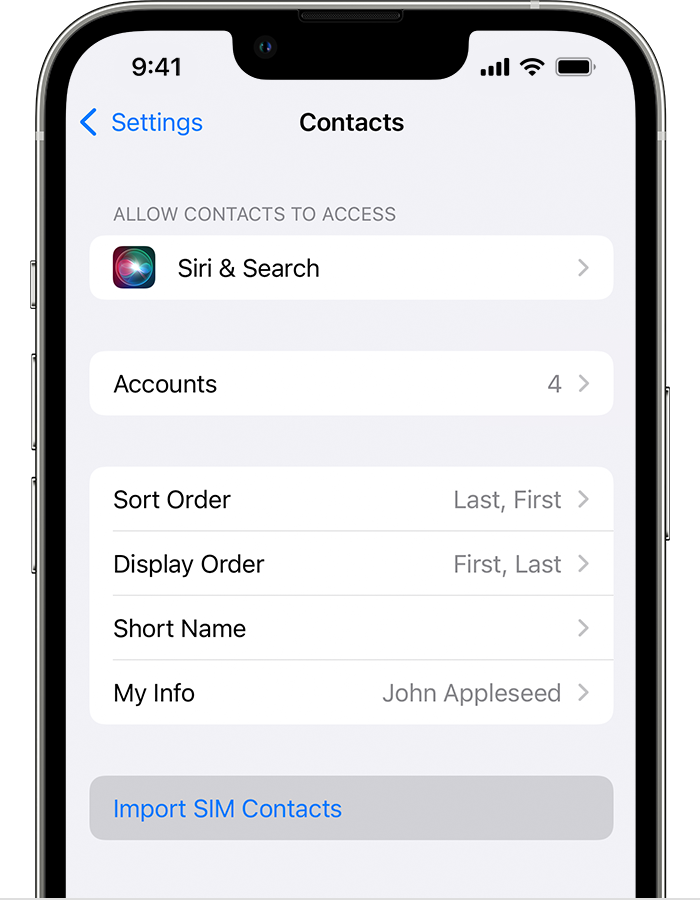
2. Tap Settings > Contacts > Import SIM Contacts.
3. If asked, choose where you want to import your SIM card contacts.
4. Wait for the import to complete.
5. Open Contacts and make sure that your contacts imported.* If needed, you can replace the SIM card you just imported from with your newer SIM card.
If your contacts are stored in another account (like an email service providers account), you would need to add that account first, then make sure contacts is enabled for the applicable accounts you want. If needed you can check out the following article as it shows how to make sure those are enabled: Use other contact accounts on iPhone - Apple Support
You also mentioned backing up. If needed, this article shows multiple ways to backup: How to back up your iPhone, iPad, and iPod touch - Apple Support
We hope that information helps.
Take care!
Hi there Irod4022,
If you've received a new iPhone and use iCloud to keep your contacts up-to-date across devices, you would need to only sign in and make sure that Contacts is enabled in Settings > tap your name > iCloud > Show All > Contacts on your new iPhone. If you want to start using contacts in iCloud, you would do the same process on your previous iPhone and wait for those to be synced to iCloud.
If you are trying to import contacts from your SIM card (if supported by your SIM card), then you'll want to follow the steps below, which is from this article: Import contacts from your SIM card to your iPhone - Apple Support
Import contacts stored on a SIM card
1. Put your previous SIM card, with your contacts, into your iPhone. Make sure that the SIM card fits.
2. Tap Settings > Contacts > Import SIM Contacts.
3. If asked, choose where you want to import your SIM card contacts.
4. Wait for the import to complete.
5. Open Contacts and make sure that your contacts imported.* If needed, you can replace the SIM card you just imported from with your newer SIM card.
If your contacts are stored in another account (like an email service providers account), you would need to add that account first, then make sure contacts is enabled for the applicable accounts you want. If needed you can check out the following article as it shows how to make sure those are enabled: Use other contact accounts on iPhone - Apple Support
You also mentioned backing up. If needed, this article shows multiple ways to backup: How to back up your iPhone, iPad, and iPod touch - Apple Support
We hope that information helps.
Take care!
Need to back up