iPad not available

ok, big problem is, seems my ipad {8th gen}crapped out. All it say is "ipad not available" , cannot power off or on, before you asked the serial # or model, contrary to what you people say o I have read, there is no serial # on the back, you guys said there was kind of sim card { Ithink}, nothing, forget about where the battery is, I'm not even gonna look. what I want to know is, is it dead, been trying to restore it using my Imac, followed you direction, but I can't find where to connect it with my ipad. Any advice?

Thanx,

Chuck


[Edited by Moderator]

Posted on Aug 2, 2023 8:17 AM

Reply
Question marked as Top-ranking reply

Posted on Aug 2, 2023 8:38 AM

“Unavailable” generally indicates that you (or someone else) has repeatedly entered an incorrect Passcode. If you see a waiting period, you can wait and try again. If you have tried too many times, you’ll have to restore the iPad.


A forgotten or unknown iPhone/iPad passcode cannot be recovered - and neither can it be reset or modified from another device.


You may find this support page to be helpful:

If you see an iPhone or iPad unavailable message or Security Lockout screen - Apple Support


iOS/iPadOS 15.2 or later with a forgotten Passcode


Apple has introduced a new procedure with which to reset an iPad or iPhone with a forgotten Passcode - allowing you to use your AppleID and associated Password to reset your device.

How to reset your iPhone, iPad, or iPod touch when you forgot your passcode - Apple Support


You will be able to restore data from a pre-existing iCloud backup without the use of a computer, but will require a PC/Mac to restore data from an iTunes backup.


iPadOS 15.1 and earlier - and all devices that are Disabled


If your iPhone/iPad indicates that it is disabled/unavailable/locked-out, or you have forgotten your iPad passcode, you have no alternative other than to follow this process:

If you’ve forgotten the passcode on your iPad, or your iPad is disabled – Apple Support


You’ll need access to either a Windows PC (with iTunes for Windows installed) or a Mac (with iTunes or Finder - as appropriate for the installed version of macOS).

Download and use iTunes for Windows – Apple Support

Update to the latest version of iTunes – Apple Support


Use of a PC or Mac is unavoidable. If you don’t have access to a suitable computer of your own, that of a helpful friend or family member will suffice. Alternatively, the technicians at the Genius Bar of your local Apple Store will be delighted to assist:

Genius Bar Reservation and Apple Support Options - Apple


AppleID


You may also need your AppleID and associated password. If these have also been forgotten, they can be recovered here:

https://iforgot.apple.com


To recover your credentials, you’ll need access to one of the following:

  • Your primary email address mailbox that corresponds with your AppleID
  • Any of the secondary/recovery email addresses that should be configured for your AppleID account
  • Any of the trusted telephone numbers (fixed line or Cellular/Mobile) that are associated with your AppleID


More information about recovery of your AppleID and associated Password:

If you forgot your Apple ID - Apple Support

If you forgot your Apple ID password - Apple Support


14 replies
Question marked as Top-ranking reply

Aug 2, 2023 8:38 AM in response to Chazz1957

“Unavailable” generally indicates that you (or someone else) has repeatedly entered an incorrect Passcode. If you see a waiting period, you can wait and try again. If you have tried too many times, you’ll have to restore the iPad.


A forgotten or unknown iPhone/iPad passcode cannot be recovered - and neither can it be reset or modified from another device.


You may find this support page to be helpful:

If you see an iPhone or iPad unavailable message or Security Lockout screen - Apple Support


iOS/iPadOS 15.2 or later with a forgotten Passcode


Apple has introduced a new procedure with which to reset an iPad or iPhone with a forgotten Passcode - allowing you to use your AppleID and associated Password to reset your device.

How to reset your iPhone, iPad, or iPod touch when you forgot your passcode - Apple Support


You will be able to restore data from a pre-existing iCloud backup without the use of a computer, but will require a PC/Mac to restore data from an iTunes backup.


iPadOS 15.1 and earlier - and all devices that are Disabled


If your iPhone/iPad indicates that it is disabled/unavailable/locked-out, or you have forgotten your iPad passcode, you have no alternative other than to follow this process:

If you’ve forgotten the passcode on your iPad, or your iPad is disabled – Apple Support


You’ll need access to either a Windows PC (with iTunes for Windows installed) or a Mac (with iTunes or Finder - as appropriate for the installed version of macOS).

Download and use iTunes for Windows – Apple Support

Update to the latest version of iTunes – Apple Support


Use of a PC or Mac is unavoidable. If you don’t have access to a suitable computer of your own, that of a helpful friend or family member will suffice. Alternatively, the technicians at the Genius Bar of your local Apple Store will be delighted to assist:

Genius Bar Reservation and Apple Support Options - Apple


AppleID


You may also need your AppleID and associated password. If these have also been forgotten, they can be recovered here:

https://iforgot.apple.com


To recover your credentials, you’ll need access to one of the following:

  • Your primary email address mailbox that corresponds with your AppleID
  • Any of the secondary/recovery email addresses that should be configured for your AppleID account
  • Any of the trusted telephone numbers (fixed line or Cellular/Mobile) that are associated with your AppleID


More information about recovery of your AppleID and associated Password:

If you forgot your Apple ID - Apple Support

If you forgot your Apple ID password - Apple Support



May 21, 2024 2:18 AM in response to OkIWill20-24

OkIWill20-24 wrote:

Why is my iPad not available?


“Unavailable” generally indicates that you (or someone else) has repeatedly entered an incorrect Passcode. If you see a waiting period, you can wait and try again. If you have tried too many times, you’ll have to restore the iPad.


A forgotten or unknown iPhone/iPad passcode cannot be recovered - and neither can it be reset or modified from another device.


You may find this support page to be helpful:

If you see an iPhone or iPad unavailable message or Security Lockout screen - Apple Support


iOS/iPadOS 15.2 or later with a forgotten Passcode


Apple has introduced a new procedure with which to reset an iPad or iPhone with a forgotten Passcode - allowing you to use your AppleID and associated Password to reset your device.

How to reset your iPhone, iPad, or iPod touch when you forgot your passcode - Apple Support


You will be able to restore data from a pre-existing iCloud backup without the use of a computer, but will require a PC/Mac to restore data from an iTunes backup.


iPadOS 15.1 and earlier - and all devices that are Disabled


If your iPhone/iPad indicates that it is disabled/unavailable/locked-out, or you have forgotten your iPad passcode, you have no alternative other than to follow this process:

If you’ve forgotten the passcode on your iPad, or your iPad is disabled – Apple Support


You’ll need access to either a Windows PC (with iTunes for Windows installed - or more recent Apple Devices App) or a Mac computer (with iTunes or Finder - as appropriate for the installed version of macOS).

Download and use iTunes for Windows – Apple Support

Update to the latest version of iTunes – Apple Support


Use of a PC or Mac is unavoidable. If you don’t have access to a suitable computer of your own, that of a helpful friend or family member will suffice. Alternatively, the technicians at the Genius Bar of your local Apple Store will be delighted to assist:

Genius Bar Reservation and Apple Support Options - Apple


AppleID


You may also need your AppleID and associated password. If these have also been forgotten, they can be recovered here:

https://iforgot.apple.com


To recover your credentials, you’ll need access to one of the following:

  • Your primary email address mailbox that corresponds with your AppleID
  • Any of the secondary/recovery email addresses that should be configured for your AppleID account
  • Any of the trusted telephone numbers (fixed line or Cellular/Mobile) that are associated with your AppleID


More information about recovery of your AppleID and associated Password:

If you forgot your Apple ID - Apple Support

If you forgot your Apple ID password - Apple Support

Aug 2, 2023 9:50 AM in response to Chazz1957

If you get the Apple Logo, then it is powering down, but it will not become available until you restore it.


click here ➜ If you see an iPhone or iPad unavailable message or Security Lockout screen - Apple Support


An 8th generation iPad uses a Lightning to USB-C cable if using the one it came packaged with. So you would need a USB-C to USB-A cable to connect it to your Mac if it has USB-A ports only.


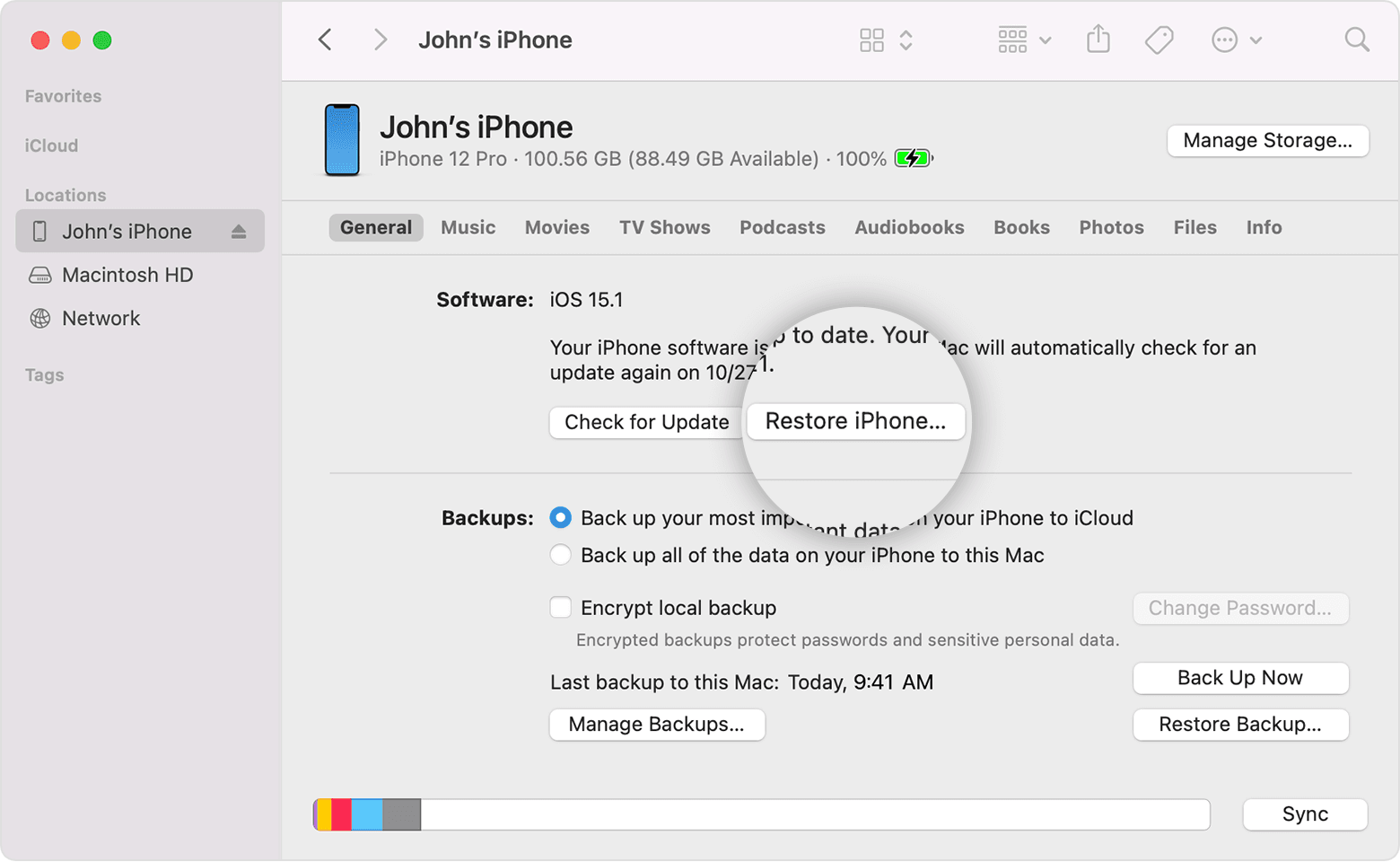
Once connected, it should appear in the Finder in Catalina under locations. But you need to follow the steps in the blue link above. Follow them carefully.


Not sure what you mean by "Connect" button. There is no such thing as a connect button when the iPad shows an unavailable message.

Apr 9, 2024 2:06 AM in response to Katsbrat

Katsbrat wrote:

My boss gave me his old I pad and he hadn't used it for some time and when we turned it on ai says I pad unavailable


“Unavailable” generally indicates that you (or someone else) has repeatedly entered an incorrect Passcode. If you see a waiting period, you can wait and try again. If you have tried too many times, you’ll have to restore the iPad.


A forgotten or unknown iPhone/iPad passcode cannot be recovered - and neither can it be reset or modified from another device.


You may find this support page to be helpful:

If you see an iPhone or iPad unavailable message or Security Lockout screen - Apple Support


iOS/iPadOS 15.2 or later with a forgotten Passcode


Apple has introduced a new procedure with which to reset an iPad or iPhone with a forgotten Passcode - allowing you to use your AppleID and associated Password to reset your device.

How to reset your iPhone, iPad, or iPod touch when you forgot your passcode - Apple Support


You will be able to restore data from a pre-existing iCloud backup without the use of a computer, but will require a PC/Mac to restore data from an iTunes backup.


iPadOS 15.1 and earlier - and all devices that are Disabled


If your iPhone/iPad indicates that it is disabled/unavailable/locked-out, or you have forgotten your iPad passcode, you have no alternative other than to follow this process:

If you’ve forgotten the passcode on your iPad, or your iPad is disabled – Apple Support


You’ll need access to either a Windows PC (with iTunes for Windows installed - or more recent Apple Devices App) or a Mac (with iTunes or Finder - as appropriate for the installed version of macOS).

Download and use iTunes for Windows – Apple Support

Update to the latest version of iTunes – Apple Support


Use of a PC or Mac is unavoidable. If you don’t have access to a suitable computer of your own, that of a helpful friend or family member will suffice. Alternatively, the technicians at the Genius Bar of your local Apple Store will be delighted to assist:

Genius Bar Reservation and Apple Support Options - Apple


AppleID


You may also need your AppleID and associated password. If these have also been forgotten, they can be recovered here:

https://iforgot.apple.com


To recover your credentials, you’ll need access to one of the following:

  • Your primary email address mailbox that corresponds with your AppleID
  • Any of the secondary/recovery email addresses that should be configured for your AppleID account
  • Any of the trusted telephone numbers (fixed line or Cellular/Mobile) that are associated with your AppleID


More information about recovery of your AppleID and associated Password:

If you forgot your Apple ID - Apple Support

If you forgot your Apple ID password - Apple Support

Aug 2, 2023 8:44 AM in response to Chazz1957

Chazz1957 wrote:

ok, big problem is, seems my ipad {8th gen}crapped out. All it say is "ipad not available" , cannot power off or on, before you asked the serial # or model, contrary to what you people say o I have read, there is no serial # on the back,

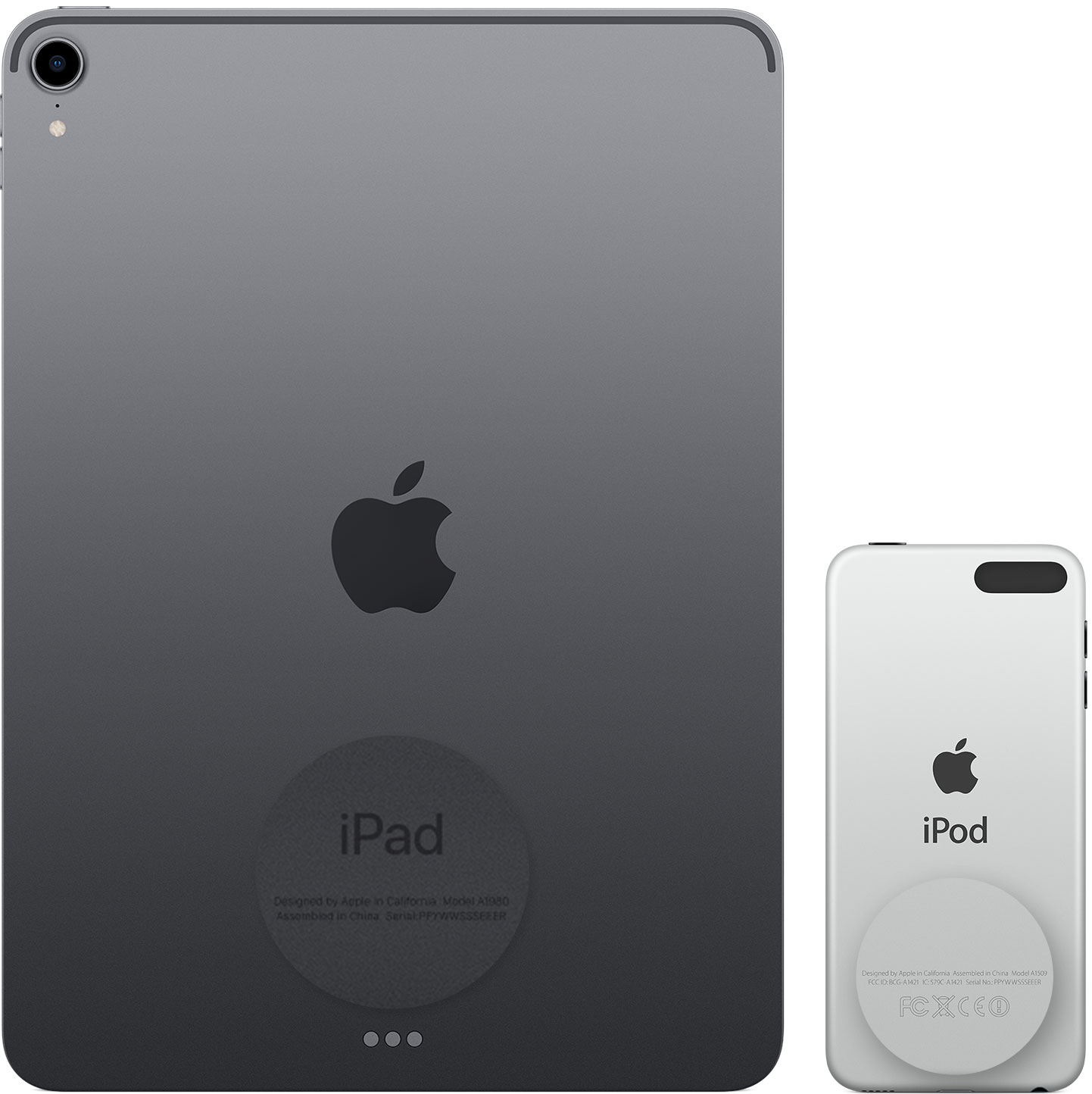
All iPads have the serial number printed on the back below the word iPad. If using a case, remove the case to see the serial number. It may admittedly be in very small print, but it should be there.


You can connect you iPad to a USB port on your computer. You may need an adapter to go form the iPad's charging cable to the port on your iMac.

Follow the steps here ➜ If you see an iPhone or iPad unavailable message or Security Lockout screen - Apple Support


An 8th generation iPad uses a Lightning to USB-C cable if using the one it came packaged with. So you would need a USB-C to USB-A cable to connect it to your Mac.


Aug 2, 2023 3:32 PM in response to Chazz1957

Chazz1957 wrote:

is the lighting cable the same as the charging cable? as I said earlier, I get no messages at all on my imac, it's like it doesnt know it's there. Where is that pic you show, show,I'm lost here lol?

Yes, the lightning cable is the charge cable.


You won't get a specific message. It will just show up in the Finder. The blue face on your dock.

This thread has been closed by the system or the community team. You may vote for any posts you find helpful, or search the Community for additional answers.

iPad not available

Welcome to Apple Support Community
A forum where Apple customers help each other with their products. Get started with your Apple Account.