Settings on macos ventura 13.4 has no ability to access imessage

There is nowhere in the Mac OS setting in Ventura 13.4.1 to change the settings of iMessage. For example, I want to change the location of where my iMessage's are being sent from specifically just my mac.


I'm trying to get my old icloud email I changed to stop sending from imessage as that email. It just changed randomly today and started sending from the old icloud email when I don't have it activated on my message's send & receive settings.


Thanks,


iPhone 11, iOS 15

Posted on Aug 3, 2023 12:53 PM

Reply
Question marked as Top-ranking reply

Posted on Aug 4, 2023 11:38 AM

Hello vansanityyyy,


You mention in the notes of your post you also have an iPhone with iOS 15. If you use the continuity feature it's recommended you check your settings on both your Mac and your iPhone for Messages. On your Mac the use the following to check the "start new conversations from" setting in step four:


"Turn your phone number on or off for your Mac

After you set up your phone number, you can turn it on or off for Messages and FaceTime on your Mac.


  1. Open Messages or FaceTime. If asked, sign in with the Apple ID that you're using with Messages and FaceTime on your iPhone.
  2. For Messages, choose Messages > Settings, then click iMessage. For FaceTime, choose FaceTime > Preferences, then click General.
  3. Turn your phone number on or off:

4. If you want recipients to see your phone number and not your Apple ID, select your phone number from the “Start new conversations from” or ”Start new calls from” pop-up menu.
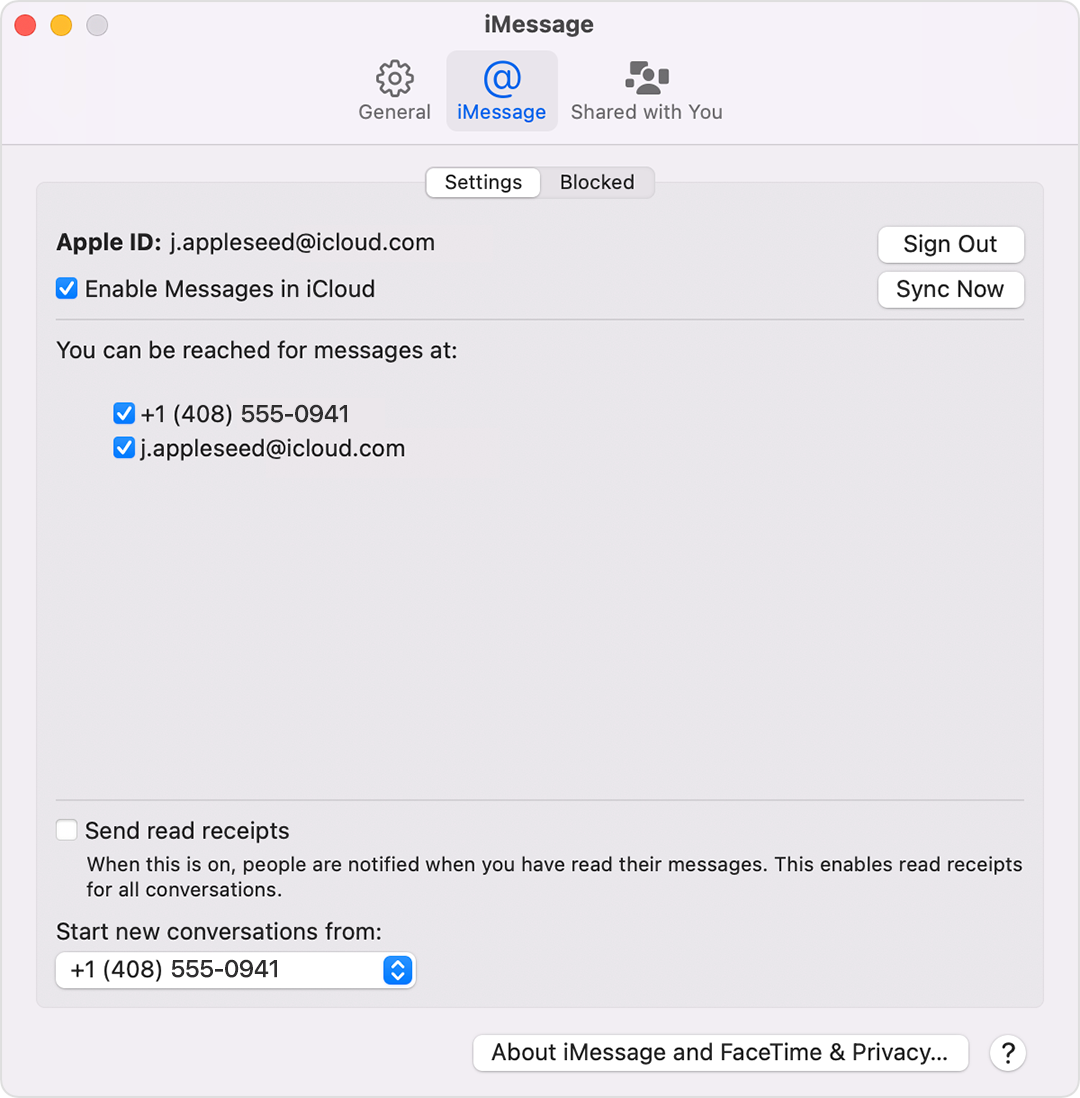

Mac screen showing how to turn your phone number on or off for your Mac"


You can also use the steps above to check the current account used with iMessage on your Mac. If needed, all the information above can be found in the article here: Add or remove your phone number in Messages or FaceTime


There's additional information and helpful steps for checking your Message settings in the guide here: Set up Messages on Mac


If for any reason you're unable to view or change the options in the settings, check your restrictions with the help of the guide here: Change Content Restrictions settings in Screen Time on Mac


Hope the information helps.


Cheers!

1 reply
Question marked as Top-ranking reply

Aug 4, 2023 11:38 AM in response to vansanityyyy

Hello vansanityyyy,


You mention in the notes of your post you also have an iPhone with iOS 15. If you use the continuity feature it's recommended you check your settings on both your Mac and your iPhone for Messages. On your Mac the use the following to check the "start new conversations from" setting in step four:


"Turn your phone number on or off for your Mac

After you set up your phone number, you can turn it on or off for Messages and FaceTime on your Mac.


  1. Open Messages or FaceTime. If asked, sign in with the Apple ID that you're using with Messages and FaceTime on your iPhone.
  2. For Messages, choose Messages > Settings, then click iMessage. For FaceTime, choose FaceTime > Preferences, then click General.
  3. Turn your phone number on or off:

4. If you want recipients to see your phone number and not your Apple ID, select your phone number from the “Start new conversations from” or ”Start new calls from” pop-up menu.


Mac screen showing how to turn your phone number on or off for your Mac"


You can also use the steps above to check the current account used with iMessage on your Mac. If needed, all the information above can be found in the article here: Add or remove your phone number in Messages or FaceTime


There's additional information and helpful steps for checking your Message settings in the guide here: Set up Messages on Mac


If for any reason you're unable to view or change the options in the settings, check your restrictions with the help of the guide here: Change Content Restrictions settings in Screen Time on Mac


Hope the information helps.


Cheers!

This thread has been closed by the system or the community team. You may vote for any posts you find helpful, or search the Community for additional answers.

Settings on macos ventura 13.4 has no ability to access imessage

Welcome to Apple Support Community
A forum where Apple customers help each other with their products. Get started with your Apple Account.